Why Should You Grow Your LinkedIn Network?
LinkedIn has grown far beyond its original role as a CV database.
Today, its true value lies in the networking opportunities with a global community of over 1.1 billion members.
To get the most out of LinkedIn, it is important to grow your network and connect with the right people.
When you do, your life will never be the same.
- Personal Branding: Creating a strong personal brand on LinkedIn allows you to become a thought leader in your industry.
- Job opportunities: Connecting with industry professionals can lead to your next role or career move.
- Finding customers: Building relationships with decision-makers and potential clients can help you grow your business.
- Attracting investments: Meeting potential investors or partners can help grow your startup.
- Talent acquisition: Using your network allows you to find top candidates through referrals and personal recommendations.
- Building a support system: Developing a circle of trusted mentors and advisors gives you access to feedback, advice, and support when navigating business challenges.
- Media coverage: Networking with journalists can help you amplify your cause or brand.
- Partnerships: Forming collaborations can open new avenues for growth.
- Access to exclusive opportunities: A strong network can lead to invitations for private industry events, VIP meetings, or closed-door discussions.
And that’s just the beginning.
Growing your LinkedIn network opens doors you never thought possible.
In this article, I’m going to share some of my favorite LinkedIn tips and tricks, as well as proven strategies I use every day to build meaningful connections and unlock new opportunities.
Ready to take your network to the next level? Then, let’s dive in!
Connections vs Followers
Sometimes people get confused about the difference between a connection and a follower.
Here’s a quick overview, that helps you understand the differences a bit better:
- Followers: This is a one-way relationship. Followers can see your posts and updates in their feed, but they can’t message you unless you have Open Profile enabled.
- Connections: This is a two-way relationship. You can see each other’s posts, updates, and message each other. When you connect with someone, their connections become your second-level connections. This means you’re more likely to find these people in search results, and it makes it easier to connect with them. Many users restrict connection requests to second-level connections, so having more connections opens up more opportunities to reach new people.
- No Connection: Everyone else.
Smart Way to Grow Your LinkedIn Network
Building a strong network on LinkedIn is a lot like dating, in a professional way.
Sure, you could wait at home, hoping Prince or Princess Charming will show up. But let’s be real. Success usually comes when you put yourself out there and make your own luck.
It’s also important to be selective about who you connect with. Don’t just send requests to random people. Check out their profile, read their about section, look at their experience, and see if you have any mutual connections. Pay attention to the content they share in their feed to spot those who really align with your goals.
Some people think sending out hundreds of connection requests at once is a good idea. But that just leads to shallow relationships without any real interactions.
If you want to be successful on LinkedIn, you’ve got to build your LinkedIn network one relationship at a time. Giving every person the time and attention they deserve.
How to find people to connect with
Personal and Professional Networks
Growing your LinkedIn network starts with leveraging the relationships you already have. Here’s a guide to finding potential connections within your existing personal and professional circles:
- Import Your Address Book: Your email address book is full of people you’ve already connected with. Importing it into LinkedIn is an easy way to add those contacts to your network. These could be colleagues, clients, or personal contacts who are already on the platform but not yet in your LinkedIn circle.
- Former Classmates and Alumni: Reach out to people you went to school or university with. Alumni networks can be powerful because you already have a common experience to build on. Many people like to help or stay connected with others from the same educational background.
- Current and Ex-Colleagues: Your current and former coworkers are natural connections, especially if you’ve worked closely together. You already know and trust them, and they might introduce you to their wider network as well.
- Clients and Customers: Your business relationships are key. Connecting with clients or customers on LinkedIn helps you maintain those relationships long-term, and they may recommend you to their own network.
- Mentors and Advisors: If you have mentors or advisors who have helped guide you, send them a connection request. Maintaining these relationships on LinkedIn can give you easy access to their knowledge and network in the future.
Online Interactions
The people who interact with your online presence offer plenty of opportunities for new connections:
- People Who Interact with Your Content: Pay attention to who likes, comments, or shares your posts. These interactions can signal interest in you or your ideas. Reach out to them, thank them for their engagement, and invite them to connect.
- People Who Follow You: Your followers are already interested in your content. It’s easy to turn that one-way relationship into a two-way connection by sending a request.
- People You Follow (But Haven’t Connected With): You might follow industry leaders or interesting professionals but haven’t connected yet. Now’s a good time to reach out and take that step toward building a relationship.
- People Who Viewed Your Profile: If someone has viewed your profile, they’re likely curious about you. Don’t hesitate to send them a connection request. It’s a good opportunity to strike up a conversation.
LinkedIn-Specific Tools
LinkedIn offers several features and tools to help you grow your network:
- People You May Know Suggestions: LinkedIn’s algorithm suggests connections based on your profile, network, and activity. Don’t ignore these—they’re often well-targeted suggestions of people in your industry or with shared interests.
- LinkedIn Learning Course Participants: If you’ve taken a LinkedIn Learning course, you can connect with other participants. This shared learning experience can be a great conversation starter.
- LinkedIn Group Members: Groups are full of like-minded professionals. Being part of a LinkedIn group opens the door to connecting with others in that group, especially if you’ve had interactions or shared ideas in group discussions.
- LinkedIn Event Attendees: Did you attend a LinkedIn-hosted event? Whether it was virtual or in person, you can connect with other attendees. It’s a perfect follow-up to conversations or presentations you found valuable.
- LinkedIn Search: Use LinkedIn’s search function to find people who fit specific roles, industries, or companies you’re interested in. Search for decision-makers or influencers within your field and send personalized connection requests.
Real-Life Networking
Don’t forget to follow up on connections made in person by adding them to your LinkedIn network:
- Real-Life Networking Events: Networking events outside LinkedIn are still a great way to build connections on the platform. After meeting someone at a conference, meetup, or industry event, follow up by sending them a request to connect and continue the conversation online.
- Business Cards: Go through the business cards you’ve collected and look up those people on LinkedIn. It’s a great way to keep in touch and continue building those relationships.
Promote Your LinkedIn Profile
Maximize your LinkedIn visibility by promoting your profile through various channels:
- Share Your LinkedIn Profile on Other Social Media Networks: Cross-promote your LinkedIn profile on platforms like Twitter, Instagram, Facebook, and even TikTok to let your followers know they can connect with you professionally.
- GitHub Repository: If you’re a developer, link your LinkedIn profile on your GitHub repository to make it easy for people to connect with you after checking out your code.
- YouTube Channel: If you have a YouTube channel, link your LinkedIn profile in your channel description or video descriptions to allow viewers to connect with you.
- Website: Add your LinkedIn profile to your personal website or blog so visitors can easily connect with you.
- Email Signature: Including your LinkedIn profile in your email signature is a simple way to make it easy for people you correspond with to connect with you.
- QR Code on Your Business Card: Adding a QR code that links to your LinkedIn profile on your business card allows people to quickly scan and connect with you.
- QR Code in Your PowerPoint Slides: If you give presentations, consider adding a QR code to your slides that links to your LinkedIn profile, making it easy for your audience to connect with you right after your talk.
Other Potential Connections
Beyond the typical connections, consider these options:
- Conference Speakers: After attending a conference, look up the speakers on LinkedIn. Connecting with them can lead to valuable insights and new opportunities.
- Politicians, Charities, NGOs: If you’re involved in social causes, connect with politicians, charities, and NGOs. These connections can lead to collaborative opportunities or involvement in meaningful projects.
How to connect with someone on LinkedIn
So, you've found someone you'd like to connect with. Great! But how do you actually send that connection request? The process can vary depending on where you're viewing the person's profile. Here's a breakdown:
On Their Profile
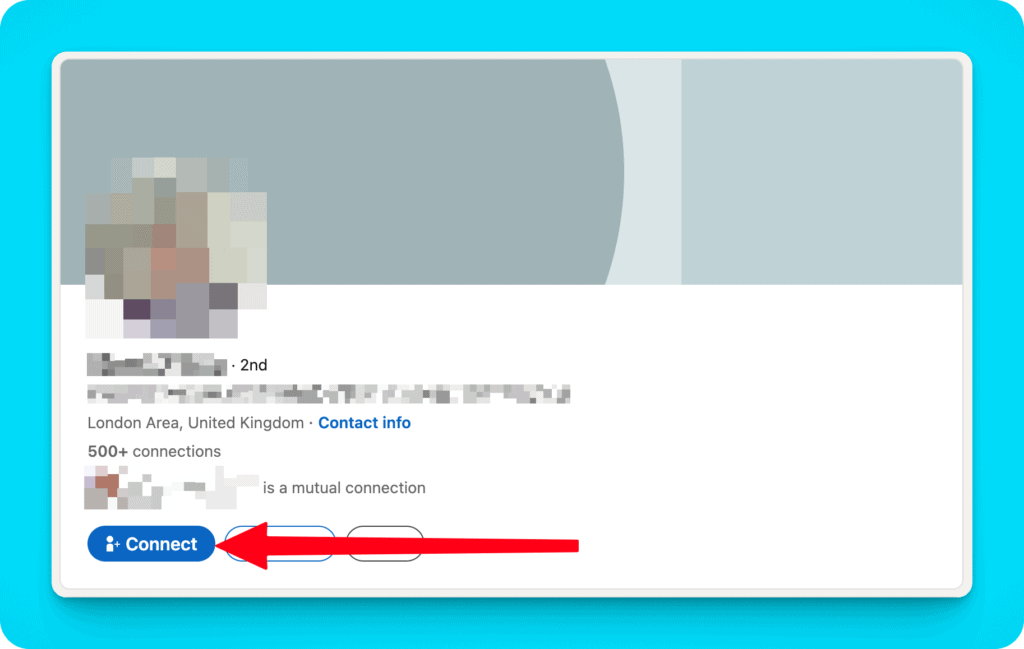
Connect Button: If you see a "Connect" button, simply click it to send a request.
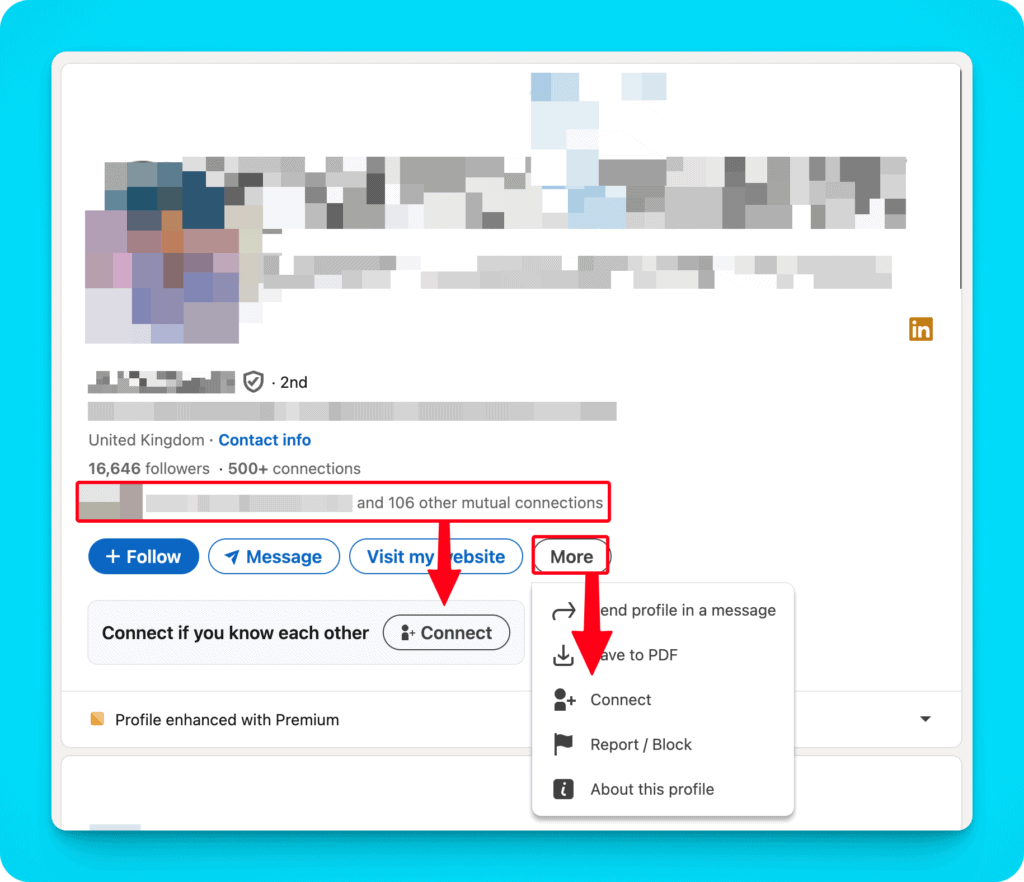
Follow Button: If you only see a "Follow" button:
- Check if LinkedIn suggests an optional "Connect" button below the "Follow" button (this often appears if you have several mutual connections).
- If not, click the "More" button, then select "Connect".
Custom Button: LinkedIn Premium members can create a custom button on their profile. Some use this to display both "Connect" and "Follow" buttons side by side.
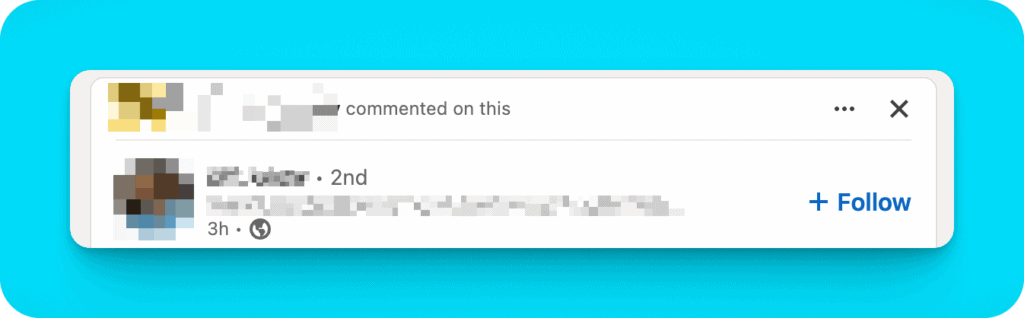
In the Newsfeed
Connect Button: If visible, click it to send a request.
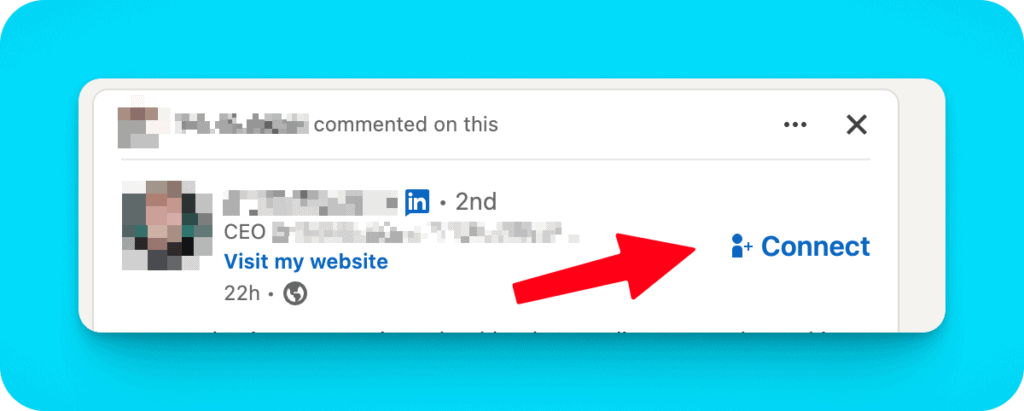
Follow Button: If you only see a "Follow" button:
- Click on the person's name or profile photo to visit their full profile.
- Once on their profile, follow the steps outlined in the "On Their Profile" section above.
In Search Results
The process here is similar to the newsfeed:
Connect Button: If present, click to send a request.
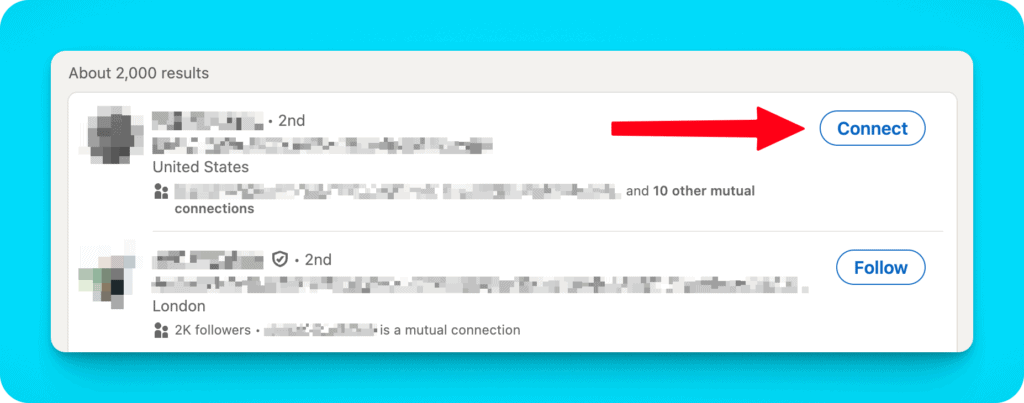
Follow Button: If this is the only option:
- Click on the person's name or profile photo to go to their full profile.
- Once there, follow the "On Their Profile" instructions above.
Remember, personalizing your connection request can significantly increase the chances of it being accepted, especially if you're reaching out to someone you don't know personally.
How to Write an Effective Connection Request
When sending a connection request, a personalized message can significantly increase your chances of acceptance. However, it's crucial to remember:
Important: LinkedIn limits connection request messages to 200 characters for standard accounts. The number of personalized invites is also limited to a total of 10 per month.
For LinkedIn Premium members, there's no limit on the number of personalized messages you can add to connection requests. Premium invitations also have a higher character limit of 300 characters per message.
Given these constraints, here are tips for crafting an effective, concise connection request:
- Be Direct: Start with a brief greeting and get straight to the point.
- Highlight One Key Point: Choose the most relevant reason for connecting - a mutual connection, shared interest, or specific admiration for their work.
- Keep It Short: With the 200-character limit, every word counts. Be concise and clear.
- End with a Simple CTA: A brief "Hope to connect" is often enough.
Here's an example within the 200-character limit:
"Hi Ben, I enjoyed your AI article in Tech Monthly. As a fellow software engineer, I'd love to connect and discuss ML developments. Hope to chat soon!"
For Premium members who can write longer messages, the previous advice about more detailed personalization still applies, but always prioritize brevity and relevance.
Remember, authenticity is key, even in short messages. Tailor each request to the individual for the best results.
Managing Your LinkedIn Network
With a small network, it's easy to maintain meaningful interactions, but as your LinkedIn network grows, managing relationships can become more challenging.
Some connections will naturally drop off—people may stop using LinkedIn, forget their login details, or simply lose interest in the platform.
Others might not have much in common with you anymore, and the relationship could fizzle out.
That's why it's crucial to implement a system for maintaining relationships and ensuring they don't go cold. Here are some effective strategies:
- Track Your Connections: LinkedIn’s 'My Network' tab gives you a list of all your connections. The default sorting (recently added) isn’t ideal for tracking interaction history, so consider using the 'Search with Filters' feature to find connections based on specific criteria like location, industry, or company.
- Use a CRM: To avoid losing track of important connections, you can mirror your LinkedIn network in a CRM tool like Notion or ClickUp. Every time you add a new connection, create an entry in your CRM with their name, LinkedIn URL, and any relevant details (like when you last contacted them). You can even add notes about personal information they’ve shared, like hobbies or family details, which you can refer to when reconnecting.
- Set Reminders: If you haven’t interacted with a connection in a while, send them a quick message to reignite the conversation. A simple "ping" to catch up can keep the relationship alive and shows you value the connection. Keep track of how often you interact and decide when to remove inactive connections.
By following these steps, you'll maintain a well-organized network and ensure your relationships stay strong as your network grows.
Dealing with Connection Requests
Not all connection requests are created equal. You'll likely receive invitations from unfamiliar people, those without mutual connections, or even suspicious profiles.
Here's a strategy for managing incoming requests:
- Evaluate Commonalities: If there are no shared connection or obvious reasons for the invitation, it’s usually best to ignore the request. However, if the person has a well-made LinkedIn profile and seems like an interesting person who is fun to talk to consider connecting anyway.
- Check Profile Quality: Look for a professional profile picture, a well-written headline, and an informative 'About' section. If the profile feels incomplete or unprofessional, it might be a sign to pass.
- Analyze Activity: Check their activity feed to see if they engage with the platform. Are they sharing useful content or commenting on posts? If so, they might be worth connecting with, as active users can provide valuable interactions.
- Personalized Invitations: Give more weight to invitations with personalized messages, especially if they mention why they want to connect or reference something specific about your work or profile.
Ultimately, your decision should align with your LinkedIn goals.
If you’re trying to build a network in a particular industry or reach certain business objectives, prioritize connections that help you meet those goals.
LinkedIn Network Hygiene
Maintaining a healthy LinkedIn network is crucial for maximizing its value.
Here are some key practices for good network hygiene:
- Regular Reviews: Periodically review your connections. Consider removing those who are no longer relevant to your professional goals or inactive on the platform.
- Quality Over Quantity: Remember LinkedIn's 30,000 connection limit. Focus on meaningful connections rather than accumulating a large number of weak ties.
- Update Based on Career Changes: As your career evolves, some connections may become less relevant. Don't be afraid to prune your network to reflect your current professional focus.
- Engagement Audit: Assess which connections consistently engage with your content or provide value. Prioritize these relationships and consider reducing emphasis on less engaged connections.
- Inactive Connection Removal: If you've made multiple attempts to engage with a connection without response, it might be time to remove them from your network.
Creating Content to Grow Your Network
Creating and sharing valuable content is an excellent way to organically grow your LinkedIn network.
Here's how to leverage content for network growth:
- Share Insights: Regularly post about your professional experiences, industry trends, or valuable lessons learned. This positions you as a thought leader and attracts like-minded professionals.
- Engage with Others' Content: Thoughtfully comment on posts from others in your industry. This increases your visibility and can lead to new connections.
- Use LinkedIn's Publishing Platform: Write long-form articles on topics relevant to your field. This can help you reach a broader audience beyond your immediate network.
- Consistency is Key: Maintain a regular posting schedule to keep your profile active and increase your chances of being discovered by potential connections.
- Leverage Hashtags: Use relevant hashtags in your posts to increase their discoverability by professionals interested in those topics.
- Encourage Engagement: End your posts with questions or calls to action to encourage comments and discussions, creating opportunities for new connections.
By creating valuable content and engaging meaningfully with others', you can attract potential connections who are genuinely interested in your professional insights and experiences.
Useful LinkedIn Networking Links
LinkedIn offers several built-in tools to help you manage and grow your network more effectively.
Here's a list of useful features and links:
- View Your Followers https://www.linkedin.com/mynetwork/network-manager/people-follow/followers/
- View Who You're Following https://www.linkedin.com/mynetwork/network-manager/people-follow/following/
- See All Your Connections https://www.linkedin.com/mynetwork/invite-connect/connections/
- Search Your Connections https://www.linkedin.com/search/results/people/?facetNetwork=%5B%22F%22%5D
- Manage Received Invitations https://www.linkedin.com/mynetwork/invitation-manager/
- Manage Sent Invitations https://www.linkedin.com/mynetwork/invitation-manager/sent/
- Discover People You May Know https://www.linkedin.com/mynetwork/add-connections/
- Who Viewed Your Profile https://www.linkedin.com/analytics/profile-views/a
Conclusion
Building a strong LinkedIn network isn't about collecting connections—it's about fostering meaningful professional relationships.
By implementing the strategies in this article, you can create a network that adds real value to your career or business.
Remember, consistency is key. Regularly engage with your connections, share valuable content, and stay open to new opportunities.
With time and effort, your LinkedIn network can become one of your most powerful professional assets.
If you want to learn more how to build a powerful LinkedIn network by creating content on LinkedIn, check out my LinkedIn Accelerator Program.