What is LinkedIn Premium?
LinkedIn Premium is LinkedIn’s paid subscription service with additional premium features that are not available in the free basic account.
LinkedIn offers unique Premium plans for job seekers, business professionals, salespeople, and recruiters.
About 6% of all LinkedIn users have a Premium subscription, with Premium Career and Premium Business plans being the most popular.
I wrote this article to help you decide if LinkedIn Premium is worth it for you based on your unique situation and goals.
First, I provide both a big-picture overview and an in-depth analysis of the features and benefits of each LinkedIn Premium plan, including Premium Career, Premium Business, Sales Navigator, and Recruiter.
I then compare all available LinkedIn Premium plans and provide specific use cases for each one.
Finally, I will share my personal experience as a content creator with Premium Business and Sales Navigator, provide the current cost of each LinkedIn Premium plan (updated as of June 2023), and answer frequently asked questions about LinkedIn Premium.
What is the difference between a free LinkedIn account and a LinkedIn Premium account?
A free LinkedIn account provides basic features for networking and finding jobs or employees.
With a LinkedIn profile, you can connect with other members, create content, join groups, become a thought leader, follow influencers, and search for jobs.
However, if you are a power user, you will quickly run into LinkedIn’s commercial usage limit. Meaning that you won’t be able to perform searches and visit other people’s profiles.
LinkedIn Premium doesn’t have these limitations.
For a monthly or annual subscription fee, LinkedIn Premium gives you access to many additional features and benefits, including:
- LinkedIn InMail credits to message people outside of your network
- Ability to see who visited your profile up to 365 days in the past
- Unlimited searches with many new advanced search filters
- Unlimited people browsing and profile visits
- Detailed job and company insights and statistics, competitive intelligence, salary estimations, a resume builder, a featured applicant feature
- Free access to 20,920 LinkedIn Learning courses
| Feature | Free LinkedIn Basic | LinkedIn Premium |
|---|---|---|
| Who Viewed your Profile | Limited | ✓ (up to 365 days) |
| Advanced search filters | Limited | ✓ Unlimited |
| Unlimited people browsing and profile visits | Limited | ✓ Unlimited |
| Free InMail credits | ✓ | |
| Detailed job and company insights and statistics | ✓ | |
| Competitive intelligence | ✓ | |
| Resume Builder | ✓ | |
| Featured applicant feature | ✓ | |
| Free access to LinkedIn Learning courses | ✓ | |
| Other Plan-specific Benefits | ✓ |
How many LinkedIn Premium plans are there?
LinkedIn offers nine premium plans, six of which are available to the general public and three of which are limited to corporations.
LinkedIn Premium plans can be grouped into four categories: Career, Business, Sales, and Recruiting.
- Career: Aimed at working professionals and job seekers currently exploring new opportunities. The focus is on providing users with the knowledge to upgrade their skills, unlimited searches, and profile browsing to find the right company for their next career move.
- LinkedIn Learning
- LinkedIn Premium Career
- Business: Aimed at small businesses, solopreneurs, and consultants who spend a lot of time researching companies and leads on LinkedIn. This plan is nearly identical to the Career plan but with more InMails and a longer timeframe for viewing who has visited your profile in the past.
- LinkedIn Premium Business
- Sales: Aimed at sales professionals who want to use LinkedIn as a CRM, these plans come with a unique user interface, the Sales Navigator platform, and many exclusive features tailored for lead generation. These include the ability to create lead lists for individual companies and decision-makers, more advanced search filters, and a higher number of InMail credits. The higher plans focus on team collaboration and integrations with enterprise-level CRMs such as Salesforce or Microsoft Dynamics 365 Sales.
- LinkedIn Premium Sales Navigator Core
- LinkedIn Premium Sales Navigator Advanced
- LinkedIn Premium Sales Navigator Advanced Plus
- Recruiting: Aimed at headhunters, recruiters, HR departments, and companies that are consistently hiring. Recruiter plans have access to a separate user interface, the Recruiter platform. Unique features include advanced search filters to find the perfect candidate, search alerts, outreach templates, hiring projects, and performance insights and analytics.
- LinkedIn Premium Recruiter Lite
- LinkedIn Premium Recruiter Professional
- LinkedIn Premium Recruiter Corporate
LinkedIn Premium Features
Now that you have a big-picture understanding of the different plans let’s talk about how each LinkedIn Premium feature works.
InMails
LinkedIn has three types of messages.
- Free LinkedIn messages: Direct messages are free and can be used by members to chat and communicate with each other if they are connected.
- Connection request messages: If you are not connected to someone, you can send them a connection request with a welcome message. Keep in mind that this message is limited to a maximum of 300 characters.
- InMails: If you need to send a longer message to someone on LinkedIn when you're not connected, InMails are the way to go. InMail messages can be up to 1900 characters long and also allow you to include a subject line up to 200 characters long. InMails have a much higher chance of being read and responded to because they are not only delivered to a member's LinkedIn Inbox but are also sent in full length to the email address associated with their account. This makes them the perfect toolkit for cold outreach on LinkedIn.
Basic LinkedIn accounts only have access to direct messages and connection requests, while LinkedIn Premium accounts receive a specific number of InMail credits per month.
Sending a new InMail consumes one credit from your account. However, the credit is returned to your account if you receive a reply within 90 days of the sent date.
Let’s say your Premium plan gives you 5 InMails per month. You can find the number of InMail message credits you have from your My Premium page.
In theory, you can send hundreds of InMails in the same month with 5 credits as long as you receive quick replies to most or all of your InMails.
However, this is not always the case. In practice, your InMail credits serve as a bottleneck and limit how many subsequent emails you can send out simultaneously.
You can accumulate InMail credits from month to month. Your InMail credits do not expire. However, there is a limit on the total number of InMail credits that you can accumulate. Career, Business, and Sales Navigator accounts can accumulate up to three times their monthly credit allotment, and Recruiter accounts up to four times.
If you need to send a large number of InMails regularly, the higher-level Recruiter plans enable team members to share InMail credits within the team.
If you ever find yourself in a situation where you need to sign up for multiple LinkedIn Premium accounts, keep in mind that the Premium Career and Premium Business InMail credits cannot be used to send InMail messages on Sales Navigator or LinkedIn Recruiter.
Who’s Viewed Your Profile
LinkedIn's Who's Viewed Your Profile feature is like your own personal doorbell camera that creates a short video whenever someone walks up to your profile front door.
So even if they just check out your profile's front door but don't ring your bell (i.e., send you a connection request or direct message), you can still know who your visitors are.
An invaluable feature for anyone who loves to overthink everything, for example: What did they want? Why did they come and check me out? Why didn't they say hi!? 😅
On a serious note, that's actually a very useful feature if you want to better understand which companies might currently be recruiting, i.e., recruiters checking out various LinkedIn profiles.
Or, if you are a small business owner and want to keep an eye out for potential new clients who might check out your services.
At the top of the page, you will see viewers organized into automatically generated groups based on mutual viewer characteristics, such as:
- Number of profile viewers
- Interesting views
- Where your profile viewers work
- Where they found your profile
- Their job titles
At the bottom, you find the list of all profile viewers in chronological order.
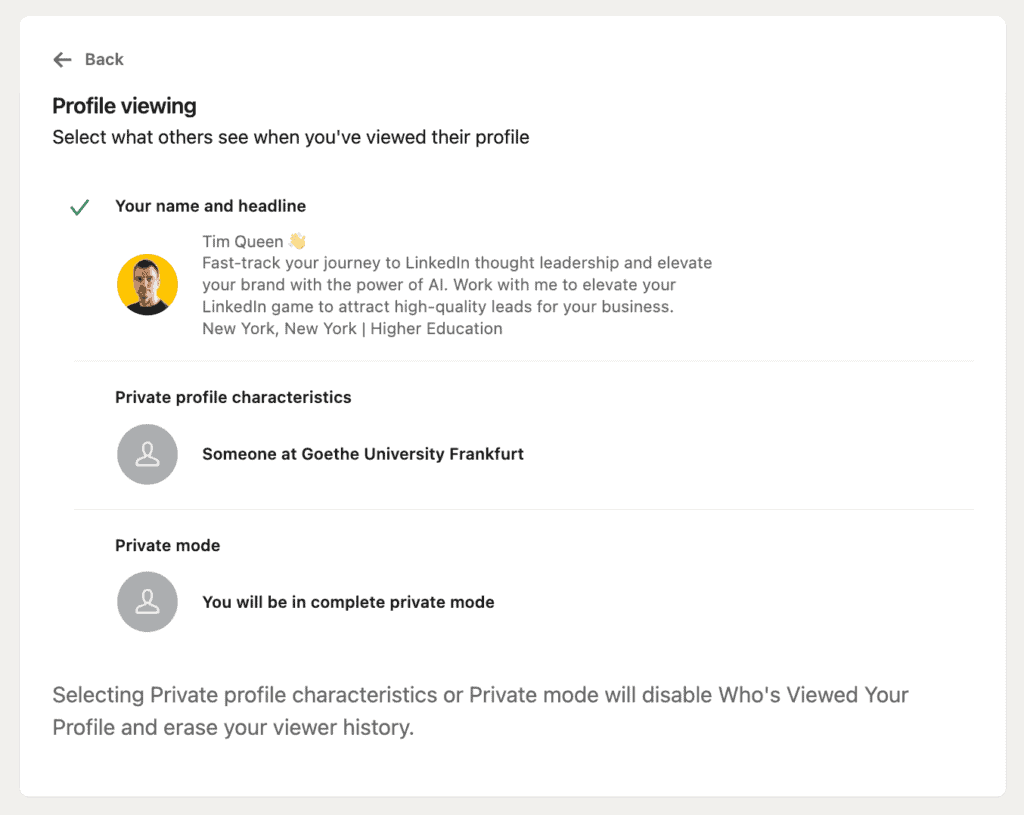
Depending on the visitors’ privacy settings, you will see one of the following:
- The viewer's name, headline, location, industry, and profile photo with a clickable link that allows you to visit their profile.
- The viewer's semi-private profile characteristics include their job title, company, school, and industry, and a blurred profile photo.
- "LinkedIn Member" if someone is viewing your profile in Private Mode.
Let's talk about some of the differences between Free and Premium plans.
Depending on your account type, there are certain limits on how many profile visitors you can see.
- Free: You can only see the last 5 people who visited your profile. The amount of information visible for each profile visitor is limited by both your visitor's and your own privacy settings. Whichever setting is stricter will determine what you see. For instance, if a visitor's setting allows everyone to see their full name, but you have set your own to private, your setting will override theirs and only display the visitor's minimal information, for example, “Someone at Microsoft” with a blurred profile photo.
- All paid Premium, Sales, and Recruiter plans:
- You will also see a chart of weekly trends that displays the number of people who viewed your profile on a day-by-day basis over the last seven days.
- Interesting Viewer suggestions on LinkedIn are based on your activity and interests, including jobs you have applied for.
- If you set your account to Private Mode, you will be anonymous if you visit other people’s profiles, but you can still see all of their information based on their privacy settings.
- Even if you have a Premium account, you cannot see the names of viewers who choose to browse in private mode or have private profile characteristics. LinkedIn respects the privacy of members who do not wish to reveal information about themselves when viewing profiles.
- Premium Career:
- You can see every person who visited your profile within the last 90 days.
- Premium Business:
- You can see every person who visited your profile within the last 365 days.
- Sales Navigator:
- You can see every person who visited your profile within the last 365 days.
- If you view profiles using the Sales Navigator platform, you can select a visibility setting that differs from your visibility setting on Basic LinkedIn. This means that changing your profile visibility in Sales Navigator will not affect your profile visibility settings for LinkedIn.com and vice versa.
- Recruiter:
- You can see every person who visited your profile within the last 90 days.
- If you view profiles through the LinkedIn Recruiter platform, you’ll always be shown as an anonymous recruiter.
Profile Badge
A LinkedIn Premium subscription comes with several perks, including a golden Premium badge that you can display on your LinkedIn profile.
Here is how it looks: It is a golden square with the white LinkedIn logo text embedded in the center.

Many people wear their Premium logo with pride.
It’s a symbol of high status that communicate to visitors that they are serious about LinkedIn and mean business.
It allows you to stand out and gives your profile a nice Premium touch.
The badge also increases trust and lets profile visitors know that you are who you say you are. Since the average spammer is unwilling to invest in any paid LinkedIn subscription due to its high cost, investing in your Premium subscription makes you appear more trustworthy.
If anything, it screams that you are rich enough to pay for it, which can be very important to some people.
However, for exactly the same reason, others would prefer to hide their badge while still enjoying the benefit of a LinkedIn Premium plan.
Lucky for them, LinkedIn makes it super easy to switch between displaying your Premium badge on your profile and hiding it.
Open Profile
The Open Profile is an optional LinkedIn Premium feature that, if turned on, allows anyone on LinkedIn to contact a Premium member for free, even if they're not in the sender's network.
All LinkedIn members can view the complete profiles of Premium members who have enabled Open Profile.
Why would you want to "Open" your profile?
Benefits of Having an Open Profile on LinkedIn:
- Lead Generation: An open profile lets possible clients talk to you right away without having to go through LinkedIn's process of asking to connect. This makes it quicker to start talking and helps build a better relationship.
- Networking Opportunities: Having an open profile signals that you are interested in networking and are ready to make new connections. This can attract more people who are interested in talking to you and can lead to important networking opportunities, which in turn can lead to new business opportunities and other unexpected rewards.
- Minimal Spam: Although it may not seem like it, having an open profile can actually reduce spam. The "message directly" feature is more difficult for spammers to automate, so they tend to target connection requests instead.
Unlimited Search
If you have a free LinkedIn account, you have probably experienced the following problem while searching on LinkedIn.
All of a sudden, after performing a few searches, you suddenly don't get any search results and are instead presented with a warning that you have approached LinkedIn's commercial use limit.
It's an unspecified limit on how many searches you are allowed to perform before LinkedIn assumes that you must be a devious salesperson or recruiter who is using LinkedIn for lead generation or hiring and, therefore, should pay for a Premium account.
The problem is that these limits are so incredibly low that you will hit them after just a handful of searches over a couple of minutes.
Anecdotal evidence suggests that the limit of searches is smaller for more generic searches, such as “Role title in City” than for specific name searches. But we can't be sure since LinkedIn is shrouding itself in a cloud of secrecy.
In any case, the result is all the same.
If you need to perform LinkedIn searches on a regular basis, you must invest in a paid LinkedIn Premium subscription.
Advanced Search Filters
With a LinkedIn Sales Navigator or Recruiter subscription, you get access to additional advanced search filters and parameters that are not available with LinkedIn’s free search.
Here is a detailed comparison of the unique advanced search filters for LinkedIn Sales Navigator and LinkedIn Recruiter.
As you can see, the ability to find specific individuals is at least 100 times more powerful than with regular LinkedIn.
1. People / Candidate Filters
The People search filter displays the biggest differences between Sales Navigator and Recruiter.
Sales Navigator focuses more on identifying specific roles and functions to quickly identify the key decision makers to reach out to win their employer company as a customer.
While LinkedIn Recruiter is looking for more nuanced details such as a candidate's spoken language, specific fields of study and degrees, individual skills, and geo-targeting down to specific ZIP codes.
| Category | Sub Category | LinkedIn Sales Navigator | LinkedIn Recruiter |
| Personal Details | First Name | ✓ | ✓ |
| Last Name | ✓ | ✓ | |
| Profile Language | ✓ | ✓ | |
| Spoken Languages | ✓ | ||
| Relationship | ✓ | ||
| Recently Joined | ✓ | ||
| Network Relationship | ✓ | ||
| Spotlights | ✓ | ||
| Education | School | ✓ | ✓ |
| Year of Graduation | ✓ | ||
| Fields of Study | ✓ | ||
| Degrees | ✓ | ||
| Experience | Current Companies | ✓ | ✓ |
| Past Companies | ✓ | ✓ | |
| Industry | ✓ | ✓ | |
| Title (Past / Current) | ✓ | ✓ | |
| Job Titles | ✓ | ||
| Years at Current Company | ✓ | ✓ | |
| Years in Current Position | ✓ | ✓ | |
| Years of Experience | ✓ | ✓ | |
| Function | ✓ | ✓ | |
| Job Functions | ✓ | ||
| Seniority Level | ✓ | ✓ | |
| Military Veterans | ✓ | ||
| Skills | ✓ | ||
| Employment Type | ✓ | ||
| Location | Location by region/state | ✓ | ✓ |
| Location by postal code radius | ✓ | ||
| Postal code / Zip code | ✓ | ||
| Group | Group Membership | ✓ | ✓ |
| All groups | ✓ | ||
| My groups | ✓ |
2. Company Filters
From a LinkedIn Recruiter perspective, companies are seen more as attributes of employees and are therefore given a lower priority in terms of search filters.
LinkedIn Sales Navigator, on the other hand, focuses primarily on companies as the target of lead generation and identifying employees and key decision makers to close the deal second.
As such, LinkedIn Sales Navigator offers far superior and more granular fine-tuned search filters for specific company attributes.
| Category | Sub Category | LinkedIn Sales Navigator | LinkedIn Recruiter |
| Basic | Company Size | ✓ | ✓ |
| Company Type | ✓ | ✓ | |
| Company Followers | ✓ | ✓ | |
| Advanced | Current Companies | ✓ | ✓ |
| Past Companies | ✓ | ✓ | |
| Hiring on LinkedIn | ✓ | ||
| Leads Following Your Company | ✓ | ||
| Company headcount growth | ✓ | ||
| Company revenue | ✓ | ||
| Department headcount growth | ✓ | ||
| Department size | ✓ | ||
| Fortune (listed on Fortune 50/100/500) | ✓ | ||
| Headquarters location (by region/state) | ✓ | ||
| Headquarters location (by postal code) | ✓ | ||
| Job opportunities | ✓ | ||
| Recent senior leadership changes | ✓ |
3. Recruiting & Candidate Activities
The primary difference here is platform-specific.
Sales Navigator focuses on organizing leads into account lists for companies and lead lists for individuals. On the other hand, Recruiters organize people by hiring projects and different research and review phases within those projects.
| Category | LinkedIn Sales Navigator | LinkedIn Recruiter |
| Exclude Contacted Leads | ✓ | |
| Exclude Saved Leads | ✓ | |
| Exclude Viewed Leads | ✓ | |
| Leads with Recent Job Changes | ✓ | |
| Leads with LinkedIn Activity | ✓ | |
| Leads Mentioned in the News | ✓ | |
| Leads with Shared Experiences/Commonalities | ✓ | |
| Search within My Accounts | ✓ | |
| TeamLink Connections | ✓ | |
| Posted Content Keyword | ✓ | |
| Recruiting Activity | ✓ | |
| Tags Search | ✓ | |
| Projects Search | ✓ | |
| Notes Search | ✓ | |
| Reviews Search | ✓ | |
| Reminders Search | ✓ | |
| Hide Previously Viewed | ✓ | |
| Applicants | ✓ | |
| In ATS (Applicant Tracking System) | ✓ | |
| Project Statuses | ✓ | |
| Candidate Sources | ✓ |
Unlimited People Browsing
Similar to searching, LinkedIn also imposes a commercial use limit for viewing people's LinkedIn profiles.
Any LinkedIn Premium subscription removes these limitations, and you are free to view as many profiles as you like, up to 3rd-degree connections.
However, be mindful that LinkedIn's safety features, which attempt to identify and ban automated bots that scrape and extract user data, are still in effect.
If you view too many profiles in a very short period of time, your account may be locked.
Try to view profiles naturally and organically, and you should be fine.
Job Insights / Applicant Insights
All LinkedIn Premium subscribers can access competitive intelligence about current applicants and gain an inside look into companies, their hiring trends, and their current employees.
This gives you an inside look at the hiring company’s information and can be especially helpful for both job seekers and hiring companies.
Competitive intelligence will appear once a job posting has received at least three applicants and provides insights about current applicants for job postings.
- The number of people who have already applied for the job you are viewing.
- Percentage-based ranking of how your profile compares to other applicants, including experience and skills. You’ll see your ranking as a percentage if you're within the top 50% of applicants.
- Top skills among the applicant pool, including the skills that you have in common.
- Seniority level among all candidates.
- Education levels of all applications.
- Geographic distribution of people who applied.
Hiring-Specific Company Insights
Every job posting also contains a “See If CompanyName Is Hiring People Like You” section.
Here you can see the total employee count and detailed hiring trends over the last two years that display the total employee headcount as a detailed growth graph.
You can view trends for the company’s headcount growth expressed as a positive or negative percentage over two years, either company-wide or department-specific, based on the department that posted looking for applicants.
This, in combination with the median employee tenure in years, is a great tool for evaluating whether you may have a positive future with this company or if they are on a downward spiral.
At the bottom, you can see if the company that posted the job has specific preferences for hiring employees who previously worked at certain companies or studied at specific universities.
This is super helpful to network with similar people working at that company. Even if you are not connected, you can use one of your InMail credits and mention shared experiences that you have in common.
Premium Company Insights
As a LinkedIn Premium member, you can visit any LinkedIn company page and click on the Insights tab to access unique company insights that can assist you in your research, analysis, and lead generation efforts.
- Total Employee Count: This metric shows the total number of LinkedIn members employed at the company over time.
- Employee Distribution and Headcount Growth by Function: This metric shows the distribution and growth of company employees by function, trending over time.
- New Hires: This metric shows the trending count of newly hired employees over time. Senior management is defined as employees with previous or current titles as Vice President or higher, but this may vary by sector.
- Notable Alumni: This metric shows former employees with past titles of Vice President or higher who have held a position with the company that ended within the last 24 months.
- Total Job Openings: This metric shows the company's total job posts available on LinkedIn, segmented by seniority and function, trending over time.
Top Applicant
The Top Applicant feature assists you in your job search by identifying jobs where you are considered a top candidate based on the information listed on your profile.
You can see a list of all jobs where you may be a top applicant, meaning you're in the top 50% of applicants, by navigating to the Jobs section in the menu and then clicking on "Jobs where you're a top applicant".
This rating is based on the current members who have already applied for the role and will only be shown if there are at least 10 applicants for the same role.
Resume Builder
While all LinkedIn plans, including the basic free plan, give members access to the LinkedIn Resume Builder tool, only LinkedIn Premium members have access to the Resume Insights sidebar.
This useful tool analyzes your uploaded or auto-generated resume based on your LinkedIn profile and provides you with in-depth insights and recommendations on which keywords to include based on your desired role title.
The "Found In Your Resume" section tells you what you are doing well by highlighting recommended keywords that are already in your CV.
As you might have suspected, the "Suggested Keywords" section gives you a list of commonly found keywords among LinkedIn members already working in your desired role title.
The idea is to “dress for the role you want”, not the one you already have, to maximize your chances of getting hired.
Once you have added all suitable keywords, re-upload your CV or generate a new version based on your profile, and watch your score rise.
Finally, you can learn more about how to format your resume and optimize it for applicant tracking software solutions.
After completing your resume, you can export it as a PDF file for easy sharing.
LinkedIn Learning
LinkedIn Learning is included in every LinkedIn Premium plan.
It is a platform designed to enhance your skills and knowledge and offers access to 20,920+ courses in 13 different languages.
Here are some LinkedIn Learning highlights and how they might be useful for you:
- Personalized Content: LinkedIn Learning automatically curates dynamic lists of recommended courses based on your skill levels, viewed job applications, recent searches, and more. This makes it super easy to quickly find the right course for your needs.
- Broad and Deep Course Library: With 20,920+ courses in 13 different languages and over 60 new courses added each week, LinkedIn Learning makes sure that the content is always fresh and up-to-date.
- High-Quality Production: All courses are produced in professional production studios, including great visuals, sound, and graphics. This high production quality keeps you engaged and excited about learning.
- Data-Driven Insights: The courses use data from LinkedIn, the world's largest professional network, to help you stay up-to-date with the latest hard and soft skills.
- Certification and CEUs: LinkedIn Learning offers on-demand courses to prepare you for professional certification exams and earn continuing education units (CEUs).
- Career Development: With LinkedIn Learning, you can explore career paths and connect with job opportunities in your organization based on your career goals and relevant skills. You can also take evaluations to understand skill proficiency and gaps, guiding your learning and receiving content recommendations at the right level.
- Interactive Community: LinkedIn Learning cultivates a supportive and interactive community where you can join learning groups, share and recommend courses, and engage in interactive Q&A on course pages.
LinkedIn Premium Career vs. Business: Which is the Right Choice for You?
LinkedIn Premium has two membership levels that include the word "Premium" in their name.
Both of these plans, Premium Career and Premium Business, can only be used on the main LinkedIn platform at LinkedIn.com.
They have identical features with only two exceptions, the number of InMail credits per month and the number of days you can look back in time to see who viewed your profile.
If you want to use LinkedIn for business but only need the unlimited search and people browsing feature, Premium Career might be your best option as it is half the price of Premium Business.
A side note: As LinkedIn has decided to price LinkedIn Learning at the same price as LinkedIn Premium Career, it would be very foolish to ever buy LinkedIn Learning instead of Premium Career, which offers the same and so much more.
| LinkedIn Learning | Premium Career | Premium Business | |
|---|---|---|---|
| Private Browsing | ✓ | ✓ | |
| Applicant Insights | ✓ | ✓ | |
| Direct messaging | ✓ | ✓ | |
| Who Viewed Your Profile | ✓ | ✓ | |
| Who's viewed your profile insights availability | 90 | 365 | |
| Unlimited access to LinkedIn Learning | ✓ | ✓ | ✓ |
| Unlimited people browsing | ✓ | ✓ | |
| Business Insights | ✓ | ✓ | |
| InMail credits per seat | 5 | 15 | |
| Pricing Per Month | $39.99/month | $39.99/month | $69.99/month |
| Pricing Per Year | $239.88/year About $19.99/month | $239.88/year About $19.99/month | $539.88/year About $44.99/month |
| Pricing verified June 2023 |
What's the Best LinkedIn Premium Plan for Sales Professionals
LinkedIn Sales Navigator is a great tool if you want to use LinkedIn as your personal CRM, including saved account and leads lists, and you need access to far more granular advanced search filters.
Only the LinkedIn Sale Navigator Core and Advanced membership levels can be bought directly, Advanced Plus requires you to reach out to LinkedIn’s sales department for a custom quote.
The differences between Core and Advanced are marginal, aside from the fact that Advanced is twice as expensive.
Advanced is designed for larger corporations with a full team of sales associates.
For most people, the only significant difference is the ability to send special tracking links that enable you to share PDF documents with prospects and to obtain a detailed breakdown of how much time they spent viewing each unique page.
I recommend implementing my step-by-step LinkedIn Lead Generation strategy for LinkedIn Sales Navigator.
| Sales Navigator Core | Sales Navigator Advanced | Sales Navigator Advanced Plus | |
|---|---|---|---|
| Private Browsing | ✓ | ✓ | ✓ |
| Applicant Insights | ✓ | ✓ | ✓ |
| Direct messaging | ✓ | ✓ | ✓ |
| Who Viewed Your Profile | ✓ | ✓ | ✓ |
| Who's viewed your profile insights availability | 365 | 365 | 365 |
| Unlimited access to LinkedIn Learning | ✓ | ||
| Unlimited people browsing | ✓ | ✓ | ✓ |
| Business Insights | ✓ | ✓ | ✓ |
| Advanced Search | ✓ | ✓ | ✓ |
| Standalone sales interface | ✓ | ✓ | ✓ |
| Custom lead and account lists | ✓ | ✓ | ✓ |
| Lead recommendations and saved leads | ✓ | ✓ | ✓ |
| Real-time updates and alerts | ✓ | ✓ (Buyer Interest alerts for Advanced and Advanced Plus only) | ✓ (Buyer Interest alerts for Advanced and Advanced Plus only) |
| Integrate with your sales tools SNAP, Outlook web integration, Sales Navigator mobile app | ✓ | ✓ (SNAP for Advanced and Advanced Plus only) | ✓ (SNAP for Advanced and Advanced Plus only) |
| Engage with your prospects and customers using your team's network TeamLink, TeamLink Extend | ✓ | ✓ | |
| Advanced outreach - Package content and track engagement Smart Links | ✓ | ✓ | |
| Administrative tools/Reporting Usage Reporting, Account Center | ✓ | ✓ | |
| Centralized billing for contracts sold through LinkedIn corporate sales Volume and multi year discounts, invoicing, dedicated relationship manager | ✓ | ✓ | |
| Enterprise tools SSO, Employee Data Integration | ✓ | ✓ | |
| CRM Sync Auto-Save, Activity Writeback, & ROI Reporting for Salesforce and Microsoft Dynamics 365 Sales | ✓ | ||
| Advanced CRM integrations Data Validation & Contact Creation for Salesforce and Microsoft Dynamics 365 Sales | ✓ | ||
| Network Access | Up to your 3rd-degree connections, with 25 unlocks per month for out-of-network profiles | Up to your 3rd-degree connections, with 25 unlocks per month for out-of-network profiles | Up to your 3rd-degree connections, with 25 unlocks per month for out-of-network profiles |
| InMail credits per seat | 50 | 50 | 50 |
| Pricing Per Month | $99.99/month | $204.55/month | Pricing on Request |
| Pricing Per Year | $959.88/year About $79.99/month | $1,890/year About $157.50/month | |
| Pricing verified June 2023 |
Which LinkedIn Premium Plan is Best for Recruiters
LinkedIn offers three unique Recruiter membership levels, Lite, Professional, and Corporate.
Only Recruiter Core can be purchased directly without contacting LinkedIn’s sales team first.
The main difference between Lite and higher tiers is the limits on the number of advanced search filters, candidate search alerts, InMail credits, the ability to share InMail credits with your team, and network access.
If you are a small business and you are hiring semi-frequently, investing in Recruiter Lite is not always the best choice, as most tasks can also be achieved with Sales Navigator Core, Premium Business, and even Premium Career at a far lower price point.
| Recruiter Lite | Recruiter Professional | Recruiter Corporate | |
|---|---|---|---|
| Private Browsing | ✓ | ✓ | ✓ |
| Applicant Insights | ✓ | ✓ | ✓ |
| Direct messaging | ✓ | ✓ | ✓ |
| Who Viewed Your Profile | |||
| Who's viewed your profile insights availability | 90 | 90 | 90 |
| Unlimited access to LinkedIn Learning | ✓ | ✓ | ✓ |
| Unlimited people browsing | ✓ | ✓ | ✓ |
| Business Insights | ✓ | ✓ | ✓ |
| Recruiting-specific design | ✓ | ✓ | ✓ |
| Automatic candidate tracking | ✓ | ✓ | ✓ |
| Integrated hiring | ✓ | ✓ | ✓ |
| Smart Suggestions | ✓ | ✓ | ✓ |
| Network Access | Up to your 3rd-degree connections | "Up to your 3rd-degree connections, with 30 unlocks per month for out-of-network profiles" | Full access to the entire network |
| Search filters | 20+ filters | "40+ filters, including advanced filters such as years at current company/position, and spoken languages" | "40+ filters, including advanced filters such as years at current company/position, and spoken languages" |
| Candidate search alerts | 10 | 50 | 50 |
| InMail credits per seat | 30 | 100 | 150 |
| Search Filters | ✓ | ✓ | |
| Pricing Per Month | $139.99/month | Pricing on Request | Pricing on Request |
| Pricing Per Year | $1,439.88/year About $119.99/month | ||
| Pricing verified June 2023 |
Benefits of LinkedIn Premium
Let's talk about the benefits of having a LinkedIn Premium, Sales Navigator, or Recruiter account, with the main focus on Premium Career and Premium Business.
Ability to message people outside of your network.
All LinkedIn Premium accounts allow you to send a certain number of InMail messages to people with whom you are not connected.
This is extremely helpful if you require a quick answer and don’t have time to send someone a connection request, wait for them to accept it, and then send them the actual message you wanted to send all along.
InMails bypass this process and send someone a message that is prominently featured in their LinkedIn inbox and is also sent in its full length to their email address inbox.
Keep in mind that some members might have opted out of receiving LinkedIn InMails, although this is quite rare.
No commercial use limits for searches and profile views.
One of the biggest advantages of LinkedIn Premium is the removal of the so-called commercial use limit.
By default, LinkedIn limits the number of searches you can perform and profiles you can visit if you have a free account. These limits are so low that even five minutes of searching can result in your search results being limited.
Just imagine this scenario: you want to search for your primary school classmate Mary Smith on LinkedIn. However, there are many people with the same name. You only remember what she looked like when she was five, so you click on several profiles that somewhat resemble her to figure out the right profile. After visiting a few profiles, LinkedIn displays a notification that you have reached the commercial use limit.
That's not happening if you have LinkedIn Premium. You can take all the time in the world to research and investigate different people both in search and profile viewing.
Understand if your LinkedIn Strategy is working by visiting the See Who visited your Profile page.
Whether you are seeking new job opportunities, trying to generate qualified leads for your business, or looking to hire new talent, each LinkedIn user has unique goals.
LinkedIn Premium offers members a helpful tool to evaluate the effectiveness of their strategy for achieving these goals: the "Who Viewed Your Profile" page.
Depending on your plan, this page shows every person who has visited your profile within the last 90 or 365 days.
This feature offers valuable insights into whether you are reaching and attracting the right people for your goals.
- If you're an independent recruiter, you may want to know if you're attracting top talent to visit your profile.
- As a marketing agency owner specializing in real estate marketing and building a strong personal brand by sharing content on LinkedIn, you may want to know if your profile is attracting visits from people in the real estate industry.
- If you're currently looking to upgrade your job by switching to a new company, you may be interested in understanding which companies recruiters are currently looking to fill new vacancies.
Bragging Rights
We've all seen photos of private jets and Lamborghinis on Instagram, but do you know who the real OG of flexing is?
Your golden LinkedIn Premium badge that you can prominently display at the top of your LinkedIn profile.
It lets everyone know that you are different and not someone to fool around with.
You are dangerous, you mean business, and you are rich enough to pay for Premium.
Be proud to stand out! 😎
You make networking easier for everyone
Normally, someone has to be connected with you before they are allowed to send you a message.
LinkedIn Premium users can, of course, send InMails, but not everybody can afford that, so you limit your networking opportunities.
However, if you invest in LinkedIn Premium yourself, you can make your networking game a whole lot easier by turning on the LinkedIn Premium feature "Open Profile".
It allows you to make your profile visible outside of your network and receive incoming messages from anyone, no matter how you're connected or if someone has a free LinkedIn account or Premium.
Make your job search 10 times more productive
LinkedIn Premium makes everything easier when it comes to finding a new role.
LinkedIn Premium provides extra details on job postings, including the number of applicants, common skills, and hiring trends, allowing you to see where you stand in terms of experience and skills compared to others.
The Top Applicant recommends job posting to you where you would stand out based on your resume, experience, and skills.
This is a super useful feature, especially for type A personalities who like to optimize every aspect of their job hunt.
The Resume Builder Insights tool allows you to upload your PDF resume or generate a resume based on your LinkedIn profile.
It provides detailed insights based on the job title you are applying for. For example, it shows which keywords recruiters are looking for when hiring someone with your chosen job title and suggests that you add them to your CV.
LinkedIn Learning offers a wide range of courses that can help you acquire new skills to make you more competitive in your job search.
Level up your skills with LinkedIn Learning
The entire LinkedIn Learning library, with over 20,920+ courses, is included with any LinkedIn Premium subscription.
Whether you want to upgrade your ChatGPT skills to stay competitive in your job or learn how to become better at selling to make more money for your company, LinkedIn Learning has a course on almost any business-related topic in its catalog.
Given the incredible amount of knowledge you can access for free, that feature might be worth the price of your LinkedIn Premium subscription alone.
Spy on your competitor with Company Page Insights
LinkedIn Premium Page Insights is a valuable tool that gives you important information about how a company is structured, how it's growing if it's hiring new people and job openings.
This tool is incredibly useful for market research, competitive analysis, and people who want to do their due diligence before making important investment decisions.
If you use these insights correctly, you will make smarter choices.
Here are a few ways how to benefit from Page Insights.
If a company is hiring more people, it might mean the company is doing well. That could mean that this is a good company to win as a customer for your business.
If a company is hiring new people in certain areas, it can be a good opportunity to perform a people search for individuals with specific job titles within that company. Then, you can network and build relationships with them before your competitors do.
If the headcount is shrinking in specific departments, it may indicate that the company is struggling and might need your services to turn things around.
By using these tools in the right way, you can better understand what's happening within specific companies and in the broader market.
If you combine insights from multiple companies in the same industry, you can see what other companies are doing and identify opportunities for growth.
Turn on LinkedIn’s Incognito Mode
LinkedIn offers three privacy options for viewing other people's profiles.
- You can share your full name, role title, industry, and company name, allowing people to click on your name to visit your profile.
- You can be semi-private by only providing general information such as "Someone working at Microsoft" or "Role title in Industry."
- You can turn on Private Mode, in which case no information is provided about you at all.
The only caveat is that if you have a free LinkedIn account, the privacy level you set will limit what you can see about your visitors.
If you turn on Private Mode, you will be private to everyone else, but every profile visitor on your own profile will also show up as anonymous, even if they are happy to share their full details.
With LinkedIn Premium, you don’t have to worry about this. If you turn on Private Mode, you will be incognito, but you see everything each profile visitor is willing to share.
Drawbacks of LinkedIn Premium
LinkedIn Premium is very expensive
Many people are not willing to pay for social media usage, as evidenced by the low number of Twitter Blue subscribers, which is only about 180,000 in the US, according to The Information. And this is for a more affordable subscription price of $8 per month.
The cheapest way to access LinkedIn Premium is by signing up for LinkedIn Premium Career, which costs $239.88/year if paid annually, or effectively about $19.99/month per month.
But even the cheapest LinkedIn Premium with the fewest number of features is more than twice as expensive as Twitter Blue. And you still will see 100% of the ads in your newsfeed.
Since most users don't use all LinkedIn Premium features equally, the decision usually comes down to whether one or two extra features are worth the cost of the entire subscription.
The Badge of Shame
By default, LinkedIn displays a golden Premium badge on every LinkedIn Premium member's profile.
While most members wear it with pride as a badge of honor, others might feel bad about it and consider it a badge of shame, for example, because they worry about being perceived as rich or elitist.
Fortunately, this can be easily fixed by disabling the Premium badge and hiding it from your profile.
Use Cases of LinkedIn Premium
Let's take a closer look at some specific use cases to see how a LinkedIn Premium plan can make your life easier.
Academia
- Alumni Networking: Use advanced search filters to connect with former colleagues or schoolmates to explore potential opportunities.
- University Admissions: College recruiters can use LinkedIn Recruiter to identify potential students for their Master and MBA programs based using Premium filters.
- Academic Research: Professors or researchers can find and connect with peers in their field of study.
- Academic Publications: Publishing research is an essential aspect of building a career in science. Using the unlimited search and people browsing features of Premium makes it easier to connect with relevant journalists in your field and get them to talk about your recently published paper.
Professional Development and Learning
- Training and Development: LinkedIn Premium gives access to LinkedIn Learning, providing an abundance of courses to help in skill enhancement.
Job Hunting and Recruitment
- Recruitment: Recruiters can use LinkedIn Recruiter to find potential candidates for various job openings with super advanced Premium search filters.
- Job Hunting: Job seekers can use Premium Insights for Jobs, Companies, and Applicants to learn more about individual job postings, the companies they are considering applying for, and how well they are qualified for a specific role based on competitive insights. Resume Builder Insights allow them to add missing keywords that recruiters are looking for to their CV.
Networking
- Peer Learning: Use unlimited profile browsing to explore networking opportunities and connect with peers to learn from their experiences and insights without ever hitting LinkedIn's commercial use limits.
- Find Mentors: Discover and connect with potential mentors in your field, for example, with LinkedIn Learning instructors whose courses you can access for free with every Premium plan.
Politics
- Policy Influence: Use premium search filters and the ability to visit as many profiles as you want to identify key people of influence in politics and relevant think tanks. This will help you influence public policies related to your industry.
Press & Media
- Research: As a journalist working for a reputable newspaper, magazine, radio, or television, you can get a free LinkedIn Premium membership, which is an incredibly powerful research tool to connect with potential insiders and learn more about the background information of someone you are reporting on. The most used Premium features are unlimited search and profile browsing.
Personal Branding
- Personal Building: Use LinkedIn Premium to establish and promote your personal brand to attract potential partners, clients, or employers. Use LinkedIn Learning to educate yourself about the latest personal branding trends and unlimited search and browsing to network with other influencers in your field. Highlight your thought leadership with the golden Premium badge on your profile.
- Content Promotion: Use your included InMail credits to connect with industry influencers to network and promote your content to large, relevant audiences.
- Product Launch: Use LinkedIn Premium and the included LinkedIn Learning to learn the latest product launch and marketing tactics to create buzz around your new product or service launch.
- Growing a Podcast: If you're a podcaster, LinkedIn Premium search and profile viewing can be used to find potential guests, promote your podcast, and engage with your listener community. The "Who Viewed Your Profile" feature can help you identify potential guests who may be interested in appearing on your show but haven't had the courage to reach out.
- Finding Guest Bloggers: Follow relevant LinkedIn Hashtags to discover thought leadership posts and articles on LinkedIn, then use your InMail credits to reach out to specific writers to invite them for guest posting opportunities on your blog.
None-Profits
- Sponsorship Hunting: Unlimited search and profile views can help you identify potential sponsors for events and initiatives. Your InMail credits also make it super easy to send messages and event invitations to potential sponsors outside of your network.
Startups
- Find Investors & Grow Your Business: If you're a startup, use the LinkedIn publishing platform to talk about your business far and loud. Then use the Premium feature Who’s Viewed My Profile to identify potential customers and investors who are checking out your profile. Use the unlimited search and InMail for lead generation, to secure funding, and to reach out to relevant journalists to promote your company.
Business Development and Expansion
- Find Partnerships: Identify potential business partners for collaborations or joint ventures via advanced search filters in Sales Navigator. Saven each company to an account list, then set up activity alerts for key decision makers, and engage with them by implementing a LinkedIn Commenting Strategy.
- Trade Show Networking: Connect with attendees or exhibitors before, during, or after industry trade shows via InMails.
- Supplier Discovery: Find potential suppliers for your business needs based on advanced Sales Navigator filters, such as annual revenue or department headcount.
- Market Research: You can use LinkedIn Premium Page Insights to research the market, analyze trends, and identify key players in different industries.
- Sales Prospecting: Use LinkedIn Sales Navigator to find and connect with potential customers.
- Building Customer Relationships: Use the Open Profile feature in LinkedIn Premium to make it easier for potential customers to reach out to you even if they are not within your network.
- Screening Vendors: If you're looking to outsource, you can use the service to find and screen potential vendors or service providers and then organize companies you have shortlisted with account lists in Sales Navigator.
Freelance and Consulting Services
- Freelancing: As a freelancer, you can connect with potential clients via InMails to showcase your work.
Marketing
- Influencer Engagement: Identify and reach out to influencers who can help amplify your brand or message by using advanced search filters, people browsing, and InMails.
- Public Relations: Reach out to media professionals and influencers to gain publicity for your brand via InMail.
Event Management and Promotion
- Finding Speakers: As an event organizer, LinkedIn is a treasure trove. With advanced search filters and InMails it’s super easy to find the perfect speaker for your next event.
- Promote Events: LinkedIn is a great place for collaboration. If you are an event organizer, why not reach out to industry-specific thought leaders via InMail and offer them free event tickets in exchange for promoting your event to their audience?
- Conference Speakers: Find experts in your industry via Premium search filters and invite them via InMail to speak at your conference.
Cost of LinkedIn Premium
Here is a comparison table of all LinkedIn Premium plans, including LinkedIn Learning, Premium Career, Premium Business, Sales Navigator, and Recruiter, with up-to-date pricing from June 2023.
| Monthly Pricing | Yearly Pricing | |
|---|---|---|
| LinkedIn Learning | $39.99/month | $239.88/year About $19.99/month |
| LinkedIn Premium Career | $39.99/month | $239.88/year About $19.99/month |
| LinkedIn Premium Business | $69.99/month | $539.88/year About $44.99/month |
| LinkedIn Sales Navigator Core | $99.99/month | $959.88/year About $79.99/month |
| LinkedIn Sales Navigator Advanced | $204.55/month | $1,890/year About $157.50/month |
| LinkedIn Sales Navigator Advanced Plus | Pricing on Request | Pricing on Request |
| LinkedIn Recruiter Lite | $139.99/month | $1,439.88/year About $119.99/month |
| LinkedIn Recruiter Professional | Pricing on Request | Pricing on Request |
| LinkedIn Recruiter Corporate | Pricing on Request | Pricing on Request |
| Pricing verified June 2023 |
LinkedIn Premium Review – How I use LinkedIn Premium
I use LinkedIn to build my personal brand, network with other thought leaders, generate leads for my marketing agency, and grow my VIVID TALKS event series.
The two features that I use the most are advanced search filters, including unlimited searches and unlimited people browsing, without running into LinkedIn's commercial use limits. This allows me to take my time when identifying the right person to collaborate with instead of having to settle for the first best match because I was blocked from additional searches and profile views.
Sales Navigator has been incredibly useful for me because it allows me to organize potential leads into account and lead lists and set up automatic alerts whenever something interesting is happening. For example, if one of my leads shares a new post, it provides an opportunity for me to nurture that relationship by leaving a thoughtful comment.
The extended search filters have been super useful too, and make it much easier to find the right kind of companies fast without having to look at hundreds of pages first.
I use the "Who's Viewed Your Profile" feature mostly for networking with people I already know. If I recognize someone visiting my profile with whom I haven't talked in a long time, I reach out to reconnect.
For my business and event series, I have taken advantage of InMail credits to connect with ideal customers and to invite outstanding speakers to speak at my events.
I don't use LinkedIn Learning much because most courses are pretty basic, but if I need a quick refresher about a specific problem, it can be absolute gold.
Is LinkedIn Premium worth it?
LinkedIn Premium Career, if paid annually, is the best overall plan for most people.
It gives you the biggest bang for your buck, including unlimited searches and unlimited profile views.
With LinkedIn Premium Career, you get all the same features as LinkedIn Premium Business, with just two slightly lower usage limits.
Namely, you can only look back 90 days to see who viewed your profile instead of 365 days, which should be plenty if you want to take action and check out the list of people every few days or weeks.
It also only gives you 5 instead of 15 InMail credits, which should be enough for most people.
Remember, you can always connect with people and then send them free messages if they accept your personalized connection request afterward, which is the recommended way anyway if the matter isn't super pressing and urgent.
If you want to attract clients and customers for your Business, LinkedIn Sales Navigator Core is the right plan for most.
What makes Sales Navigator worth it are the super advanced search filters that make it 10 times faster to find interesting companies to work with.
The ability to create lead lists for companies and people allows you to use LinkedIn as your personal CRM system, which could be worth the price of your subscription alone.
Sales Navigator also includes 50 monthly InMail credits, which is a lot more than what Premium Career or Business offers.
When it comes to recruiting new talent, most smaller companies don't need a Recruiter Light account. A Premium Career account can provide good results for them at a third of the price.
If your business has grown to the point where you have a full-time HR professional overseeing your operations, LinkedIn Recruiter Light may be a worthwhile investment.
Frequently Asked Questions
In the following section, I am sharing answers to some of the most common questions about LinkedIn Premium, Sales Navigator, Recruiter plans, and features.
LinkedIn Premium Questions
How many subscribers does LinkedIn Premium have?
LinkedIn does not publicly disclose the exact number of its Premium subscribers.
But according to estimations from Statista, the percentage of LinkedIn Premium users is 6%.
With a total of 1.1 billion LinkedIn members, this means there are approximately 55 million LinkedIn Premium users.
Does LinkedIn Premium offer unlimited searches?
All LinkedIn Premium, Sales Navigator, and Recruiter plans to provide unlimited searches and browsing of people, but some search activity may be subject to an undisclosed fair usage limit.
This is to prevent malicious bots from scraping user data from LinkedIn.
Under normal circumstances, you will never run into issues.
Is there a way to tell if someone has a LinkedIn Premium subscription?
Yes, LinkedIn Premium members typically have a "Premium" badge on their profile.
Keep in mind that Premium users have the option to hide their badge.
If they choose to do so, there is no way of knowing that they are premium.
What are the different types of LinkedIn Premium subscriptions available?
The different types of LinkedIn Premium subscriptions are LinkedIn Premium Career, LinkedIn Premium Business, LinkedIn Sales Navigator Core, LinkedIn Sales Navigator Advanced, LinkedIn Sales Navigator Advanced Plus, LinkedIn Recruiter Light, LinkedIn Recruiter Professional, and LinkedIn Recruiter Corporate.
There is also a dedicated LinkedIn Learning subscription which has none of the Premium features and costs the same as LinkedIn Premium Career.
What features do I get with a LinkedIn Premium subscription?
LinkedIn Premium provides features such as seeing who viewed your profile, free access to all LinkedIn Learning courses, unlimited searches and profile views, a certain number of monthly InMail credits, Insights for jobs, companies, and resume builder, among other things.
What are the advantages of using LinkedIn Premium?
The four main advantages of LinkedIn Premium are that there are no limitations on how many searches you can perform or how many profiles you can view, advanced search filters, and the ability to send InMail messages to people outside of your network.
What is the difference between LinkedIn Premium Career and LinkedIn Premium Business subscriptions?
LinkedIn Premium Career is tailored for job seekers, while Premium Business is aimed at business owners. There are only two differences:
- Premium Career gives you 5 InMails/month and Premium Business 15.
- Premium Career allows you to see who visited your LinkedIn profile within the last 90 days, and Premium Business up to 365.
LinkedIn Sales Navigator Questions
How can I utilize LinkedIn Sales Navigator effectively?
You can use LinkedIn Sales Navigator effectively by leveraging its advanced search features to find potential leads, save them in your account and leads list to stay organized, then use InMails to reach out to those leads.
You can learn about this in my article on how to generate leads with LinkedIn Sales Navigator.
Is there a feature to export leads from LinkedIn Sales Navigator?
LinkedIn Sales Navigator does not offer an option to export account and lead information from Sales Navigator into a CSV or XLS file.
If you're a Sales Navigator Advanced Plus user, you can sync all your lead and account information between Sales Navigator and Salesforce. This means that information is updated in real-time between your CRM and Sales Navigator.
This plan also offers embedded profiles for Salesforce and MS Dynamics that provide Sales Navigator information within your CRM, which you can leverage.
As a Sales Navigator Advanced Plus user, you can add information about a new lead directly to your CRM from a Sales Navigator lead page.
How many LinkedIn Sales Navigator invites can I send per day?
LinkedIn Sales Navigator uses the same weekly limit for the number of 100 outgoing connection requests.
What's the maximum number of leads I can have in LinkedIn Sales Navigator?
A maximum of 10,000 leads can be saved.
What's the maximum number of lists I can have in LinkedIn Sales Navigator?
There is no limit in terms of how many accounts or leads list you can create in LinkedIn Sales Navigator. However, you can only save up to 10,000 leads in total.
How many people can use the same LinkedIn Sales Navigator account?
LinkedIn Sales Navigator accounts are meant for individual use.
Sharing accounts may lead to restrictions or suspension.
Is there a usage limit for LinkedIn Sales Navigator?
There's no general usage limit, but LinkedIn may limit certain activities if they resemble spam or breach the terms of service, for example, if someone is using scraping or automation tools.
Does LinkedIn Sales Navigator function as a CRM tool?
LinkedIn Sales Navigator is not a true CRM tool.
Although it allows you to save accounts and leads into lists, it does not have the ability to track leads through specific phases of your sales funnel.
However, if you have a Advanced or Advanced Plus plan, you can integrate Sales Navigator with some CRM tools.
How useful is LinkedIn Sales Navigator for businesses?
LinkedIn Sales Navigator is useful for businesses for lead generation, sales prospecting, and gaining insights about potential clients.
Is LinkedIn Sales Navigator GDPR compliant?
Yes, according to LinkedIn, all of its services, including Sales Navigator, comply with GDPR regulations.
Is Sales Navigator included in a LinkedIn Premium subscription?
No, Sales Navigator is a separate subscription and is not included in the LinkedIn Premium subscription.
What are the functionalities of LinkedIn Sales Navigator?
LinkedIn Sales Navigator offers advanced search filters, InMails, lead and account recommendations, CRM integration, and sales insights.
How can I use LinkedIn Sales Navigator to generate leads?
You can generate leads in LinkedIn Sales Navigator by using its advanced search features to identify potential leads, saving those leads into lists to follow-up with them later, and using InMail to directly message them.
How does LinkedIn help identify sales opportunities?
LinkedIn identifies sales opportunities through Sales Navigator's lead and account recommendations, real-time insights on leads and accounts, and alerts when your leads and accounts have significant changes or news.
LinkedIn Recruiter Questions
How can I maximize the use of LinkedIn Recruiter Lite?
You can maximize the use of LinkedIn Recruiter Lite by taking advantage of its features, such as advanced search, InMail messages, and the ability to manage and track candidates.
How can I switch from LinkedIn Recruiter Lite to LinkedIn Recruiter Professional or Corporate?
To switch from Recruiter Lite to a higher tier, you'd need to cancel your current subscription and then purchase a new subscription to Recruiter Professional or Corporate.
How can I switch from LinkedIn Recruiter Lite to LinkedIn Sales Navigator?
Similar to above, to switch from Recruiter Lite to Sales Navigator, you'd need to cancel your current subscription and then purchase a new subscription to Sales Navigator.
LinkedIn Premium Pricing, Costs, Discounts, and Promo Codes Questions
Can you get LinkedIn Premium for free?
LinkedIn Premium is a paid service, but LinkedIn does offer a one-month free trial for new Premium members.
However, LinkedIn will offer free time-limited upgrades to LinkedIn Premium and LinkedIn Learning to qualified individuals such as journalists, veterans, military spouses, students, and graduates.
Does LinkedIn offer discounts or promo codes for LinkedIn Premium?
LinkedIn does not usually offer discounts or promotional codes for Premium.
However, certain users might occasionally be offered discounts or free extended trials as part of special promotions.
How to save 50% on LinkedIn Premium?
If you sign up for a LinkedIn Premium account and then cancel your subscription, LinkedIn will offer you a 50% discount for 2 months if you stay.
How can I reduce the cost of my LinkedIn Premium subscription?
You may reduce the cost by choosing a lower-tier plan or by paying annually instead of monthly, as LinkedIn usually offers a discounted rate for annual subscriptions.
Does LinkedIn offer a free trial of LinkedIn Premium?
Yes, LinkedIn offers a one-month free trial for new Premium members.
Can I get free lifetime access to LinkedIn Premium?
There are no official programs that offer free lifetime access to LinkedIn Premium.
Your best option is to apply for a job at LinkedIn, which includes free access to LinkedIn Premium features for as long as you are working there.
Is LinkedIn Premium available for free with Amazon Prime?
LinkedIn Premium is not available for free with Amazon Prime.
LinkedIn Premium for Content Creators Questions
Does a LinkedIn Premium subscription increase the organic reach of my posts?
A LinkedIn Premium subscription does not increase the organic reach of your posts.
Do my LinkedIn posts get more views if I have a LinkedIn Premium subscription?
No, having a LinkedIn Premium subscription does not give your posts more views. If you want to increase views, you need to learn how to create better LinkedIn content.
Who has Viewed Your Profile
Can I see who the anonymous profile visitors are with LinkedIn Premium?
No, LinkedIn Premium doesn't reveal the identities of individuals who have chosen to remain anonymous when viewing your profile.
If someone chooses to browse in private mode, their name and other personal info will never be shared with the people they are viewing.
Does LinkedIn Premium show who has viewed my profile?
Yes, LinkedIn Premium enables you to view a list of who has viewed your profile within the last 90 to 365 days (depending on your plan), unless the viewer is using private mode.
LinkedIn Premium Advanced Unlimited Search Questions
Is there a feature to search for people who have a LinkedIn Premium subscription?
No, LinkedIn does not have a search filter to search specifically for people who have a LinkedIn Premium subscription.
LinkedIn Premium People Browsing Questions
What is LinkedIn's commercial use limit?
LinkedIn's commercial use limit is a limit on search activity that LinkedIn places on accounts if they are doing heavy searching off a non-Premium account within a calendar month.
Once reached, search functionality and people browsing is limited for the remainder of the month.
You can remove this limitation by signing up for a LinkedIn Premium plan.
Can I view unlimited profiles, or is there a fair usage limit?
With LinkedIn Premium, you can view an unlimited number of profiles.
However, there are rate limits that restrict the number of searches you can perform within a short time frame. These limits are in place to prevent malicious bots from scraping LinkedIn profiles.
LinkedIn Premium InMails Questions
How many InMail messages can I send with LinkedIn Sales Navigator?
With LinkedIn Sales Navigator, the number of InMails you can send depends on your subscription type.
For the Core plan, you get 50 InMail messages per month, for Advanced 50, and Advanced Plus 50.
Can I send mass emails from LinkedIn Sales Navigator?
LinkedIn doesn't allow mass messaging, including mass InMails, to maintain the quality of communication and prevent spam.
You can send a maximum of 10 consecutive InMails at the same time.
How can I increase my LinkedIn InMail response rate?
To increase your InMail response rate, make your messages personal and relevant to the recipient, keep them concise, use a compelling subject line, and end with a clear call to action.
LinkedIn Premium Plans Comparison Questions
What is the difference between LinkedIn Sales Navigator and the regular LinkedIn interface?
LinkedIn Sales Navigator offers advanced features for sales professionals, including advanced search filters, lead and account lists, recommendations, and InMail credits. These credits allow you to message people you are not connected with.
How does LinkedIn Sales Navigator differ from LinkedIn Premium?
LinkedIn Sales Navigator is specifically designed for sales professionals who need more advanced search filters and need the ability to bookmark companies and people into leads lists.
The other main difference is that Sales Navigator gives you 50 InMails per month, while Premium Business only gives you 15 and Premium Career 5.
What is the difference between LinkedIn Sales Navigator Core, Advanced, and Advanced Plus?
With a Sales Navigator Advanced account, you'll have access to all the features of Sales Navigator Core, plus the following additional features:
- You can upload your book of business via .CSV to Sales Navigator.
- You can integrate embedded profiles (SNAP) across your sales tech stack and CRM so teams can access Sales Navigator information throughout their workflows.
- Advanced outreach is possible through Smart Links. This tool allows you to package content in a single link and track engagement with that content to better understand the interest and uncover new buying committee members.
- You can receive Buyer Intent signals such as alerts on buyer intent and engagement and aggregated insights on an Account's interest in your company.
- Detailed usage reporting is available to monitor performance.
- Team collaboration tools include the ability to share lists and searches.
- You can tap into your team and company network with TeamLink and TeamLink Extend. This feature highlights coworkers who can provide a warm introduction to a lead.
How does LinkedIn Recruiter differ from the standard LinkedIn interface?
LinkedIn Recruiter offers specialized tools for recruiters, including advanced search, talent pool recommendations, and applicant management features, which are not available in the standard LinkedIn interface.
What differentiates LinkedIn Recruiter Lite, Recruiter Professional, and Recruiter Corporate?
Recruiter Lite offers basic recruitment tools and a limited number of InMails. Recruiter Professional and Corporate have twice as many advanced search filters and generally have higher limits for InMails, search alerts, extended network access, and the ability to share InMail credits within a team.