What Is the Tubebuddy Channelytics Tool
You need the TubeBuddy Channelytics tool if you want to compare your channel with a competitor's channel and if you like graphs and data.
Here is how it works...
How to Access Channelytics on YouTube
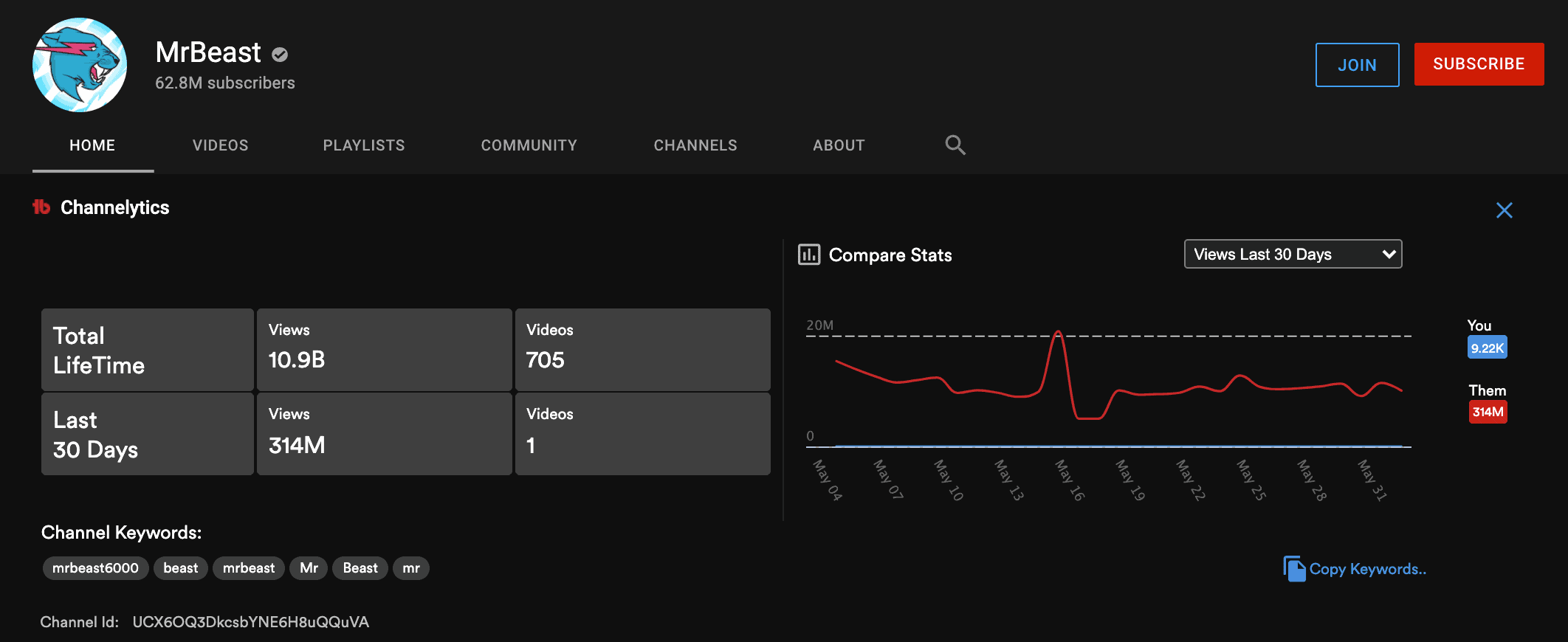
Channelytics adds a small info panel on the overview page for any YouTube channel.
You will be able to see how many views the channel has accumulated over its lifetime and separately for the last 30 days, as well as the number of its published videos.
In the graph on the right, you can compare daily view and subscribers gains over time.
The best thing? TubeBuddy allows you to compare your channel's performance with any other channel on YouTube. The blue line represents your channel, the red line represents the channel you're inspecting.
Next Steps
You need to keep an eye on your competition if you want to grow on YouTube.
As you browse YouTube for new content ideas, a tool like TubeBuddy's Channelytics can help you compare your channel to others.
You can read my detailed TubeBuddy review to learn more about how it can help you grow.


