What Is Tubebuddy?
With TubeBuddy, you can manage your YouTube channel more efficiently and get more views, clicks, watch times, and subscribers with super powerful tools that will help you create better videos and optimize them to rank higher on YouTube and Google search.
When I launched my YouTube channel in 2018, the competition on YouTube was already much more challenging than in the early days of YouTube.
Especially in my area of expertise - content marketing - I knew that simply taking videos on my iPhone and uploading them wouldn't suffice if I plan to monetize my channel in the long run.
My business needed a YouTube marketing strategy.
To accomplish my YouTube goals, I needed tools.
That's when I discovered TubeBuddy.
In this article, you'll learn exactly how TubeBuddy helped me grow from zero to 3000 subscribers on YouTube, and how it might be able to do the same for you - here is The Ultimate TubeBuddy Review:
How to Get Started With Tubebuddy
TubeBuddy is an incredibly powerful tool for any YouTube content creator, and it's super easy to get started.
Just click the following link to install the free TubeBuddy browser extension and then follow the on-screen instructions to create a free TubeBuddy account, install the TubeBuddy extension, and connect your TubeBuddy account with YouTube.
You can also check out my step-by-step tutorial on how to sign up for TubeBuddy for a detailed walkthrough guide.
How Tubebuddy Can Help You Grow Your YouTube Channel?
Making videos based on popular topics helps you be discovered via YouTube search engines and quickly grow your channel.
To grow your YouTube audience, you can use TubeBuddy's Keyword Explorer tool to find low-competition, high-search-volume keywords and topics.
Additionally, TubeBuddy's SEO Studio and Opportunity Finder allow you to optimize all your existing YouTube videos so they will rank for more keywords as well.
With TubeBuddy's Click Magnet, Thumbnail Designer, and Thumbnail A/B Testing tools, you can create better YouTube thumbnails that attract more clicks to your videos.
The Share Tracker feature of TubeBuddy allows you to share and promote your YouTube videos across various social media networks to reach a wider audience.
By using TubeBuddy's Vid2Vid promotion tool, bulk search and replace features, and Playlist optimization tools, you can get people to binge-watch more of your videos.
How to Find Better Video Topic Ideas With Tubebuddy?
TubeBuddy is my favorite tool for finding great YouTube titles and optimizing your videos for YouTube SEO.
Download the free Chrome extension, link it to your YouTube channel, and then use TubeBuddy Keyword Planner to identify the best keywords for your YouTube videos.
TubeBuddy uses YouTube's database to identify the number of competing videos for a given search term.
With this approach, you will identify keywords that have low competition and high search volume.
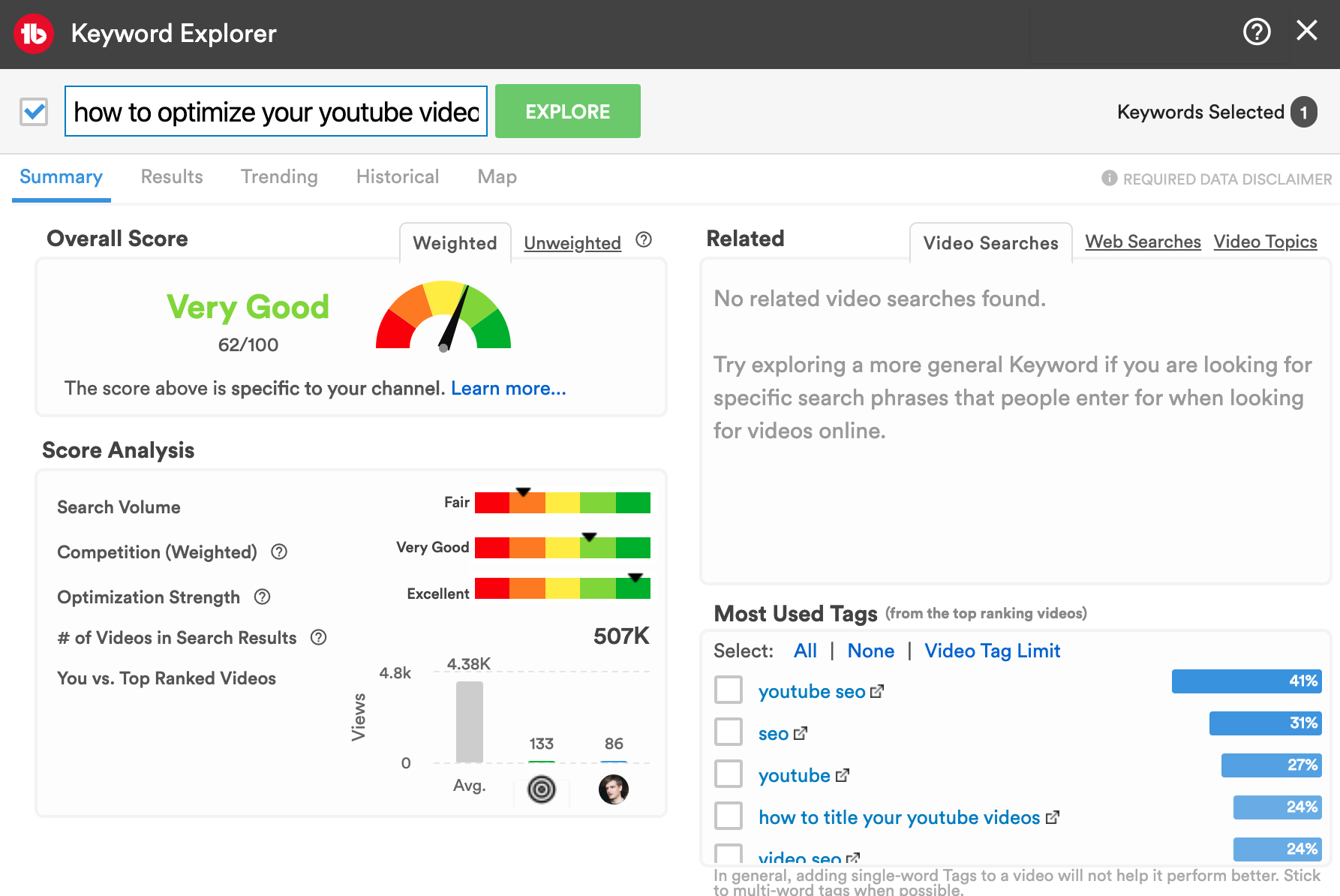
Within TubeBuddy's Keyword Explorer tool, you can analyze any keyword or search phrase for which you want to rank your videos.
Your keyword will be forwarded to YouTube's database, and the YouTube data will be used to determine five success scores:
- The search volume for the phrase you entered
- How many YouTube videos are ranking for this keyword.
- An evaluation of how well a video would rank for a particular keyword. Unweighted, or based on your channel's performance, search volume, competition, relevance, and how you compare to others currently ranking in search.
- The average optimization strength of the top-ranking videos.
- Based on these four factors, you will also receive an overall score.
Short and generic search terms tend to have a low success rate on average. Many of the more established channels have already covered many broad and generic topics.
Instead, I recommend using long-tail keywords, especially if your YouTube channel has less than 1000 subscribers.
How to Film Better Videos With Tubebuddy?
Interested in creating awesome videos that your target audience will rave about?
One of the best ways to make better YouTube videos is to answer questions that nobody else has answered for small channels.
And TubeBuddy has just the tool you need to locate them.
Open the Keyword Planner start with a broader target keyword.
From the right side, click on Video Topics. You will be presented with a filtered list of all questions people typed into the YouTube search bar associated with your search term.
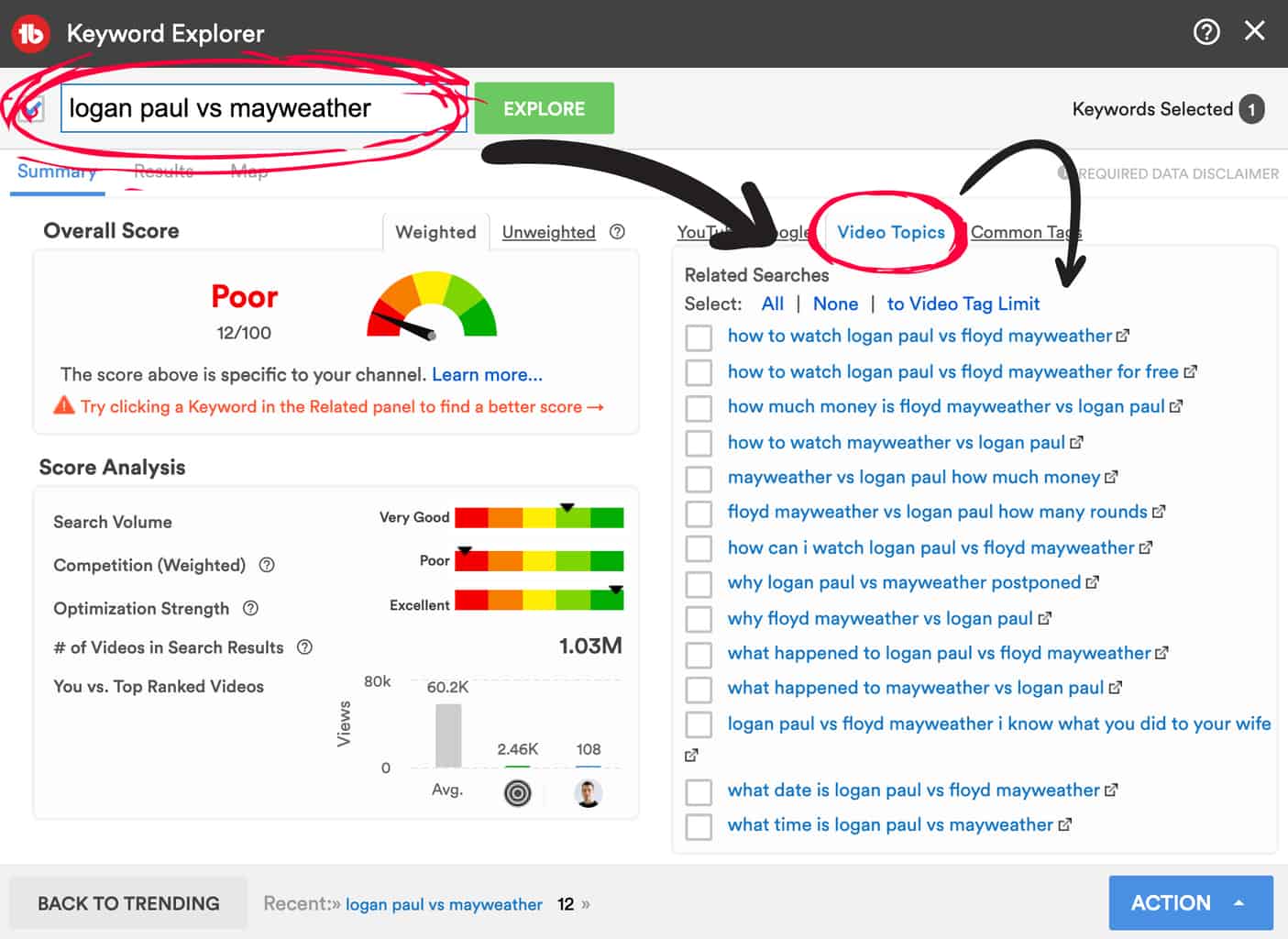
That's so powerful!
Create a short video answering a single question, compile a list of good questions and use this as the outline for your video script.
If you combine this with YouTube chapter marks for each question/answer, you dramatically increase the likelihood of ranking both on YouTube and Google anytime someone types in the same question.
How to Get More Subscribers With Tubebuddy?
TubeBuddy is a great tool for getting more subscribers.
First, let's do something simple.
Do you know why people would subscribe to your YouTube channel? Because they had a great experience watching your videos, received a lot of value, and because you ask them to. 🙂
Performance coupled with structure is the key to creating an unforgettable experience.
TubeBuddy cannot really help you become more comfortable on camera.
Don't worry about it. It will come more naturally to you as you make more videos.
Tubebuddy can help you structure your videos better.
Create a video outline for each of your videos using TubeBuddy's Keyword Explorer tool to know which high search volume is low competition keywords to use. Then identify related questions using the Video Topics tab.
Using this method, you can hit two birds with one stone, an attractive topic that is high in demand, + several subtopic questions that have yet to be answered.
If you research each topic thoroughly, your videos will almost certainly be precious to your viewers.
Lastly, you should invite your audience to subscribe to your channel.
You can include a call to action to subscribe to your YouTube channel in the description, info cards, and end screens of your videos with the Default Upload Template, the Bulk Copy Card, and the Bulk Copy End Screen tools offered by TubeBuddy.
Your video and your first comment can both be scheduled with TubeBuddy's Scheduled Publish tool.
Simply invite your audience to subscribe to your channel in the first comment of the video, and your call to action is complete.
You can automatically ask your subscribers to confirm their subscription to your YouTube channel when you add "?sub_confirmation=1" to the end of your YouTube channel URL.
When you eliminate even one click, it's much more likely someone will sign up.
Here is a full example of how the final URL should look like with my YouTube channel: https://www.youtube.com/c/iamtimqueen?sub_confirmation=1
How to Get More Views With Tubebuddy?
Getting more views on YouTube can be accomplished in a variety of ways.
There are several proven methods that TubeBuddy can help you with.
You can use TubeBuddy's Click Magnet to identify potential titles and thumbnails for optimization.
With TubeBuddy's Keyword Planner, you can optimize the title and tags of your videos.
Using TubeBuddy's SEO Suite, you can optimize your video description for search engines.
TubeBuddy's thumbnail design tool helps you create click-worthy thumbnails.
Use TubeBuddy's AB Testing tool to experiment with different thumbnails.
TubeBuddy's Default Upload Template lets you add links to your most popular videos.
You can promote some of the best videos in your info cards and end screens with Bulk Copy Cards and Bulk Copy End Screens.
Ensure that your newest YouTube video is promoted across all of your other videos with TubeBuddy's Bulk Find & Replace & Append tools or Vid2Vid promotion tools.
How to Get More Watch Time With Tubebuddy?
YouTube's watch time is one of the key ranking factors to expose your videos to new audiences organically. YouTube will automatically perceive your video as valuable if a large percentage of your video is watched.
TubeBuddy's Retention Analyzer tool allows you to identify videos with exceptionally high watch time/watch time percentages.
TubeBuddy's Playlists Action tool is another amazing TubeBuddy tool that'll increase your overall and per person watch time.
You can use it to automatically sort all your playlists so the videos with the most watch time will be at the top, ensuring that when someone starts one of your playlists, the videos with the most watch time will be there.
With the Bulk Search and Replace tool, you can start promoting the videos and playlists with the longest watch time percentage across your existing YouTube videos.
TubeBuddy's Promotion Materials page provides you with a collection of special links that you can use to share your most recent and most popular videos with your audience.
One of its cool features is to not only share the videos themselves but to share them embedded within one of your playlists.
This way, once the shared video has finished, the playlist will automatically play more of your videos, increasing your overall watch time.
If you combine this tactic with TubeBuddy's Playlist Tools to put those videos with the highest watch time at the top, you have an unbeatable combination to boost your YouTube watch time.
You can read my article on how to get 4000 hours on YouTube for more details.
How to Get More Clicks With Tubebuddy?
A viewer can only watch your video if they click on it first.
What can TubeBuddy do to help you gain more clicks?
TubeBuddy offers a powerful tool that lets you track your videos' click-through rates.
It is called the TubeBuddy Click Magnet.
You can access it through the "Content" tab within YouTube Studio.
Select TubeBuddy's Bulk & Misc Tolls at the top right and click on "Click Magnet".
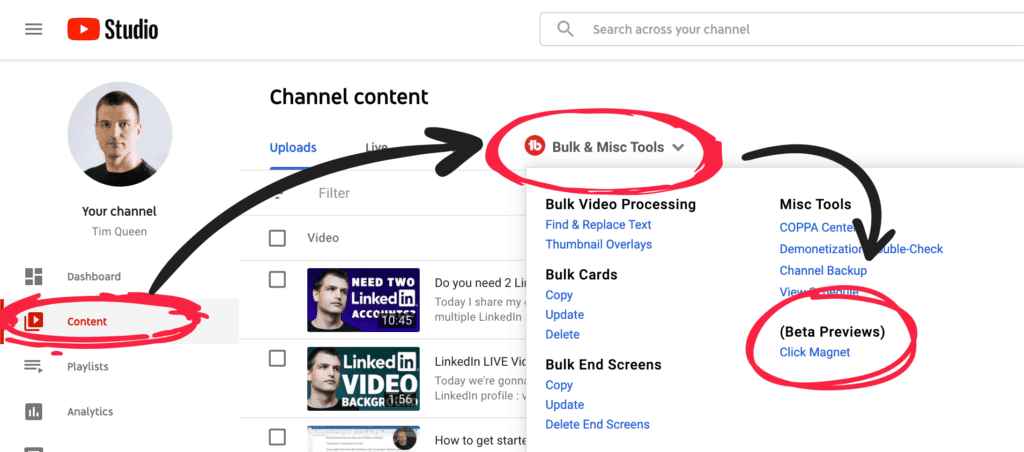
These are the tools that we can use. We have Power Rankings, Element Inspector, CTR Opportunities, and Advanced Analytics.
Other approaches and strategies can be found in this article that will help maximize your YouTube videos' click-through rate.
How to Spy on Your YouTube Competitors With Tubebuddy?
TubeBuddy offers several tools that allow you to keep track of your competitors.
Receive instant notifications when your competitors upload new videos using TubeBuddy Alerts.
The TubeBuddy Competitor Scorecard tool compares your channel to the channels of all your competitors based on views, subscribers, and uploads (either one month or lifetime). In addition, you will find an in-depth list of the most recent and most popular videos.
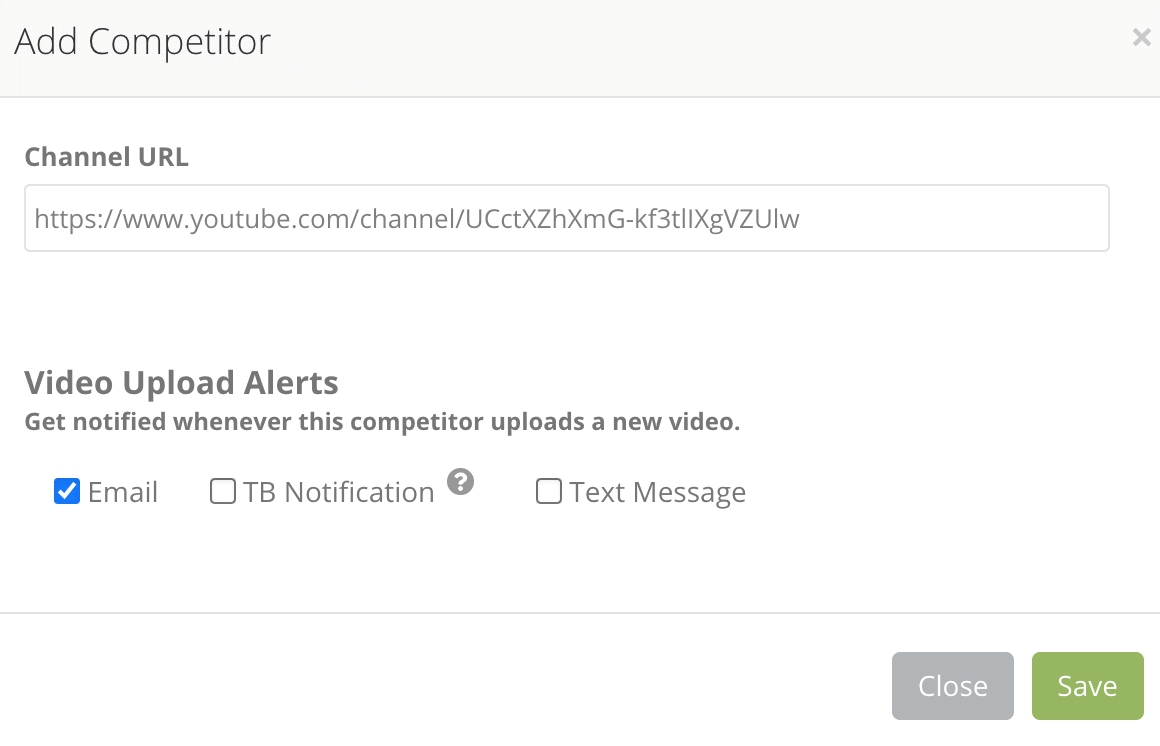
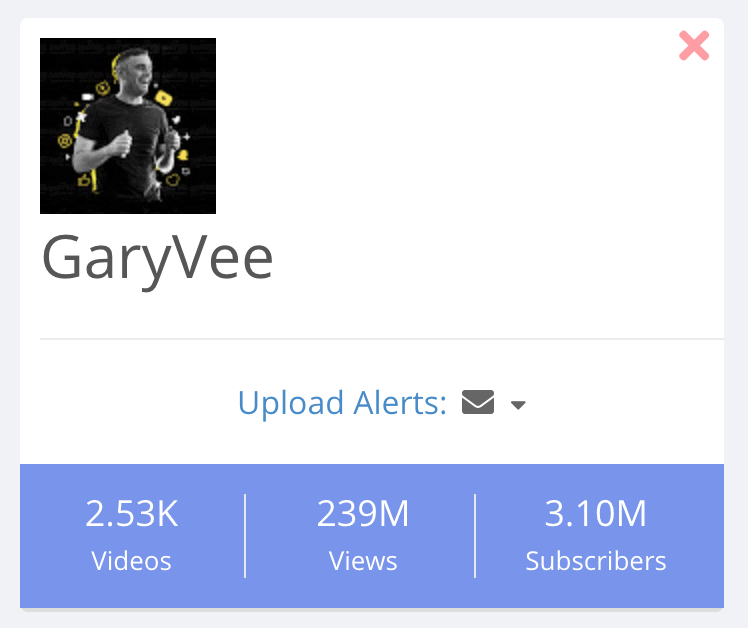
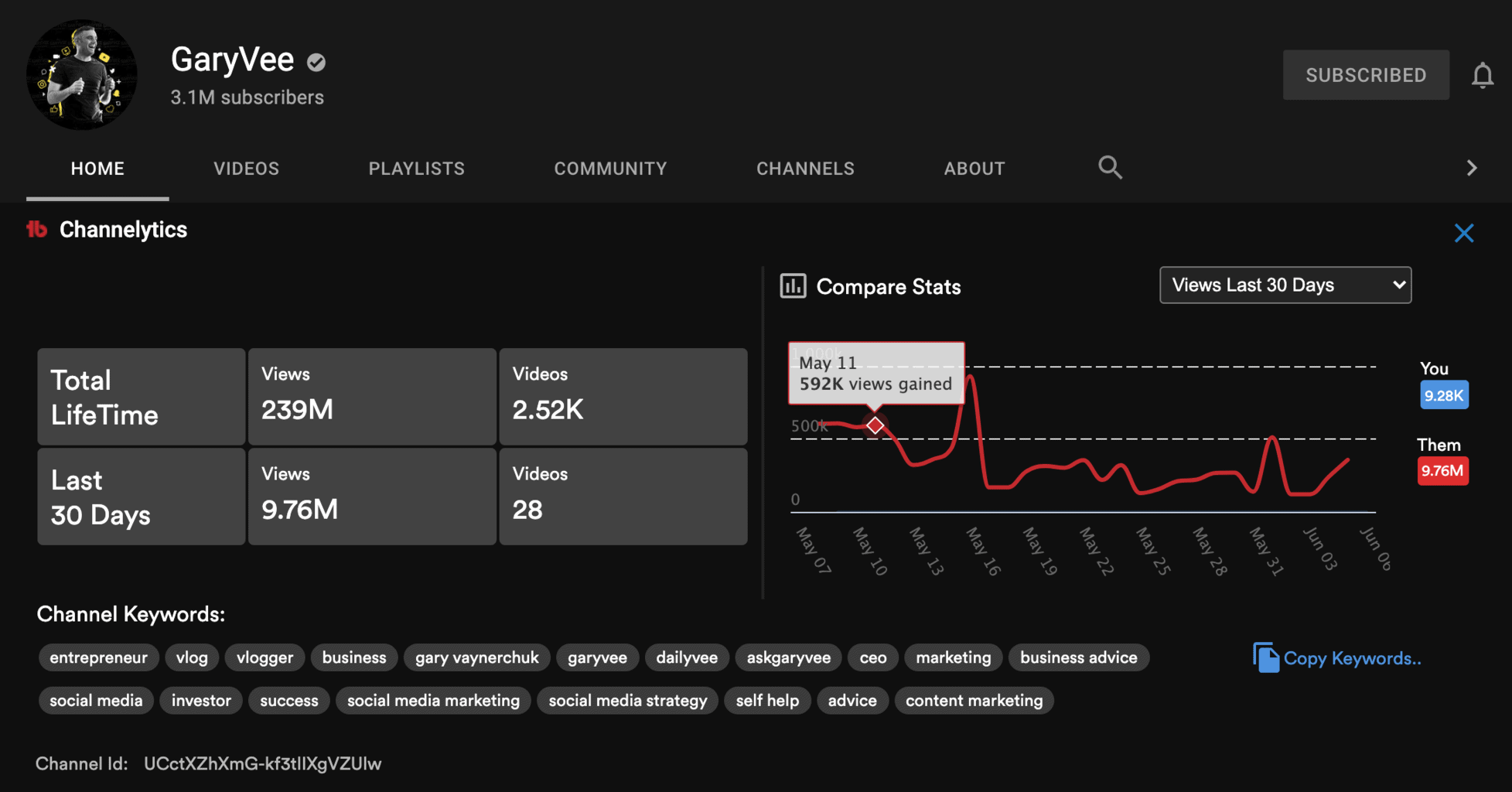
Detailed statistics are also available at your competitor's YouTube channel or by watching their videos.
Here is an example of what I can learn from GaryVee's Channelytics on YouTube.
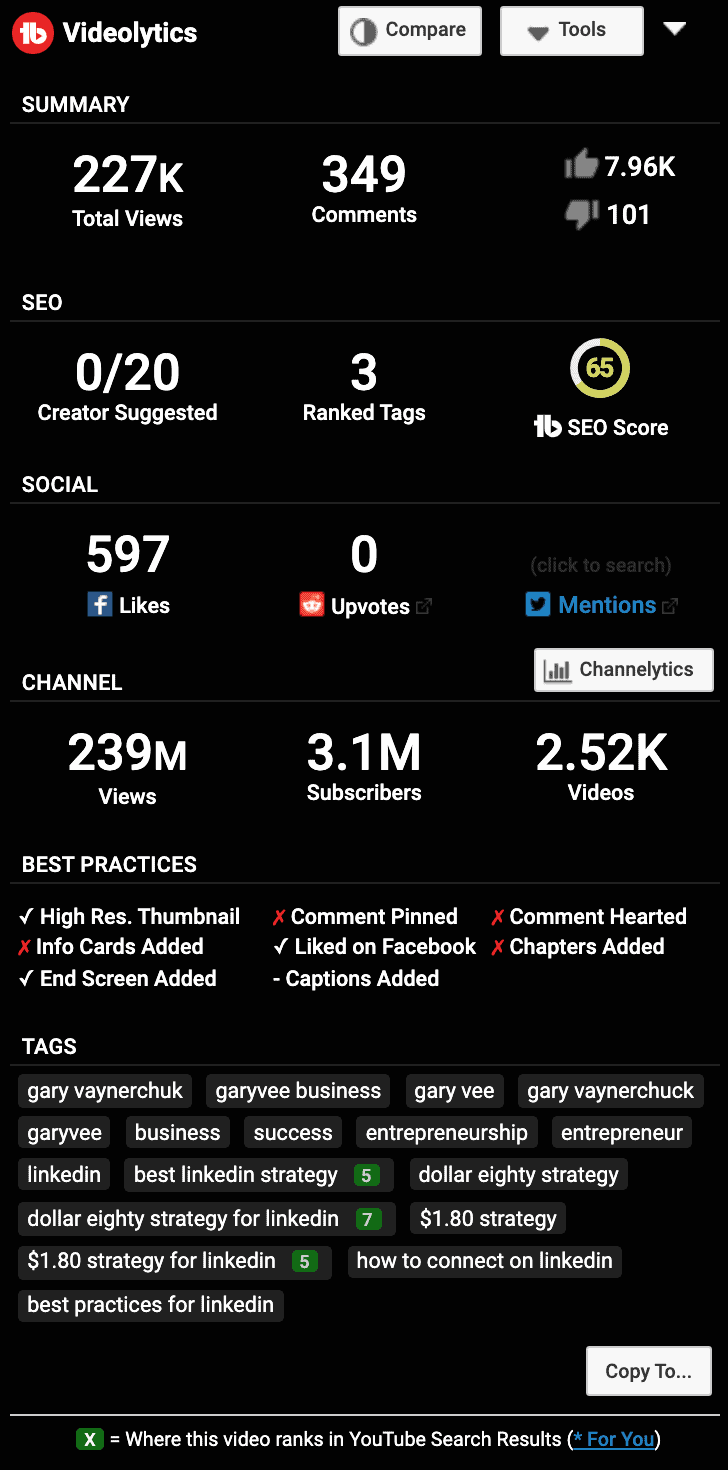
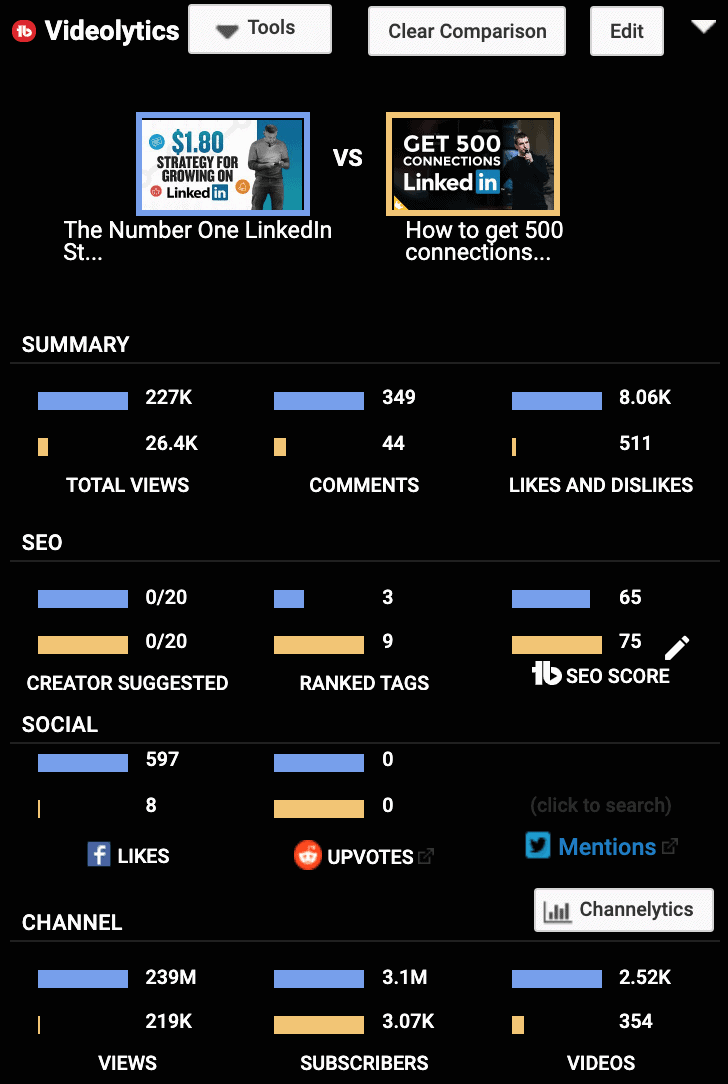
Here is what the Videolytics of one of his videos revealed to us.
You will notice that there are little green icons in the keyword section with a number on them.
Those are the keywords Gary V is ranking for. You can also see the video position Gary V has from the top of the results.
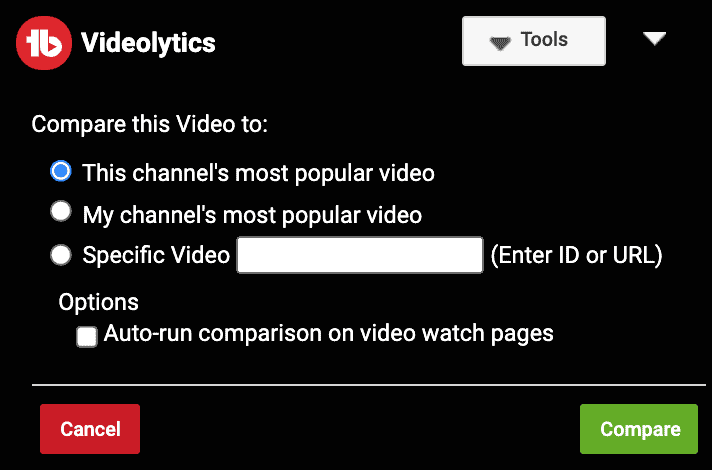
By pressing the Compare button at the top, you can compare this video to other videos.
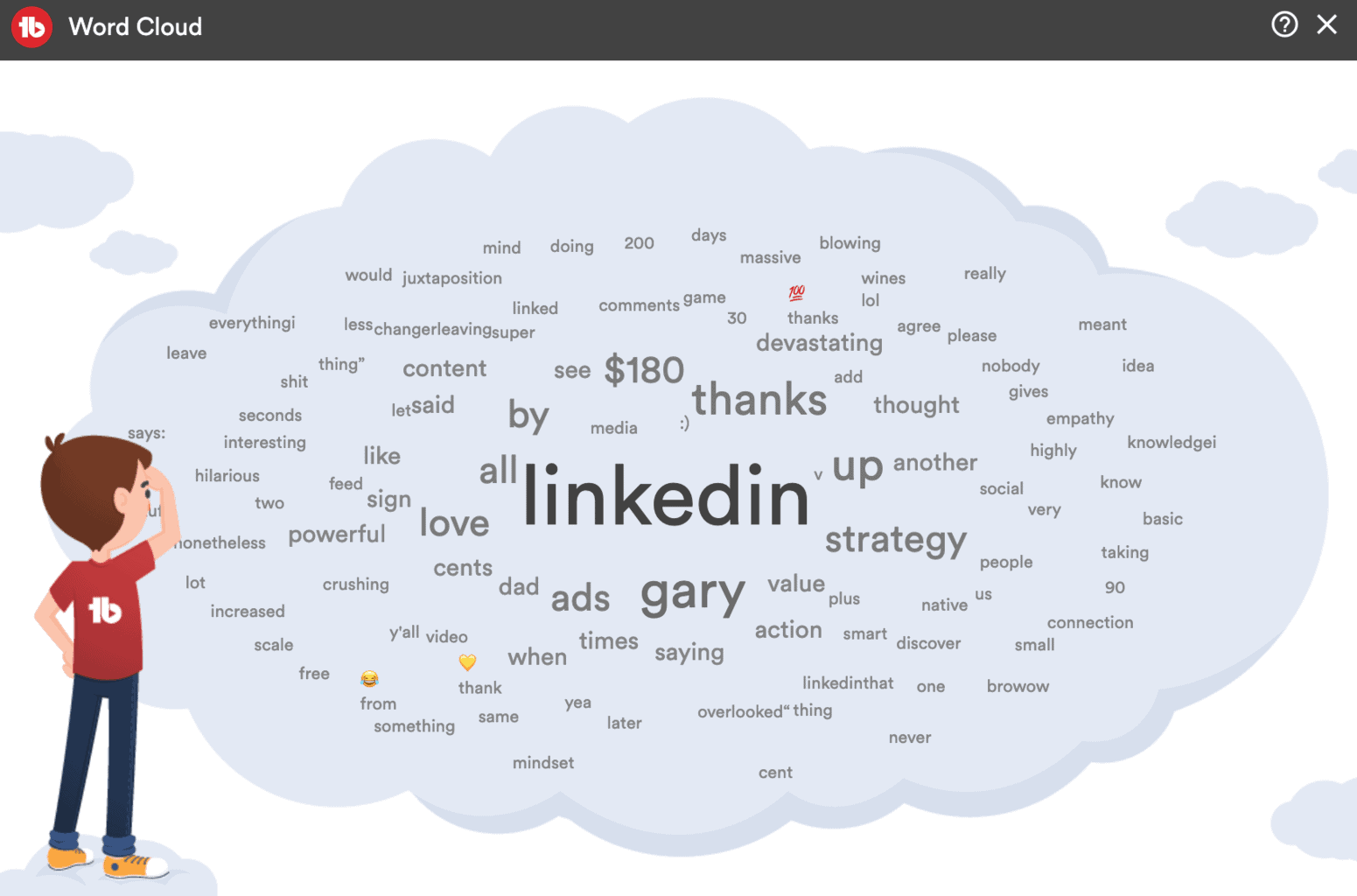
When you scroll down to the comment section of one of your competitors' videos, you can see the TubeBuddy comment word cloud.
By viewing the most commonly used words across the entire comment section, you can gain valuable insights.
How to Make Better Thumbnails With Tubebuddy?
We have already discussed how important it is to increase the click-through rate of YouTube videos.
Usually, people would like to know what a video is about and whether or not they would find it interesting before clicking on it.
With a good thumbnail, YouTube viewers can understand what your video is about, whether it is helpful to them, and if they can relate to you.
The "visual appeal" of the thumbnails can influence whether a viewer clicks through to your video or scrolls past it.
This is where TubeBuddy pays off.
TubeBuddy comes with a built-in thumbnail creation tool that allows you to create eye-catching thumbnails for each of your videos.
The next feature that TubeBuddy offers is an AB Testing tool for thumbnails that allows you to compare two thumbnails side-by-side. This is one of the most powerful tools that allow you to make better thumbnails based on data.
It is especially useful if you combine it with TubeBuddy's Click Magnet tool, which analyzes your videos and utilizes AI technology to classify each thumbnail by face vs. no face, emotions, face sizes, text vs. no text, or word overlays on top.
And then calculates how different visual elements on your thumbnails influence your video click-through rate.
How to Make More Money With Tubebuddy?
The more views and watch time your videos get, the more likely advertisers will bid on them to display their ads.
The videos you create must also be properly categorized so advertisers can find them.
Your video needs to be optimized for YouTube SEO, including the title, description, and tags.
Utilizing the Keyword Explorer tool and the SEO Suite will help you make the most of each video.
Once your videos are optimized, you should perform a Demonetization Audit to ensure YouTube's AI hasn't flagged them as unmonetizable.
The longer someone watches your videos, the more ad impressions they will see, especially if you use mid-roll and end-of-video ads.
TubeBuddy can assist in this aspect by cross-promoting your most popular videos across your entire channel.
Your best friend for this job will be Bulk Copy Cards, Bulk Copy End Screen, Bulk Search & Replace, and Vid2Vid promotion tools.
You can learn more about how to make money with your YouTube channel here.
How I Grew My YouTube Channel From 0 to 3,000 Subscribers Using Tubebuddy.
Understanding the YouTube algorithm
During YouTube's early years, you could upload anything and instantly go viral.
That was a long time ago.
As YouTubers became increasingly adept at gaming the YouTube algorithm, low-quality content quickly flooded the storm gate leading to an overall poor user experience.
YouTube had to fight back against a swarm of clickbait videos that promised the world but delivered nothing.
How did YouTube solve this?
With Watch Time!
The importance of YouTube watch time
YouTube figured that clicks or views weren't a good measure for quality.
People might click on videos by accident or get tricked by clickbait titles and thumbnails.
But what if someone actually watched a video from beginning to end? That was a much better indicator for the quality of videos.
As a result, the YouTube algorithm started calculating the watch time for each video, and if enough people watched a large portion of a video, the video would now rank very high.
Although this YouTube algorithm change was great for viewers, it wasn't good for smaller YouTube channels.
Simply put, they did not have enough data in terms of watch time for YouTube to recommend their videos.
How to get started as a small YouTube channel
Because many established channels already had a track record of long watch times for most keywords, YouTube wouldn't take a chance on small creators.
It was a Catch-22 situation that seemed impossible to overcome.
The question is, is it?
The solution as so often comes down to using data to start and grow your own successful YouTube channel.
How tubebuddy helped me to rank on YouTube search
TubeBuddy is a handy tool for doing just that.
It uses direct connections to the YouTube database to get real-time data on every keyword that has ever been searched on Youtube search and how many videos are ranking for that keyword.
Visit TubeBuddy's Keyword Explorer tool to try it out yourself.
I spend hours optimizing each of my videos with the tubebuddy keyword planner and SEO suite tool.
Here are some things you can do with this data.
Identify keywords with a high search volume, meaning that people are likely to search for these terms often, and little competition, meaning that few videos rank for these terms.
To put it another way, look for long-tail keywords in high demand, but there aren't many videos about them.
Therefore, you'll find there is minimal competition as soon as you upload your video on YouTube.
Low competition makes it irrelevant if your channel is brand new and has zero views.
As a result, YouTube is forced to suggest your videos when someone searches for such a keyword.
This is how you get your watch data and train YouTube AI that your videos are of high quality.
As you rank for more videos and collect more watch time data, it becomes easier to rank for even shorter and broader keywords.
I used the tubebuddy keyword planner to create high search volume low competition video topic ideas and filmed them.
My video optimization doesn't stop there.
I also use the Keyword Planner to plan out new videos, and I even write interesting questions into the video scripts based on what people are searching for in the Video Topics panel.
Using TubeBuddy's keyword planner before creating a single video is a great idea.
It is easier to grow your audience on any platform if there is low competition and a large audience interested in seeing videos about underserved topics.
In 2013, there were 100 hours of videos uploaded every minute.
Today, this number has soared to over 500 hours of video every minute. Every hour, this amounts to about 30,000 hours of new content. Every day, it adds up to 720,000 hours of content.
What a crazy high level of competition...
My YouTube strategy powered by tubebuddy
There were already a lot of broad-topic videos in my niche. And the channels that were ranking for them were well established.
Because of that, my videos had very little chance of being discovered on YouTube if I wanted to compete for any of the popular keywords.
It's why I create videos about long-tail topics that are highly sought after (high search volume), but not many creators have posted videos about them, so my videos are more likely to appear on YouTube page one.
That is the strategy I used for YouTube.
My TubeBuddy Keyword Planner helped me identify those topics, and I soon had a list of very promising long-tail keywords.
I used tubebuddy's ab thumbnail testing tool to optimize many of my thumbnails.
Video production is challenging enough, but making a great video that is entertaining is another story altogether.
As I was confident I would improve my performance over time, I kept optimizing my YouTube thumbnails with TubeBuddy's AB Testing tool.
I quickly identified which thumbnails performed the best, and I continued to create better and better thumbnails as I did so.
Using this method, I quickly increased the number of views on my YouTube videos and gain more subscribers.
Check out this article to learn more about creating a great YouTube thumbnail.
I use the bulk replace tool to cross-promote new YouTube videos, articles, promote my online courses and affiliate offers
My goal was to increase my watch time and watch time percentage to see more of my other YouTube videos in their news feed.
TubeBuddy's bulk processing tools allowed me to promote my other videos and playlists.
To get new viewers to binge-watch as many of my videos as possible, I used TubeBuddy's Playlists Actions to sort my playlists by watch time percentage.
In addition to promoting my videos, I also promoted some of my articles, lead magnets, and my paid online course to monetize my channel while waiting to meet the YouTube partner program requirements.
In this article, you will learn how to get your channel monetized.
I use tubebuddy's click magnet to design better thumbnails
As my channel grew, I was finally able to join the YouTube partner program.
Just in time for the release of one of TubeBuddy's newest features.
The TubeBuddy Click Magnet tool.
Using this tool, I was able to identify videos with high watch time and engagement but below-average click-through rates.
Using these data, I designed new thumbnails and tested them with TubeBuddy's AB Thumbnail Testing tool to see which thumbnails would get me more clicks.
Using TubeBuddy's Opportunity Finder and the Keyword Explorer tool, I find new keywords that might even get more clicks than my current video title.
With the Keyword Explorer and Tag Rankings tool, I eliminated keywords that were not performing well, and the Tag Sorter allowed me to place the most important keywords at the top.
Tubebuddy Plans, Features & Pricing
TubeBuddy offers a limited FREE plan and three paid premium plans with additional features.
I recommend starting with the FREE plan to better understand how TubeBuddy can work for you. Once you're ready, sign up for the Pro plan. You get 50% off Pro if your channel has less than 1,000 subscribers.
Or, if you don't want to waste any time, sign up for a free 30-day trial of the TubeBuddy Legend account here.
Tubebuddy Review Summary
I couldn't have grown my channel as quickly and as efficiently without TubeBuddy.
It literally saved me thousands of hours on research and repetitive tasks that I could automate with TubeBuddy.
TubeBuddy's free plan already has many great features, but if you want to get the full benefit, you definitely want to upgrade to one of their paid plans later on.
It will save you so much time and money in the long run.
Today my YouTube partner program earnings can easily pay for my TubeBuddy Legend subscription, and I have more time and freedom to focus on creating amazing videos for my viewers.
If you want to take your YouTube game to the next level, make sure to download the TubeBuddy extension today.
And if you have any questions about TubeBuddy, have a look at my TubeBuddy Frequently Asked Questions article.


