What Is the Tubebuddy Quick Links Menu
YouTube Studio has come a long way and is one of the most powerful tools for any YouTube content creator.
But sometimes it can be overwhelming because some of its most useful features can be difficult to find.
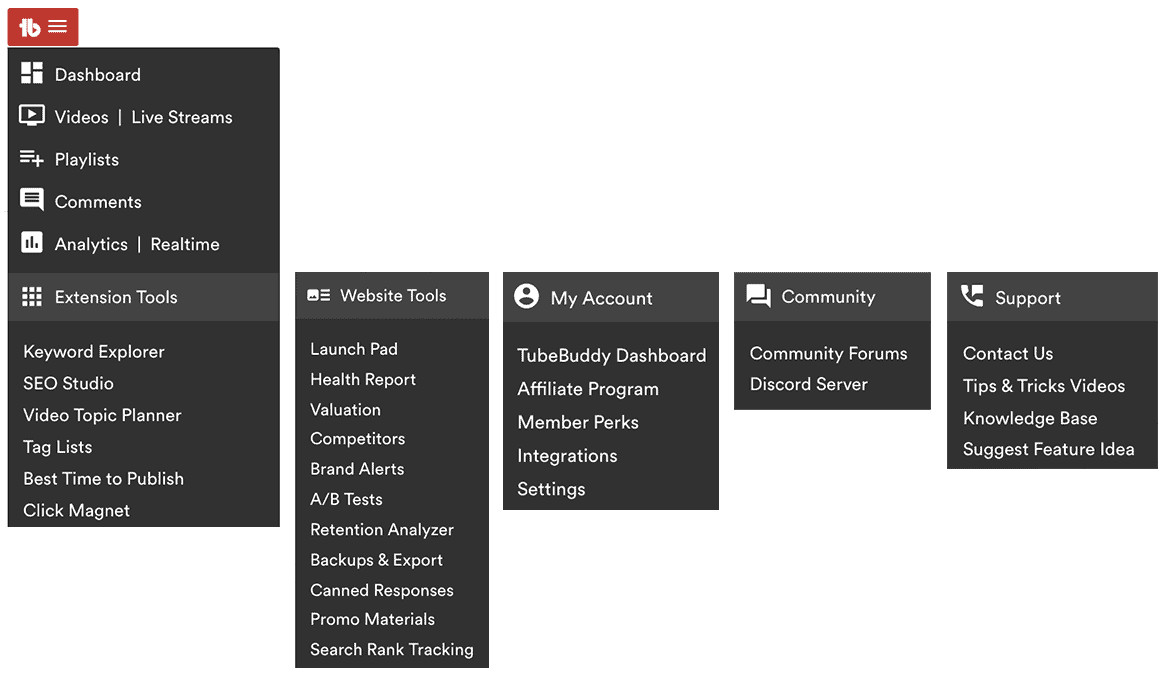
That's why TubeBuddy added a special Quick Links Menu to YouTube Studio that allows you to quickly access many of the most useful tools and features with the click of a button.
You can find the Quick Links Menu at the top sidebar of YouTube Studio.
Keep an eye out for the red TubeBuddy icon.
It's always available when you need it.
Which Features Can You Access via Quick Links?
Here is a list of all the tools and features you can access with it.
Note that some features appear to be hidden. You have to click on Extension Tools, Website Tools, My Account, Community, or Support to reveal them.
Next Steps
The Quick Links menu makes it super simple to access the most important TubeBuddy tools and YouTube Studio features. I use it every day when I am working on my YouTube channel.
TubeBuddy recently announce that you will soon be able to customize the Quick Menus with your favorite links. So keep an eye out for that.
Want to learn more how this incredible tool can help you to grow your YouTube channel? Then read my detailed TubeBuddy review.


