What Is the Tubebuddy Comment Formatting Tool
Did you know that you can format your comments on YouTube and make your text bold, italic, and strike-through text?
All you have to do is surround the any text with special characters, *, _, or -.
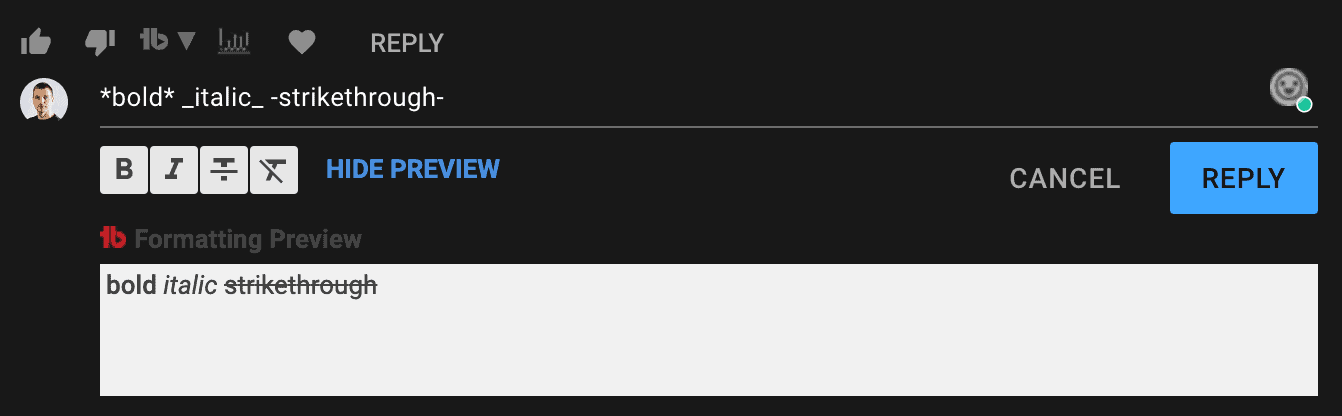
Example: *bold* _italic_ -strike-through- will turn into bold italic strike-through.
You can do this manually, or you can use TubeBuddy's Comment Formatting feature to add simple buttons to your comment section that allow you to select text and then apply the desired style.
How to Format Your YouTube Comments With Tubebuddy
To access the Comment Formatting tool, visit YouTube Studio, open any video and then head over to the comment section. Alternatively, just visit any of your videos on YouTube, and scroll down to the comments.
Add a new reply and the tool will automatically show up just below.
TubeBuddy also gives you a preview of how your formatted comment will look like below.
Styling your comments can be further enhanced by adding emojis to your comments. Take a look at the small face icon above the Reply button, that's how you can access it.
You can learn more about the TubeBuddy Emoji Picker here.
Next Steps
The comment formatting tool is a nice gimmick that makes your life a little easier and can make your comments look wonderful, especially if you combine with emojis.
TubeBuddy has a ton of useful tools and gadgets that can help you grow your YouTube channel and to make day to day tasks that much more convenient by saving you precious time. You can learn more about TubeBuddy in my detailed review.


