What Is the Tubebuddy Retention Analyzer
YouTube loves videos that get viewers to stick around from beginning to end.
This is referred to as audience retention, and a video that has high audience retention would more likely get a push to new viewers by the YouTube algorithm.
While it is impossible to get a full 100% retention for each video, a target of 50% or more would be perceived as relatively good.
The TubeBuddy Retention Analyzer reviews users' behavior for every video - work out how much of the video did they watch and whether they watch a second video after.
From the collected information, a YouTuber can identify which are videos that make their audience tick.
How to Access the Retention Analyzer
From the YouTube Studio dashboard, open the TubeBuddy Quick Links menu at the top. Under Website Tools click on Retention Analyzer.
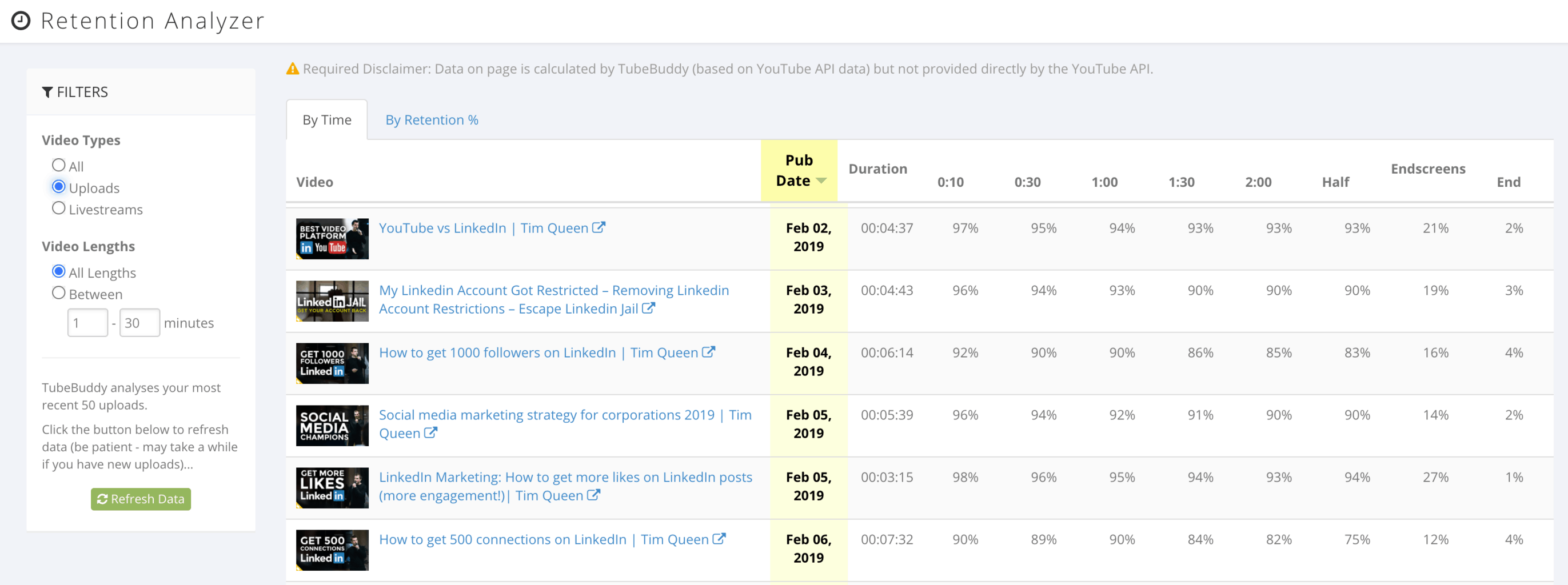
On the left you can filter by videos and livestreams, and video length.
On the right, you can sort videos based on retention minutes or percentage. The columns represent the first X seconds of each video. The 0:30 column means, how many people watched until the 30-second mark.
Next Steps
This is a very useful tool to review your best performing videos in terms of watch time. This makes it easier to reach 4000 hours of YouTube watch time to get your channel monetized faster.
To learn more about TubeBuddy's powerful features, read my full review here.


