This article shows you how to monetize your YouTube channel quickly, including a foolproof step-by-step action plan to join the YouTube Partner Program even if you have zero subscribers and no videos.
Are you an aspiring content creator looking to make money on YouTube? Or you've been posting videos for a while, but your channel isn't growing, and you want to learn how to get your YouTube channel back on track.
This article provides the knowledge and tools to monetize your channel and earn money on the platform.
I walk you through the YouTube Partner Program approval process and provide expert tips and tricks to ensure your channel is approved quickly and easily. Let's get started!
What Is the YouTube Partner Program?
YouTube launched its Partner Program in May 2007. It's based on Google AdSense and allows creators to earn a revenue share from selling advertising on the YouTube platform.
Video creators earn 55% of advertisement revenue. And YouTube takes a 45% cut.
What Are the YouTube Channel Monetization Requirements?
To join the YouTube Partner Program, you and your channel must fulfill the following requirements.
- You must live in a country or region where the YouTube Partner Program is available.
- You must be at least 18 years old, or have a legal guardian older than 18 who can handle your payments via AdSense.
- Your YouTube channel must have either
- more than 4,000 valid public watch hours in the last 12 months.
- or more than 10,000,000 valid public Shorts views in the last 90 days.
- You must have more than 1,000 subscribers.
- You have to connect your AdSense account with YouTube.
- Comply with the YouTube Partner Program policies.
- Don't violate YouTube Spam policies.
- Follow the YouTube Community Guidelines.
- You can only monetize videos that meet YouTube's advertiser-friendly content guidelines.
- If you want to upload videos onto YouTube that don’t comply with these guidelines, you should turn off ads on individual videos.
That's all?! 🧐
Well, it's not as complicated as it sounds!
How Can I Join the YouTube Partner Program?
Let's check your YouTube monetization status by logging into YouTube Studio.
Open the "Monetization" menu entry on the left sidebar, and you should see a screen similar to this.
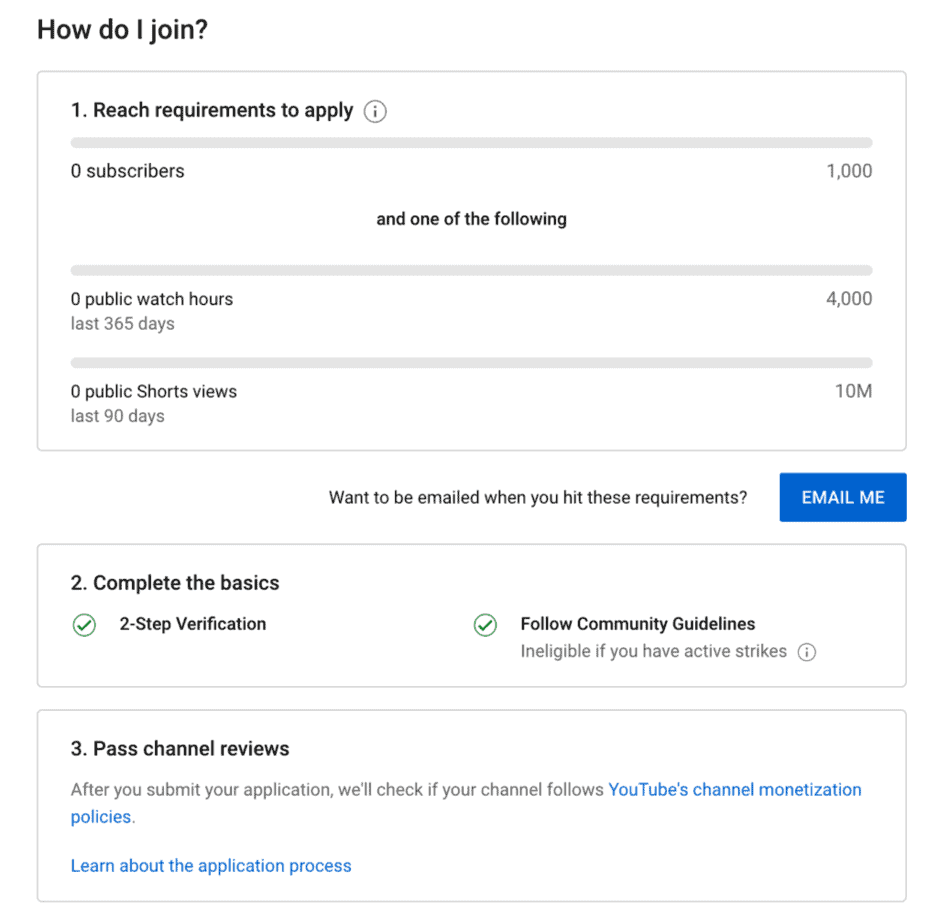
In the first section, you can see your progress toward reaching 1000 subscribers, 4000 public watch hours, and 10 million public Shorts views. As you can see, you only need one of the two factors, either 4000 watch hours within 365 days or 10 million Shorts views in 90 days.
The second section tracks if you enabled two-factor authentication and if you had any community guidelines strikes on your channel. If you followed the guidelines linked above, you should see a green checkmark here.
The third section will allow you to start your YouTube Partner Program application once you fulfill all the requirements from sections one and two.
Note that this will not happen automatically. You must visit this page regularly to check if you can apply. Or you can simply press the blue Email Me button to get an email once your channel ticks all the necessary boxes.
Sometimes, YouTube will tell you that you're not eligible for monetization:
Don't panic! This can happen for two reasons.
- The YouTube Partner Program isn't available in your country. Check if you can sign up for the YouTube Partner Program from your country. If the program isn't available in your country yet, I recommend exploring other ways how you can make money with your YouTube channel. You can still join the YouTube Partner Program at a later stage when Google rolls it out in your country.
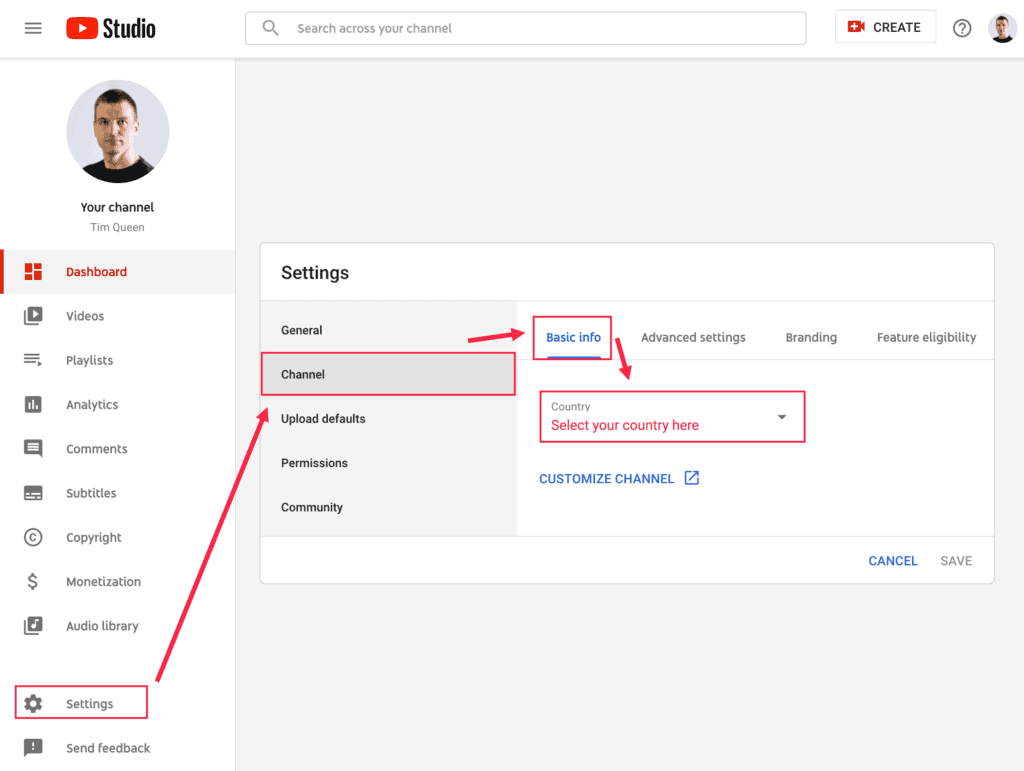
- You are eligible but haven't set your country yet. This is one of the most common reasons and can easily be fixed in the settings. First, open YouTube Studio. Locate the "Settings" entry at the bottom left and press it. Switch to "Channel" on the left and then select "Basic Info" at the top. Scroll down until you see "Country" and select your country from the drop-down menu. Done! If you open "Monetization" again, it should now tell you that you're eligible.
How to get 1000 YouTube subscribers
Getting your first 1,000 subscribers will always be the most difficult challenge. If you want to get there fast, you have to hustle hard!
But you have to be smart about it too! Don't look at this as a number problem. It matters a lot more WHO your subscribers are for the long-term growth of your channel.
I wrote an entire article on how to get your first 1,000 subscribers, and I highly recommend that you check it out!
Pick a niche
In summary, pick a narrow niche for your YouTube channel and stick with it at least until you have your first 1,000 subscribers.
Optimize your videos for YouTube SEO
Optimize your videos for YouTube SEO with TubeBuddy. Focus on optimizing the title of your video, description, and tags.
Add subtitles to all of your YouTube videos
Use Descript to create subtitles for each of your videos so YouTube can turn each of your videos into a full-text search engine.
Increase your YouTube authority scores
To increase your overall YouTube channel authority score, think about niche-specific keywords as keyword clusters that span over every aspect of your video, from choosing your video title, description, tags, and subtitles, to spoken words, all the way to the keyword density of related keywords across all the videos in your channel and your YouTube channel description.
Be the first to publish time-sensitive content
Take advantage of the first-mover advantage and prioritize recency over quality if your channel focuses on time-sensitive and news content.
Create exclusive content for your YouTube channel
Always remember that people don't want to change. Anything that's extra work will be avoided at all costs.
If you want to move people from one platform to another, you have to give them an incentive.
Tim Queen
For YouTube, exclusivity is the most powerful strategy to achieve this.
Ask people to subscribe to your YouTube channel
To get people to subscribe to your channel, you have to ask them to subscribe to your channel and turn the notification bell on.
I recommend either doing this at the end or once at the beginning and once at the end of your videos.
Build an email list
Don't rely on YouTube to notify your subscribers via email whenever a new video is out. They might change that in the future.
Instead, start your email newsletter with Moosend and promote it with a very attractive lead magnet related to the niche of your YouTube channel.
Share your videos far and wide
Last but not least, share your videos in as many relevant places as possible. If you have a relevant audience, share it on your social media and email list.
If you start from scratch, borrow other people's audiences without being spammy or promotional.
How to get 4000 YouTube watch hours
Alright, let's take a look at how to increase your video watch time fast. Your goal is to get to 4,000 hours of watch time within the last 365 days.
This works as a rolling average.
The last 365 days always move along with time.
If you had one day when you accumulated 1,000 hours of watch time 500 days ago, but only generated 3,000 hours within the last 365 days, you would still only have 3,000 hours.
The 1,000 hours you collected 500 days ago are too old and won't be considered by YouTube.
The good news is that you only have to get 4,000 hours once.
Once you qualify for monetization, you can apply. If you only get 1,000 hours the year after, it doesn't matter.
I wrote a comprehensive article on how to get 4,000 hours of YouTube watch time fast. Check it out if you want to go into even more depth.
Ok, everyone ready?
Let's get started!
Create a video schedule that works for your channel
Some people recommend making as many videos as possible. Ideally, 365 per year to increase your watch time as quickly as possible.
But it's not all about the number of videos. Quality and creativity are much more important to get more views out of each video and to get more people to subscribe to your channel.
A generally good schedule that works for most channels is three videos per week, each 10 to 15 minutes long, and one 1-2 hour-long live stream per month.
Try to create a video strategy that works for you and your schedule. There is no point in getting too ambitious and giving up after three weeks because you feel burned out.
Create videos cards for your YouTube videos
Add up to five video cards to each of your videos to promote related video from your YouTube channel to encourage viewers to watch more of your content.
The key is to give new viewers enough exposure to your content to realize that your content is dope! ...or not. In that case, thanks for the watch time, and have a nice day! 👋😇
Use pinned comments to promote related videos
If I recommend videos in video cards, I always share the same videos in the comment section and pin them.
This gives viewers multiple ways to find the information they want and increases their watch time.
Add end screens to each YouTube video
Add an end screen for your videos and promote at least one of your videos and one of your playlists.
Make sure they’re either your most popular videos or playlists and/or closely related to the video someone just watched.
I use TubeBuddy to add end screens to all of my YouTube videos in bulk.
Create a list of your most popular videos and add it to your video description
Your overall aim with your YouTube videos should be to offer viewers as many opportunities to watch more of your content.
That's why I compiled a list of my most popular and recommended YouTube videos and shared them in the video description.
I update my list every 4-8 weeks and then use TubeBuddy's search and replace function to update my video recommendations across all of my videos in bulk.
Add your videos to topic-specific playlists
Another way to increase the overall watch time per viewer is to organize your videos into topic-specific playlists.
This allows viewers interested in a specific topic to binge-watch all your content in one session.
Use series playlists
While we're talking about playlists, make sure to take advantage of the particular series-playlist function on YouTube.
It allows you to create playlists that should be watched in a very specific order.
You can add each video only to one series playlist, so organize your playlists wisely.
Using series playlists increases the likelihood that the following video on your series playlist will be recommended as the “next video to watch."
Share playlists - clock up watch time for channel monetization eligibility requirement.
A cool trick to clock in more watch hours is to share a specific video attached to a playlist instead of the video direct link itself.
Here is an example: Instead of sharing the direct link to this video, I like to share the video with the attached playlist.
Make sure that the video of your choice has been added to a playlist of your choice.
Then open the playlist and select the video that you want to share from your playlist.
Copy the URL from your web browser address bar and share it.
The benefit of this approach is that there is a 100% guarantee that when your video ends, all viewers will continue to watch more of your videos which translates into more watch time for you.
Share your YouTube videos on social media
Make sure that you always promote all of your videos on social media.
I use SocialBee to automatically share new YouTube videos to all of my social media channels.
SocialBee also has another feature that allows me to frequently re-promote older videos over time, so new social media followers also get a chance to discover some of my older videos.
Every share creates a few additional video views, adding to your overall watch time.
Live stream on YouTube
I recommend live-streaming on YouTube at least once per month. If you have more time, you might even do it once per week.
Live streams usually have more viewers than regular videos, and because of their long length, they make incredible watch time boosters.
Share webinars on YouTube
I use WebinarJam and Restream to live-stream my webinars on YouTube.
Webinars are usually between one and two hours long and have a very low drop-off rate.
Having someone's undivided attention is not only great for building a personal relationship with your viewers, it also adds 1 to 2 hours of watch time for every attendee.
And if someone can't attend live, they can still watch the replay on your channel.
Host your online courses on your YouTube channel
Similarly, you can use YouTube to host videos for one of your free online courses.
People love to watch content in a streamlined and organized manner and online courses are the perfect vehicle for that and is a great tool to amp up your watch hours on YouTube.
Promote your YouTube videos with google ads
If you want to get results REALLY fast, think about creating a video ad campaign on Google Ads.
This can achieve two things. Boost your watch time in record time. And increase the number of YouTube subscribers at the same time.
Annoy your friends
And if all of these are not enough, bug your friends and force them to watch your videos on their smartphones 😉
How to get 10 million YouTube Shorts views
Jump on Trends
One of the best ways to get views on Shorts is to create relevant and timely content. To do this, jump on popular trends and challenges on the platform. Here's how:
- Check the "Shorts" tab on the YouTube app to see what's trending.
- Create a video that puts your unique spin on the trend or challenge.
- Make sure to use relevant hashtags when uploading your Shorts to help them get discovered.
- Engage with viewers by responding to comments and asking for feedback on your content.
For example, if you see a trend where creators are doing a particular dance, you could create a video where you dance in a unique setting, like in a grocery store or at the beach.
Keep it Short
As the name suggests, Shorts are meant to be short and snappy. Here's how to make the most of the short format:
- Keep your Shorts under 60 seconds to ensure they are easily digestible and shareable.
- Make sure your content is engaging and attention-grabbing from the first few seconds.
- Experiment with different formats, such as tutorials, challenges, or funny skits to see what resonates with your audience.
- Use high-quality visuals and good lighting to make your content stand out.
For example, when creating a tutorial, focus on the most essential steps and keep the video short and to the point. If you're doing a challenge, make sure the challenge is easy to understand and participate in and use engaging visuals to keep viewers interested.
Use Hashtags
Hashtags are an essential way for users to discover Shorts. Here's how to use them effectively:
- Research relevant and popular hashtags in your niche.
- Add 2-3 relevant hashtags to each Shorts video you upload.
- Ensure the hashtags are specific to the content in the video and not too general.
For example, if you're creating a Short about a new makeup look, you could use hashtags like #makeuptutorial, #beauty, and #makeupartist.
Collaborate with Other Creators
Collaborating with other creators can help increase your reach and potentially go viral. Here's how to collaborate on a Shorts video:
- Find creators who make similar content and have a similar audience.
- Reach out to them to see if they are interested in collaborating on a Shorts video.
- Plan the video together, highlighting each other's strengths and unique styles.
- Tag each other in the video and promote it on your respective channels.
For example, if you're a food blogger, you could collaborate with a local restaurant to create a Short about a new dish they're offering.
Repurpose Your TikTok and Instagram Reels
If you already have a following on TikTok or Instagram Reels, consider repurposing that content for Shorts. Here's how to do it:
- Adjust the aspect ratio of your video to fit the vertical format of Shorts.
- Add relevant hashtags to the video before uploading it to YouTube.
- Make sure the video content is relevant to the Shorts platform and audience.
- Engage with viewers by responding to comments and asking for feedback on your content.
For example, if you have a popular TikTok video where you share a recipe, you could edit it to fit the Shorts format and upload it to YouTube with relevant hashtags.
Post Consistently
Consistency is key when it comes to getting views and subscribers on Shorts. Here's how to post consistently:
- Create a schedule for Shorts and stick to it, whether once a day or once a week.
- Make sure the content is high-quality and relevant to your niche.
- Engage with viewers by responding to comments and asking for feedback on your content.
For example, if you're a fashion blogger, you could post a new Shorts video daily showcasing a different outfit or styling tip.
Promote Your Shorts
Once you've uploaded your Shorts, promoting them to a wider audience is important. Here's how to promote your Shorts:
- Share your Shorts on other social media platforms, like Twitter, Facebook, and Instagram.
- Embed your Shorts on your website or blog to drive traffic to your YouTube channel.
- Include links to your Shorts in your email signature or other marketing materials.
For example, if you're a travel blogger, you could share your latest Shorts video on Instagram with a caption that links to your YouTube channel.
Engage with Your Audience
Engaging with your audience is a great way to build a loyal following on Shorts. Here's how to do it:
- Respond to comments and questions on your Shorts videos on time.
- Ask for feedback and suggestions on future video topics.
- Consider running polls or other interactive features to encourage engagement.
For example, if you're a fitness blogger, you could ask your audience to suggest new workout routines or to vote on which workout they want to see next.
Use High-Quality Visuals
High-quality visuals are important for making your Shorts stand out. Here's how to create high-quality visuals:
- Invest in a good camera or smartphone with a high-quality camera.
- Pay attention to lighting and framing to ensure the video looks professional.
- Use editing software to add effects, text, or other enhancements to your video.
For example, if you're a beauty blogger, you could invest in a ring light and a high-quality camera to make sure your makeup tutorials look crisp and clear.
Try Different Formats
Experimenting with different formats can help you find what works best for your audience. Here are some ideas:
- Create tutorials, challenges, or funny skits to see what resonates with your audience.
- Collaborate with other creators to bring new perspectives to your content.
- Try using music or sound effects to enhance your Shorts videos.
For example, if you're a pet blogger, you could create a funny skit featuring your pets or collaborate with another pet blogger to create a "challenge" where you try to train each other's pets.
Monitor Your Analytics
Monitoring your analytics can help you understand what content resonates with your audience and adjust your strategy accordingly. Here's how to monitor your analytics:
- Check your YouTube analytics to see which Shorts videos get the most views and engagement.
- Monitor metrics like watch time, engagement rate, and click-through rate.
- Experiment with different types of content and see which ones perform the best.
- Adjust your strategy based on what you learn from your analytics.
For example, if you're a tech blogger, you could monitor your analytics to see which topics get the most views and adjust your content strategy accordingly.
In conclusion, creating engaging and high-quality Shorts videos on YouTube can be a great way to build your audience and reach the eligibility criteria for the YouTube Partner Program. By following these tips and experimenting with different types of content, you can create a Shorts strategy that works for you and helps you grow your channel.
How to comply with YouTube's policies to get approval for the partner program
If you follow these strategies, getting to 1,000 subscribers and either 4000 watch hours or 10 million Shorts view should be a piece of cake.
But are you creating the right content?
Remember, if you create the wrong type of content, you could meet all of the base requirements for monetization yet still get your YouTube Partner Program application denied, especially if your videos don't meet YouTube's advertiser-friendly guidelines.
I recommend reading through all of these documents:
- YouTube Partner Program policies.
- YouTube Spam policies.
- YouTube Community Guidelines.
- Advertiser-friendly content guidelines.
YouTube partner program compliance policies in short
But here is the short version:
- Only upload original content that you have created yourself. If you use third-party content, ensure you have the proper license for everything. This will ensure you don't get into trouble with copyright issues on YouTube.
- Stay away from anything edgy and controversial. Whenever you think about creating a new video, do a quick test. If this was played on national television, would this content cause an outcry? If yes, don't do it. Here are the primary topics and themes that you should avoid at all costs:
- Inappropriate language
- Don't curse. If you can't help it, use milder replacements whenever possible and keep it to a minimum.
- Violence
- A good sanity test is, would my 5-year-old niece be scared or have nightmares after watching this? If yes, then it's a no-no.
- Adult content
- Anything in the category 18+. Keep it family-friendly.
- Harmful or dangerous acts:
- Do your due diligence and don't take on random challenges that might be dangerous. Maybe you think that it's safe for you. But your confidence might inspire others who are not qualified. If it's in any way dangerous, give it a pass.
- Hateful content
- Sanity check, anything "we" against "them" combined with strong emotions of hate for the other group is off the table.
- Incendiary and demeaning
- This is often found in combination with hateful content but can also be a topic by itself. Rule of thumb If you feel so angry about something or someone that you want to break some plates, stay away from the topic.
- Recreational drugs and drug-related content
- Taking drugs, making drugs, instructing people on how to buy them, praising drugs, and making drugs look less harmless. All of these topics will get you into hot water.
- Tobacco-related content
- It's self-explanatory after the drugs section, but worth mentioning anyway.
- Firearms-related content
- Remember family-friendly? Firearms don't fall into this category and should be avoided.
- Controversial issues and sensitive events
- These can be topics such as eating disorders or mass shootings.
- Adult themes in family content
- That's content that is generally family-friendly but discusses topics such as sex or violence.
- Inappropriate language
- Always be friendly and respectful to everyone. Never attack other people in your videos. Never use foul language.
- Play by the rules. Never try to manipulate YouTube in any way. Don't pay for fake subscribers, views, comments, shares, etc.
How to create a Google Adsense account to receive payments from the YouTube Partner Program
Once approved for the YouTube Partner Program, you have to link a Google AdSense account with YouTube to receive your payments.
All earnings of the YouTube Partner Program are processed via Google AdSense. That means that you have to create an AdSense account and link it to your YouTube account before you can monetize videos on your YouTube channel.
Once your channel has been approved to join the YouTube Partner Program, you have to link an approved AdSense account with your YouTube channel to earn money from your videos to get paid.
Do not create a new AdSense account via the official Google AdSense signup form. Your account will be disapproved, and monetization will be disabled.
You have to create a new AdSense account through your YouTube account itself!
To do that, go to your Monetization page in YouTube Studio and follow the instructions on applying for a Google AdSense account.
If you have multiple Google accounts, double-check that you are currently logged in with the same Google account that you want to create an AdSense account. If you're not, switch to the right account first.
Next, accept the Google AdSense association and provide your contact information.
If you're over 18, you can create a Google AdSense account in your name.
If you're under 18, you have to ask one of your parents or legal guardians to sign up for a Google AdSense account on your behalf.
Once your application is complete, submit it.
You'll be redirected back to YouTube and will see a message that your AdSense application has been received.
You will be updated via email once your AdSense account is approved, and your AdSense ID will be updated on the AdSense Association page.
It may take up to 48 hours for the association to be fully active.
Conclusion
In summary, read all of YouTube's content guidelines.
Focus on making longer videos and doing weekly live streams.
Promote your videos to your target audience or borrow an audience from other people. If you want to speed things up, invest in YouTube video ads.
Start a newsletter with Moosend and promote it with a very attractive lead magnet.
You want to give YouTube enough data points to understand what kind of people are interested in your YouTube channel and videos. This allows YouTube to create lookalike audiences of similar viewers, increasing your organic reach.
Plan out your videos in advance so you can recommend upcoming videos inside each video. This encourages viewers to subscribe to see your next video.
Promote your channel at the beginning and end of your video. Also, ask them to turn on the notification bell.
Promote some of your other videos in video cards, end screens, video description, and pinned comments.
Optimize your videos from A-Z with TubeBuddy for YouTube SEO. (You can learn more from my TubeBuddy Review and how it helped me grow my YouTube channel from 0 to 3000 subscribers.)
Use Descript to create subtitles for each of your videos so YouTube can turn each of your videos into a full-text search engine.
If you want to learn more about YouTube, check out my YouTube articles on my website.


