What Is the Tubebuddy Insta-Suggest Tool
Adding tags to your YouTube video is essential for YouTube SEO and helps you to attract more organic views.
But which tags are the best?
Beside's TubeBuddy's remarkable Keyword Planner, you can also use its Insta-Suggest feature.
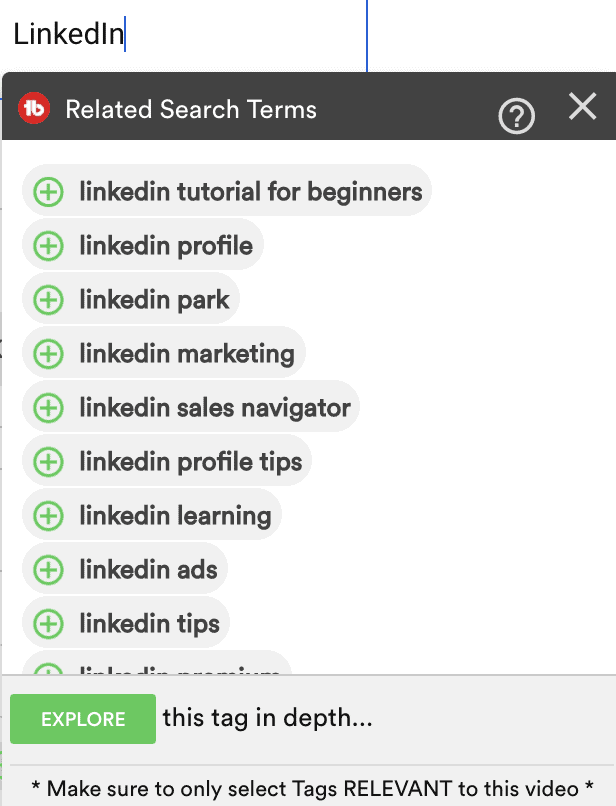
It will automatically offer instant suggestions of the most popular tags as you type in more and more letters.
How to Access the Insta-Suggest Tool
Open a video in YouTube Studio and scroll down to the Tags section.
Click in the tags container and start typing a new tag name.
TubeBuddy will automatically suggest related search terms in a popup window that begin with your seed phrase.
Click the green plus to add one or more related search terms to your video.
Next Steps
This TubeBuddy tool works very similar to Google's autocomplete feature and can give you a quick way to find and add the best video keywords, if you don't have the time for a full Keyword Explorer session.
I often use it to add some initial keywords and phrase to my video tags, and then click on each of them to verify their keyword score with TubeBuddy's Keyword Explorer tool.
Want to learn more, read my full TubeBuddy review.


