How to Get More People to Watch Your YouTube Videos
If you want to grow your YouTube channel, all you have to do is to get more people to (click through and) watch your videos.
Sounds simple, right?
Well, let's not get ahead of ourselves.
Everything starts with an impression.
Someone might search for a specific keyword on YouTube search and discover one of your videos in the search results.
Or they might be watching someone else's video and see your thumbnail in the suggested video section right next to the video.
That's called a video impression.
To turn a video impression into a video view you have to get someone to click on your video.
The percentage of people who see an impression of your video and click on it is called the YouTube impression click-through rate.
If your video was shown to 100 people and 5 people clicked on it, your click-through rate would be 5% (5 / 100).
In this article, we are going to explore every aspect of the YouTube impression click-through rate, how it affects the YouTube algorithm, and how to get more YouTube views and to grow your YouTube channel with new subscribers.
(On a side note, if your channel is not monetized via the YouTube Partner Program yet, you might want to check out my article on how to quickly get your first 1000 YouTube subscribers and clock up 4000 public watch hours to meet YouTube's monetization requirements.)
What Are YouTube Video Impressions?
Once you publish a new video, YouTube will start showing it to people whom YouTube believes, are interested in your video.
This might be people who subscribed to your YouTube channel, someone searching for a specific key phrase in a YouTube search, or someone watching someone else's video and seeing your video in the right sidebar of suggested videos.
Whenever your video thumbnail shows up on someone's screen we refer to this as a YouTube video impression.
Think of each impression as an opportunity to earn a view.
So what exactly counts as a YouTube impression today?
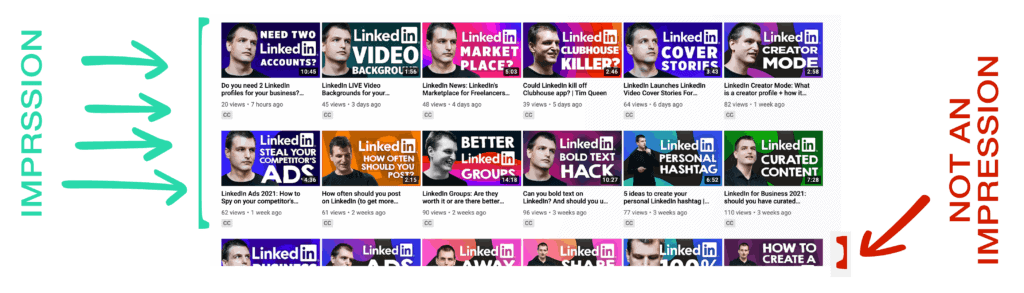
- The thumbnail of your YouTube video has to be on screen for more than 1 second and at least 50% of your thumbnail has to be visible to viewers. Check out the screenshot below to see an example.
- An impression is counted right away if a viewer clicks on the thumbnail.
- Clicking on a link does not count as an impression.
- Notifications and traffic from external websites or end screens are not included in your impression number.
What counts and doesn't count as a YouTube impression:
How YouTube impressions change over time
When and where your video surfaces can influence the number of impressions. Let’s look at the example below to see how the number of impressions changes over time and why that might be so.
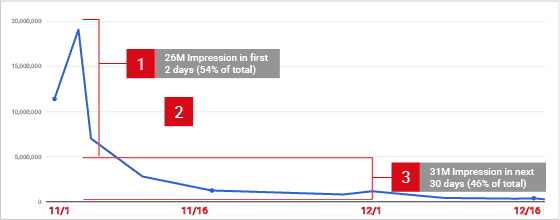
For most YouTube videos, you will see a spike in impressions right after publishing it.
This happens because your subscribers and returning viewers account for the majority of initial video views, kickstarting its performance on the YouTube platform.
It’s normal for impressions to decline afterward. YouTube will continue to show your videos in different places such as YouTube searches and suggested videos over time.
Additional bumps in impressions may occur in the future.
For example, if the topic of your video was about a specific holiday season, or if your video was promoted by a popular website driving additional watch time and views.
What Is the YouTube Click-Through Rate?
The Youtube impressions click-through rate measure the percentage of how many of your impressions on YouTube turn into views.
In other words, how often viewers watched a video after seeing an impression of your video.
Remember, while some of your views come from impressions, some views might come from sources with no thumbnail impression, for example from video links that are shared outside of YouTube.
If you would promote one of your YouTube videos on LinkedIn or in your email newsletter, neither of these would count as an impression.
Why Is the Click-Through Rate of Your YouTube Videos So Important?
If you want to be successful on YouTube, you have to master the following two success factors: video watch time and video watch time percentage.
In other words, what percentage of your video is watched on average.
If you upload a 10-minute video and your viewers watch 7 minutes on average, that represents a 70% watch time percentage.
The higher your watch time, the more likely YouTube will recommend your video to relevant new users who might enjoy your video.
So far so good...
But everything lives or dies with your YouTube impression click-through rate.
YouTube screenspace is extremely limited.
So when YouTube takes a gamble with one of your videos and fills – let's say – 10% of someone's newsfeed with your video thumbnail, this gamble has to pay off.
Otherwise, YouTube would waste everyone's time and screen space, scrolling over non-relevant videos.
That's exactly what happens when your click-through rate is low.
YouTube will just stop suggesting it to new users.
And thus your video dies, even though it had a great watch time...
Today I will show you how to avoid early death and how to attract thousands of relevant clicks for your YouTube channel.
What Affects Your Click-Through Rate on YouTube?
There are many different factors that affect your click-through rate. Some are within your control, some outside.
Placement of your video impressions on YouTube
Depending on in what context your video shows up on YouTube, you will receive different click-through rates.
The higher the intent, the better the click-through rate.
When someone makes a search on YouTube
For example, when someone searches for a specific keyword in a YouTube search, the intent to watch a video is very high.
If your video matches what they were looking for, they are much more likely to click on it.
That's the reason why the click-through rate for YouTube search is generally the highest on the YouTube platform.
When YouTube recommends your videos
Next, we have the browse and suggested video features.
Videos in these categories appear on the YouTube homepage newsfeed and within the right sidebar of videos. The watch intent in these categories is typically lower, resulting in lower click-through rates.
When users check out your channel's home page
Next, we have YouTube channel pages. That's the page that you see when you click on anyone's channel name. For example, this is mine: https://www.youtube.com/iamtimqueen
Most of the time, viewers might visit your channel page after they just watched one of your videos to get a sense of what videos you upload on your channel, and if it would make sense for them to subscribe for future videos. (Side note: Here's how to see if someone subscribes to your YouTube channel.)
Generally speaking, the click-through rate on YouTube channel pages tends to be lower than for browse and suggested videos.
YouTube channels with a very narrow niche perform better than channels with a broader range of topics.
Impressions from your YouTube playlists
The last category is YouTube playlists. If someone decides to watch one of your playlists and then skips one of your videos, that would add to your click-through rate.
If someone just watches one video after another, they would still see impressions for the remaining videos, but most people typically don't click on them and watch everything in sequence.
Thus the click-through rate is the lowest on the YouTube platform.
How timing affects your video click-through rate
Timing is an important factor for your click-through rate.
Newly uploaded YouTube videos receive on average more than 50% of their first 30 days impressions within the first 2 days after they are uploaded, and the remaining 50% impressions within the next 28 days weeks.
Since YouTube is boosting your impressions for the first two days after posting, you have to also consider if there are any events in your audience's life that might impact your views during that critical first period.
For example, national holidays, religious festivals, school holidays.
As some of your videos become more popular, they may get shown to a wider audience, and you may get more impressions.
But since this audience may extend beyond your core viewers, your click-through rates may be lower.
But don’t worry, you may still see an increase in overall video views and watch time. 🙂
How your audience's expectations influence your click-through rate
This brings us to your audience.
As you grow your channel and depending on many of your choices along the way when it comes to themes and topics, your audience is starting to develop expectations about what topics you talk about in your videos and the style of how you deliver your content.
Any deviation from these expectations and your audience might not click on your videos with the same enthusiasm as before.
How changes to your YouTube content strategy cause fluctuations of your click-through rate
The topic of your video is especially important. Most viewers on YouTube have a very narrow focus of interest.
Imagine you are running a gaming channel and you predominantly play Minecraft.
Over time you grow your YouTube subscribers from Minecraft-specific searches and suggested videos on Minecraft related videos. The majority of your audience loves Minecraft and expects to see further Minecraft-related content.
If you were suddenly changing from Minecraft content to let's say Grand Theft Auto, your audience might not want to watch any of your content anymore.
And because of the fact that YouTube heavily promotes your new videos to your most engaged subscriber base first, you might ruin your click-through rate, because of the negative feedback loop of seeing one of your videos they would have normally clicked on and then ignoring it.
It's also entirely possible that even if you created a Minecraft-related video, that the click-through rate went through the floor because the sub-topic was just not interesting enough to anyone.
Why your YouTube title is so important for your video click-through rate
Now you might have a great topic, but you might not be able to express what it's all about with your title.
Imagine your YouTube channel was about cooking and you just published a new video about how to make the perfect New York style pizza at home, but instead of communicating this in your video title you just named it "new video".
Not very descriptive, isn't it...
Your video title has to communicate the value of watching your video to your audience.
Usually, that works best by explaining what your video is all about in the title.
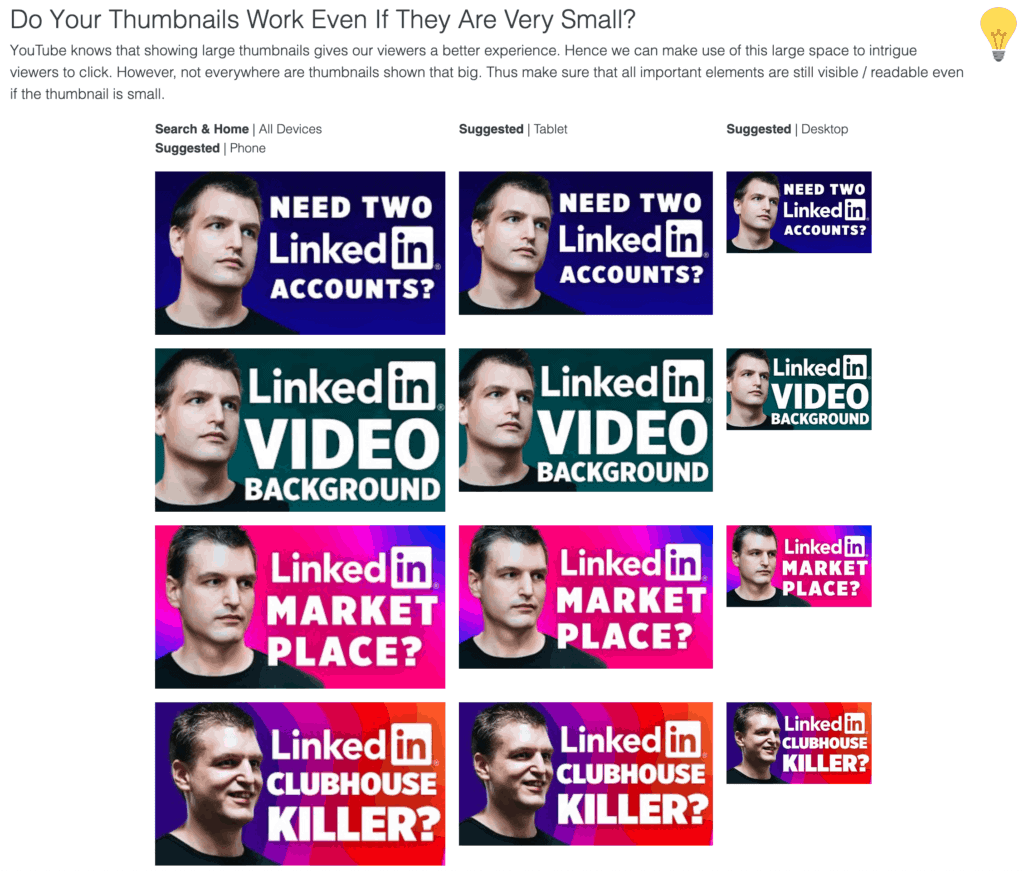
How your video thumbnail design is affecting your click-through rate
Ok, you wrote the perfect video title, super descriptive, with all the right keywords that your audience is interested in, yet your click-through rate might still suck...
Why?
- Because your video thumbnail isn't standing out among other videos.
- Maybe your thumbnail didn't contain any faces?
- Or the face was too zoomed in or out?
- Or maybe you put someone else's face on it, and nobody is recognizing who this is?
- Or the font was too big or too small?
- Or the text didn't match with the video title?
- Maybe the colors were wrong?
- Or there was too much going on all at the same time and nobody understood your video?
There are so many possibilities to mess up your thumbnails, that's why we are going into great detail further down, where I explain to you how to design the perfect thumbnail for your videos!
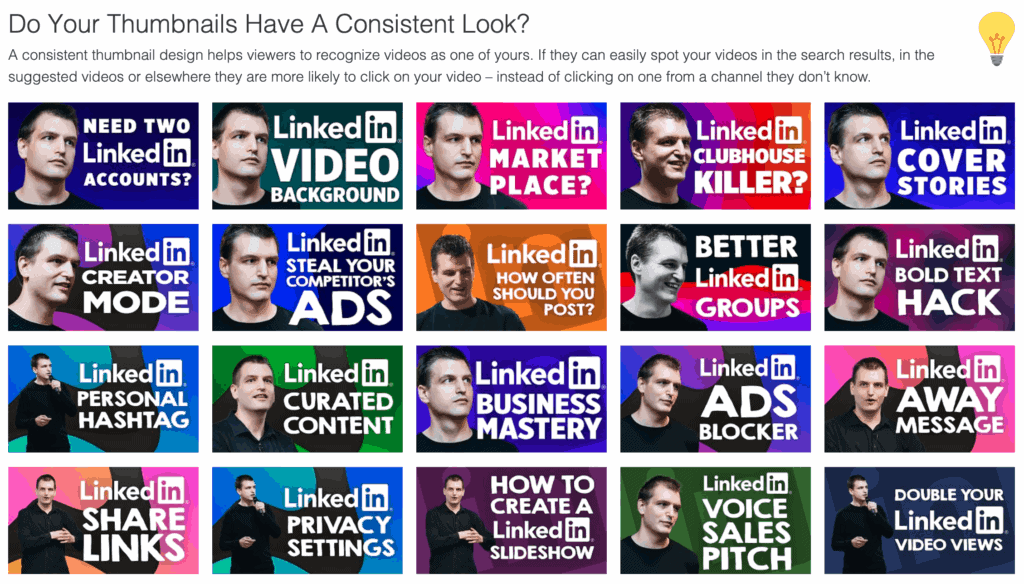
Why your YouTube video keywords matter for high click-through rates
Last but not least, let's talk about video keywords. Some people might call them video tags.
YouTube allows you to add important keywords to each of your videos so YouTube can better understand the content of your video.
Having no keywords at all, or keywords that don't match the content of your video can result in bad suggested video recommendations.
In other words, your video might be suggested next to a totally unrelated video and as a consequence, nobody clicked on it and your click-through rate suffered.
What Is a Good Click-Through Rate on YouTube?
How do you know if your YouTube video click-through rate is high or low?
According to YouTube, half of all YouTube channels and videos achieve click-through rates between 2% and 10%.
Unfortunately for us, the average click-through rate on YouTube has never been published.
Fortunately for you, you have me and my all-time favorite YouTube app called TubeBuddy. It offers an amazing tool called Click Magnet, that allows you to identify videos that have a lower than average click-through rate.
(On a side note, I've also written an in-depth TubeBuddy Review where I share how the tool helped me to grow my channel from 0 to 3000 subscribers.)
These are the click-through results based of my YouTube channel specifically.
- Outstanding – My top 10% best-performing videos have a click-through rate of more than 6%.
- Very Good – To make it into the top 20% videos need to have a click-through rate between 5.5% and 5.9%.
- Good – Top 30% of videos require a click-through rate between 4.5% and 5.4%.
- OK – The top 40% has a click-through rate between 4% and 4.4%
- Bad – The bottom 60% of videos have a click-through rate of less than 3.9%
Your YouTube impressions click-through rate will always vary based on the type of content, your audience, the topic, and where on YouTube the impression was shown.
Video thumbnails are always competing with other videos on the YouTube homepage, in the suggested video section, in YouTube search results, and more.
New videos or channels or videos with fewer than 100 views can see an even wider range.
If a video gets a lot of impressions, it's natural for the CTR to be lower.
Videos, where most of the impressions are from sources like your channel page, may have a higher rate.
Clickbait Could Lead To Your Channel's Downfall
While it's super important to increase your YouTube click-through rate, you have to be careful. The end doesn't justify the means.
If you optimize your video title and thumbnail too much just to get clicks, you might accidentally create false-promise clickbait.
In other words, your title and thumbnail promise a video about topic A – because A is super popular right now – while in reality, the video was about topic B.
This would be a very BAD idea.
Yes, you would be able to increase your click-through rate, but because you are unable to fulfill the promise of your video, your watch time will be very low and as a consequence, YouTube will stop promoting your video to new audiences.
Meet YouTube Studio Analytics
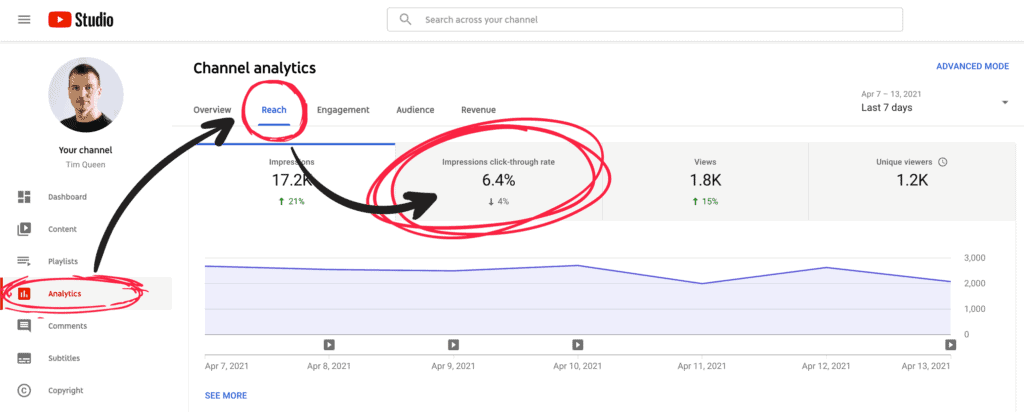
YouTube Studio allows you to discover a huge variety of metrics to measure your YouTube channel's success. One of the most interesting ones is located in the "Reach" tab.
To access it, first, open YouTube Studio. Click on the "Analytics" on the left side menu. Then located the "Reach" tab at the top. Your global click-through rate is located above the graph.
Make sure to change the date in the top right corner to explore different date ranges and to see how your click-through rate has changed over time.
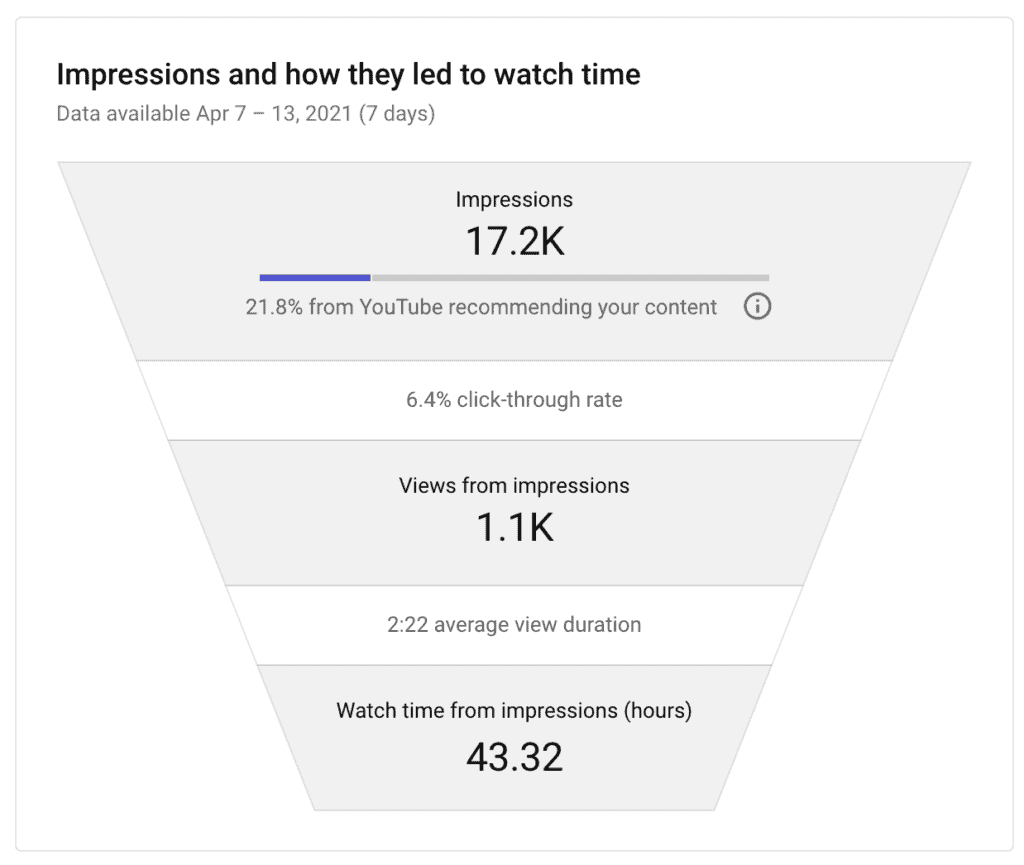
Scroll down to see an overview of YouTube impression to watch time funnel.
At the top you see the total number of impressions. Note that the impressions number does not include instances where your content is found through “external sources”, like embeds on websites, blogs, social media, or YouTube notifications.
Right below you see your click-through rate, followed by the number of views, your average view duration, and total watch time.
In my case I had 17.2 thousand impressions, 6.4% of those impressions resulted in a click, which generated 1.1 thousand views.
Notice the little info icon on the right of your impressions. What happens when you click on it? Let's find out!
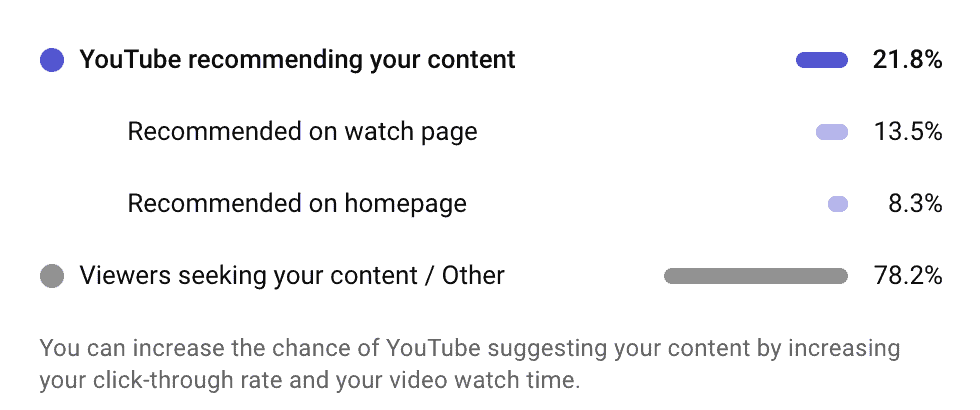
YouTube will display a popover to further explain the placement of your impressions.
In my case, 21.8% of my total impressions come from YouTube promoting my videos in the suggested videos section and on the homepage.
The remaining 78.2% of impressions were generated from viewers seeking my content. In other words, from YouTube search and videos on my channel page.
For even more insights you can activate the advanced mode for YouTube analytics in the top right corner, just above the date range.
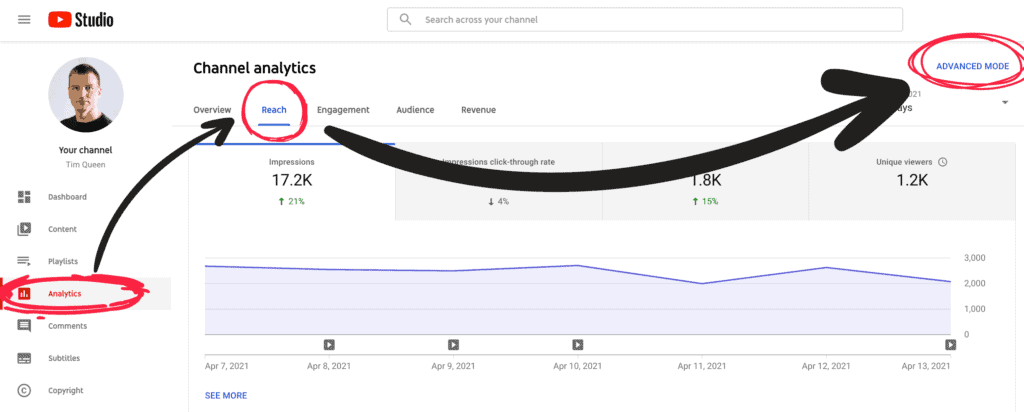
Welcome to YouTube analytics's advanced mode!
The most powerful tool when it comes to analyzing your YouTube channel from top to bottom.
Now, how do you use it?
Impression data is available at both the channel and video level so you can look at an overview on your channel or deep dive into how individual videos are doing.
Let's start by exploring your YouTube click-through rate grouped by traffic source.
Click on the "Traffic Source" tab at the top, then compare the "Traffic Source" and "Impressions click-through rate columns of the table to see how your click-through rate varies.
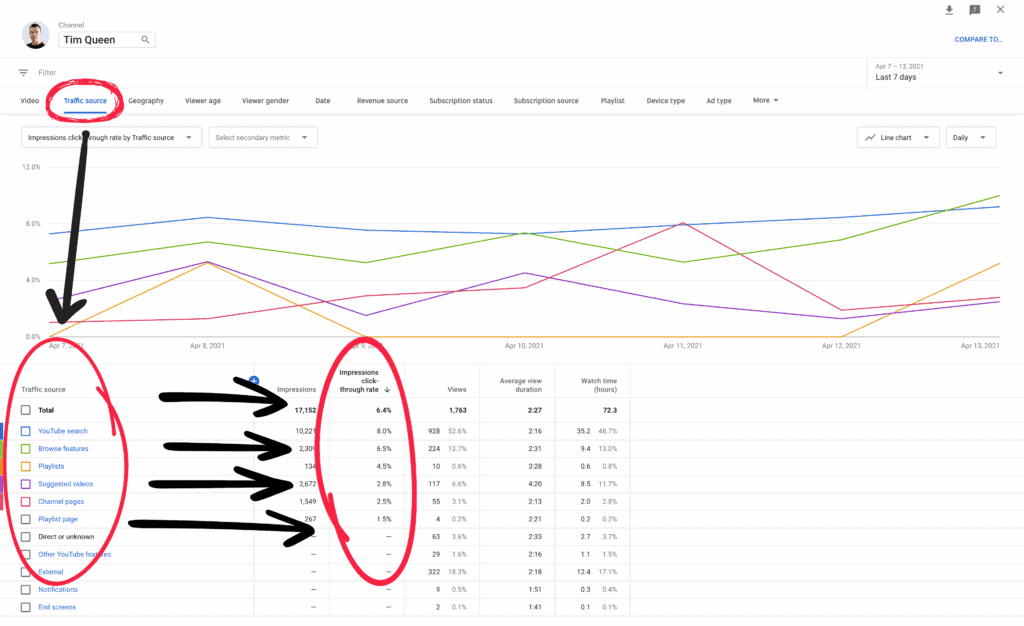
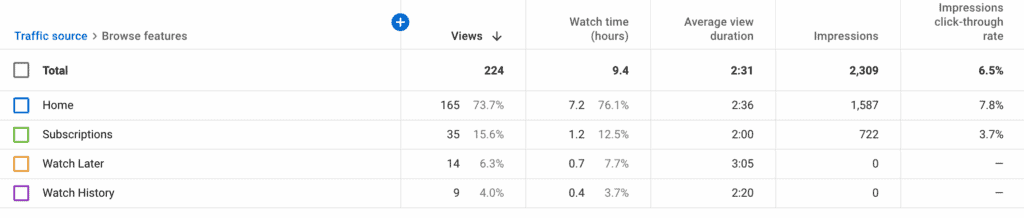
Click on any specific traffic source to explore it in more detail.
This is what you would see if you clicked on "Browse Features":
How to see the click-through rate of each of your individual YouTube videos:
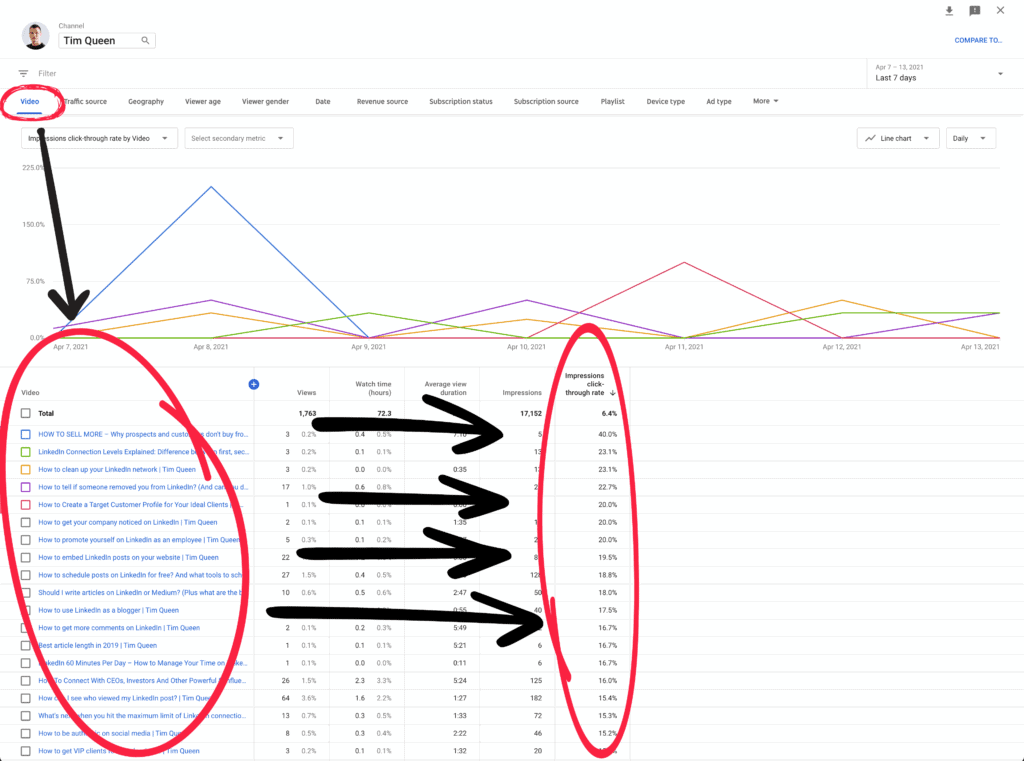
Here you will discover the number of impressions of your videos, how many of these impressions were clicked, and how many views and unique viewers you were able to attract.
Tubebuddy Click Magnet
One of my all-time favorite YouTube tools is TubeBuddy. Most of its features are accessible via a Google Chrome extension and add additional features and functionality within the YouTube Studio.
TubeBuddy recently released a brand-new feature that allows you to explore how different thumbnail designs affect your click-through rate.
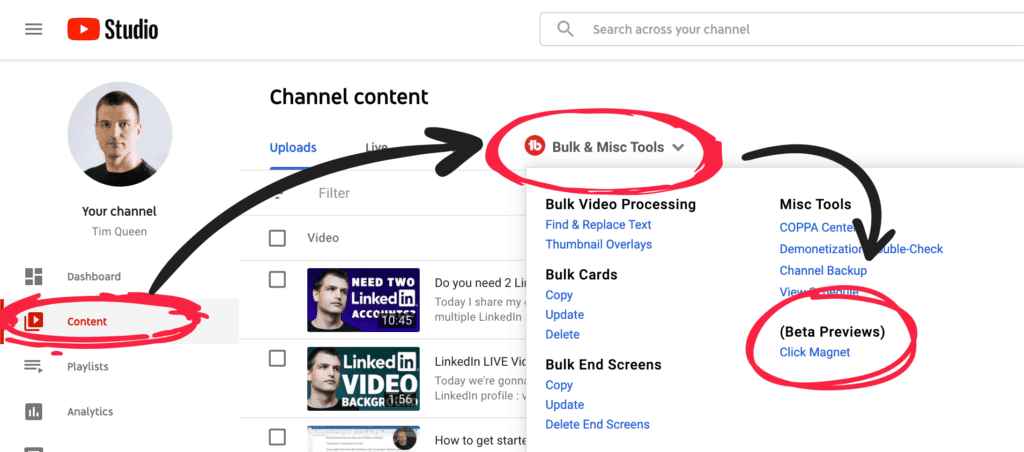
It's called Click Magnet and can be accessed via the "Content" page within YouTube Studio. To the right of the Uploads and Live tab, click on the TubeBuddy menu and then select "Click Magnet".
It will open up the Click Magnet dashboard.
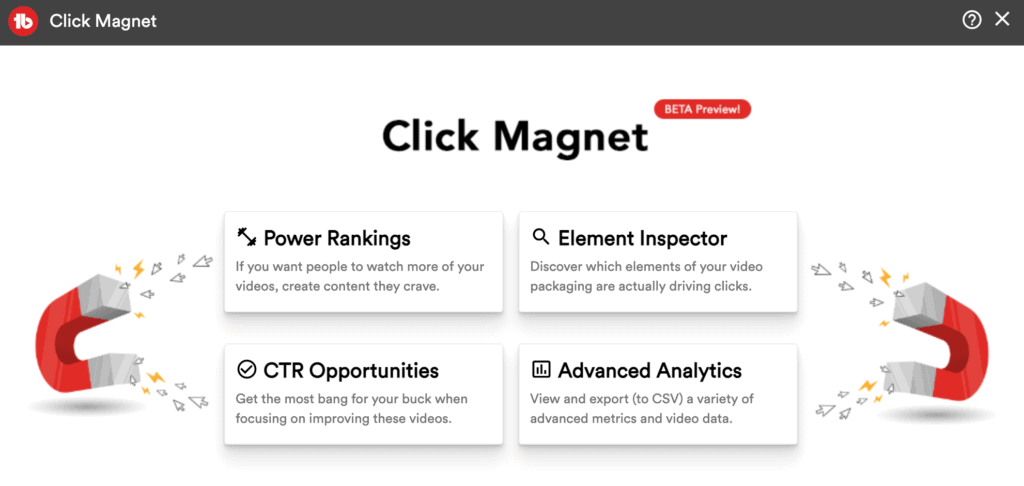
Let's have a look at the different tools.
Click magnet power rankings
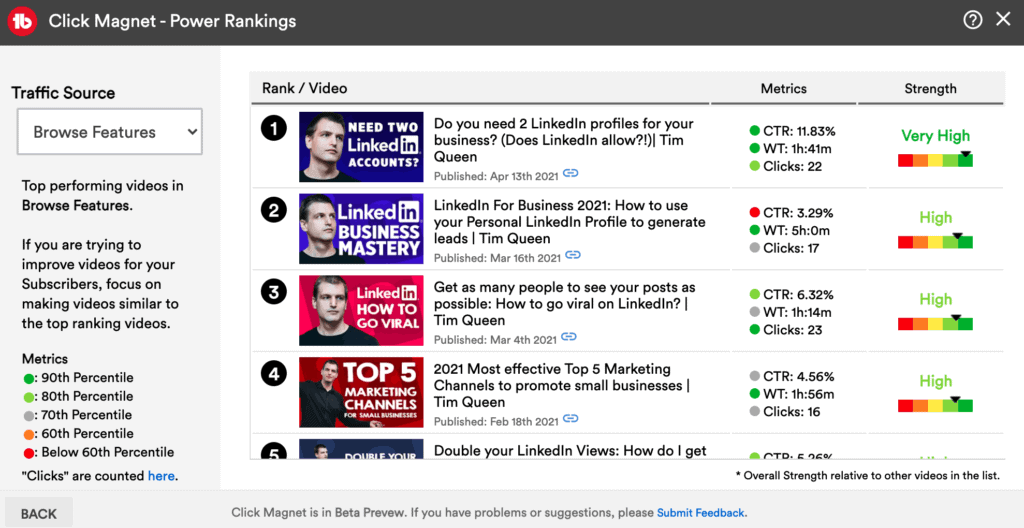
In the top left corner, you'll find the Power Rankings tab.
It will open up a list of all of your videos and show you your click-through rate, watch time, clicks, and overall performance of each video.
On the left you can filter by specific traffic sources such as all traffic, YouTube search, suggested videos, and browser features.
The traffic light colors allow you to quickly identify videos that are not performing as well as they could.
If you want to improve your click-through rate watch out for any video that has a red or yellow flag in the CTR column.
Click magnet element inspector
The element inspector is my favorite TubeBuddy Click Magnet tool. It uses AI to analyse all of your video thumbnails and then breaks them down element by element and shows you how each design factor is affecting your click-through rate.
So let's have a look at my YouTube channel thumbnails.
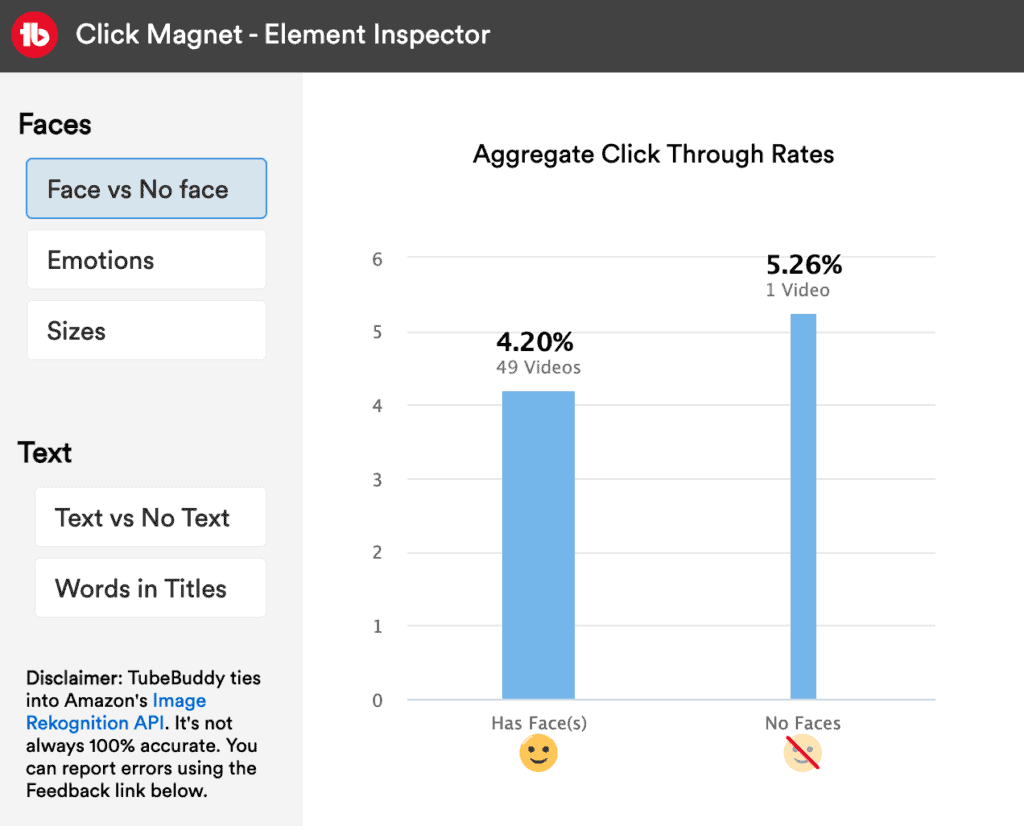
Face vs no face
Video thumbnails with faces seem to have a lower click-through rate than videos without. Then again, I only have 1 video without face so this might just be an outlier.
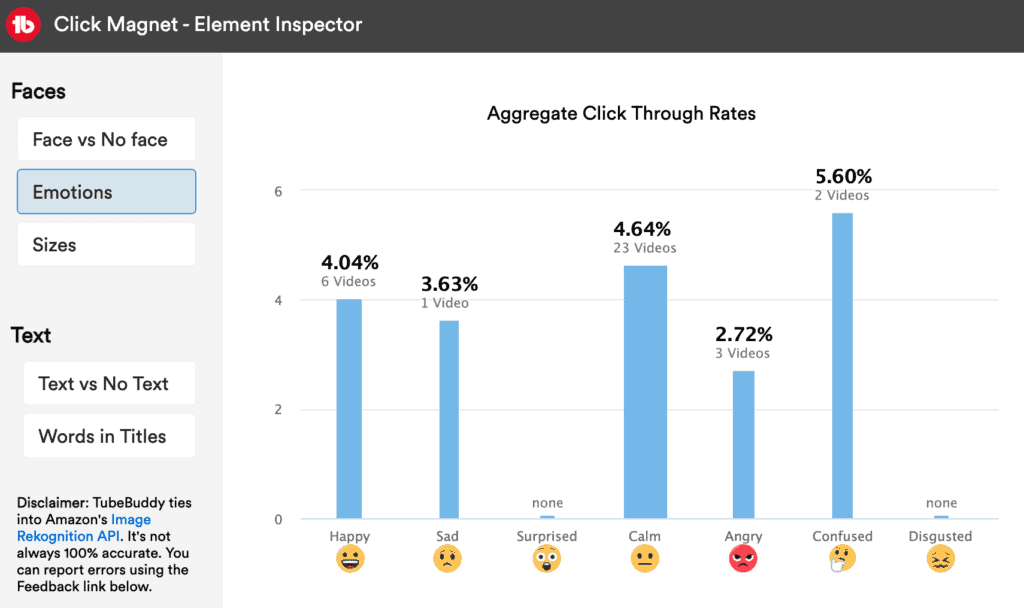
Emotions
Next, let's see if facial emotions result in different click rates. For my videos confused, calm, and happy facial expressions seem to perform best.
It also appears that I never expressed either surprise or disgust in any of my videos thumbnails. I will keep this in mind and might test this with future thumbnails.
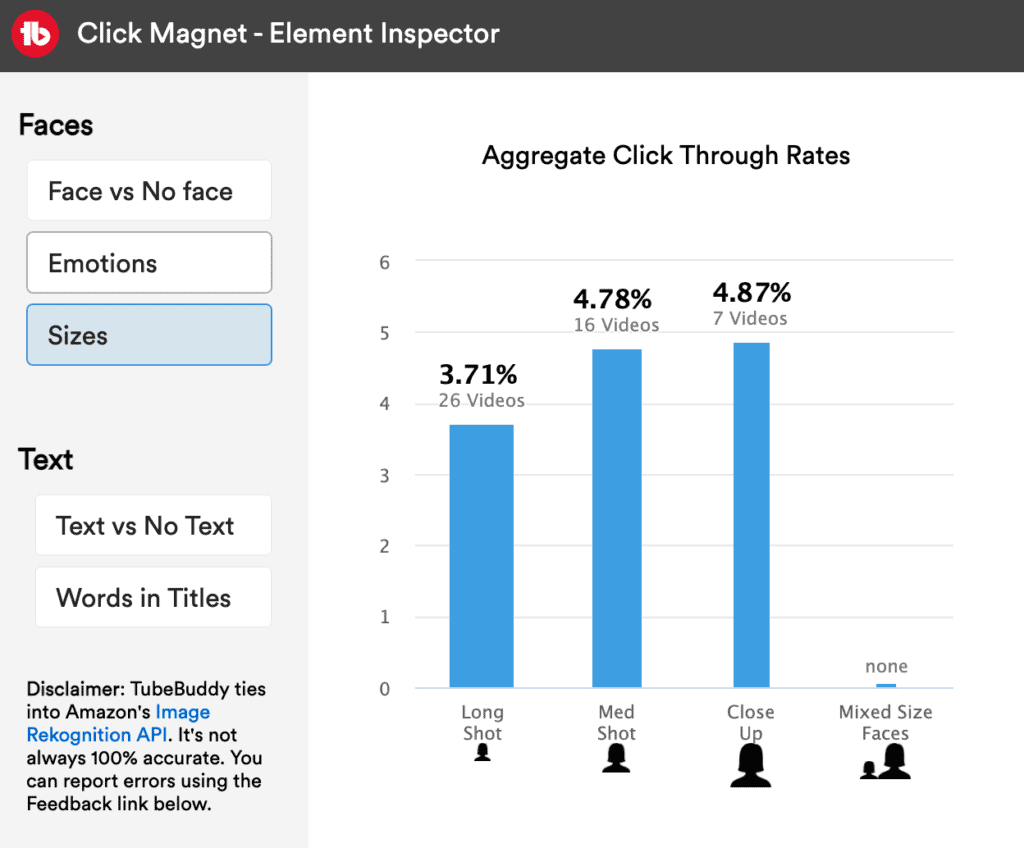
Face sizes
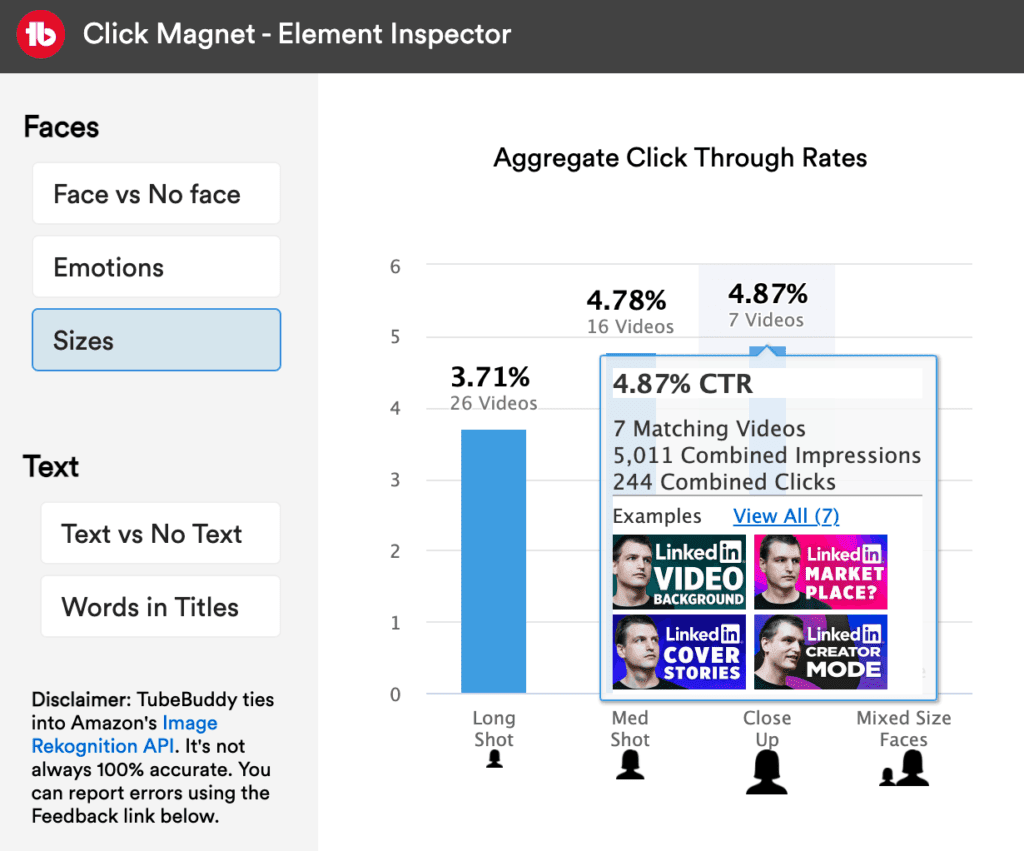
Great so far, now let's check out if the size of faces is important. For my videos close-ups of my face seem to perform best!
By the way, you can hover over any of the blue bars to see example videos within each category.
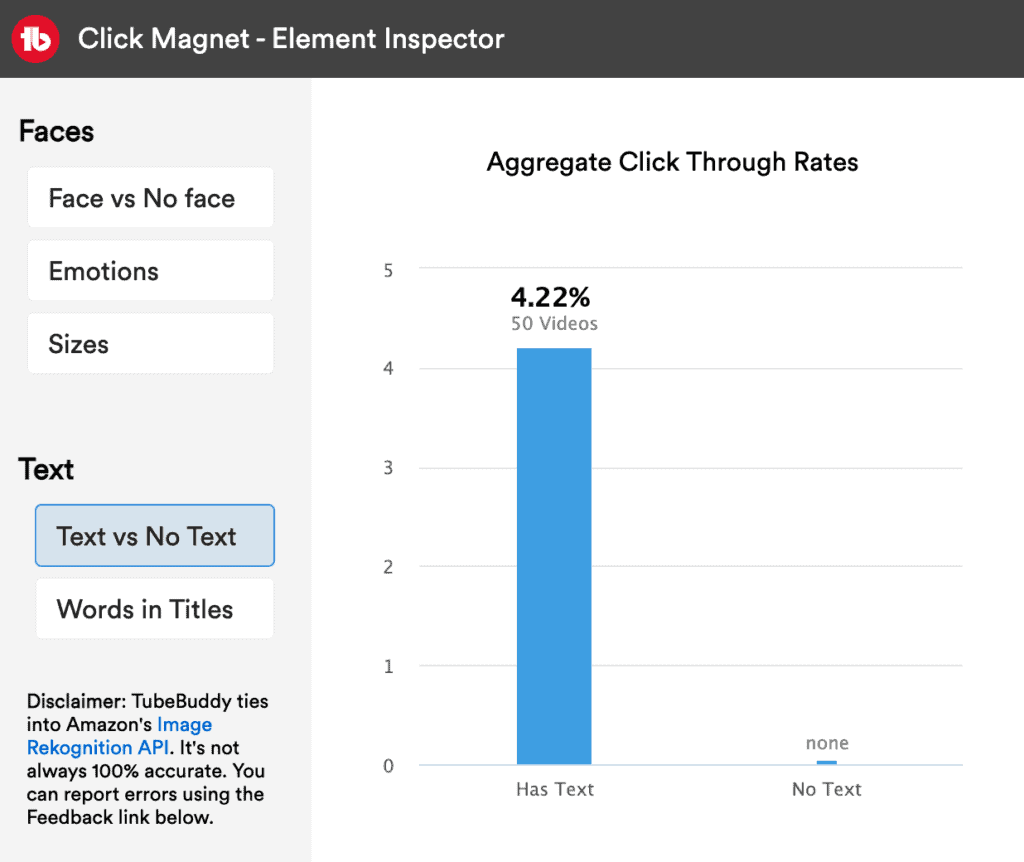
Text vs no text
How do video thumbnails with or without text overlay perform? In my case all of my videos contain text, so this doesn't give me any insights at the moment.
I might experiment with no text versions at a later date.
Words in titles
This feature analyses all of your YouTube video titles and then groups and rank them by common keywords. Click Magnet allows you to compare the CTR of all of these keyword groups.
"What", "get" and "how" seem to perform really well for my channel! 🙂
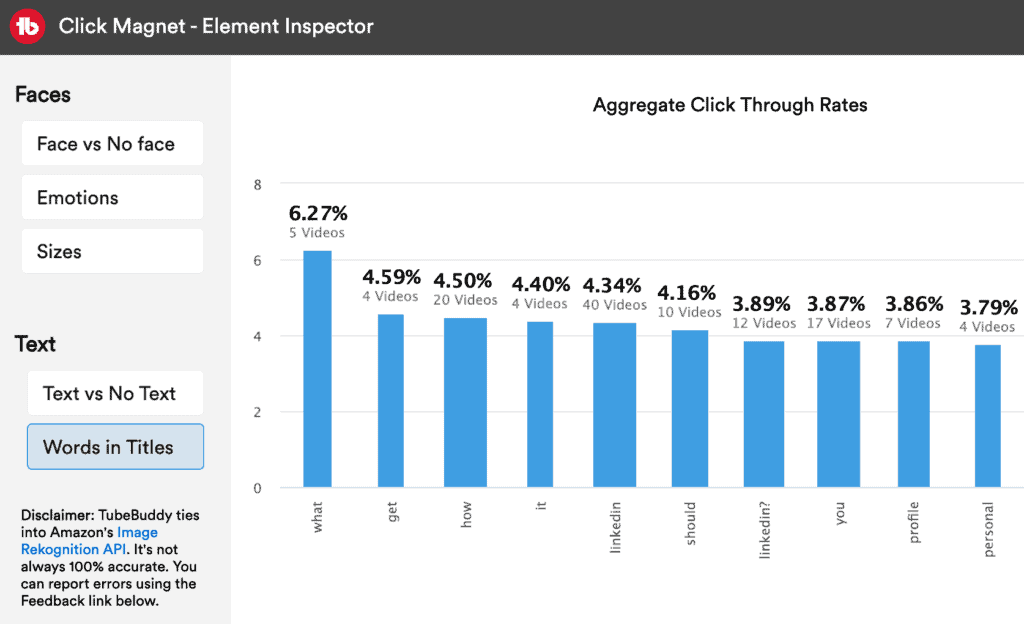
Click-through rate opportunities for your videos
This view quickly identifies videos that have a great performance in terms of watch time, but a low click-through rate.
Thinking about redesigning all of these thumbnails and then use TubeBuddy to A/B test both video thumbnails against each other to see which performs best.
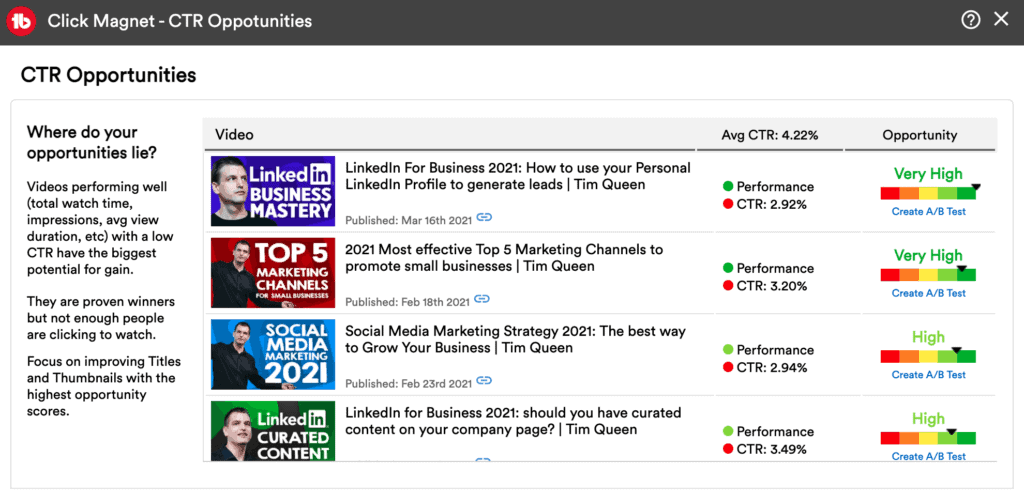
Click magnet advanced analytics
The last tool we are going to look at today is Advanced Analytics. It allows you to filter by time frame, traffic source and minimum impressions to find new opportunities for improving your video click-through rate.
How to Improve Your YouTube Click Through Rate
The first factor we are going to optimize today is the content-audience match.
In other words, how well your content matches your audience's expectations.
In the early days of YouTube, you were more or less able to create whatever content you want and still were able to attract an audience.
Today, YouTube is way more crowded than ever and it can be challenging to get your videos watched by new people.
That's because YouTube doesn't know and understand your channel yet.
If you have less than 1,000 subscribers YouTube doesn't have enough data to understand which of your videos are good and who might be interested in watching them.
That's why YouTube is very cautious when it comes to recommending videos from small YouTube channels to new members.
The secret to growing on YouTube as a small channel is to niche down your channel to the extreme.
Focus on a specific theme or topic, then select an even smaller sub-theme or sub-topic within that space and create videos within this hyper-focused niche.
The more clearly defined your target audience on YouTube, the easier it is for you to create content that will achieve high click-through rates.
Take out a blank sheet of paper and describe your target audience as specifically as possible.
Some people find it easier to think of their audience as a group of people, others prefer to think of a single individual and might even give this person a name.
The strongest communities online and offline often revolve around common interests and shared beliefs.
Ask yourself...
- What is their story?
- What's their background?
- Who are these people?
- What do they enjoy?
- How old are they?
- What problems and frustrations do they have?
- What do they love?
- What do they despise?
- What’s ther education level?
- What are they looking for online?
- What do they value and believe in?
- What is important to these people?
- What do they really care about?
- What do they believe in?
Optimize your YouTube content strategy
Ok great, you now know who your ideal audience on YouTube is.
Next, let's figure out specific topics and themes they are most likely interested in.
I recommend picking one specific topic and then breaking it down into multiple video ideas.
Examples:
If you have a cooking YouTube channel, start with one of your favorite dishes. Let's say it was burgers. You could make 5 videos about different burger recipes, or you could break down a topic such as "making the perfect burger" into 5 parts from how to make baking the perfect bun, selecting the right meat, cooking the most delicious burger sauce, etc.
If you have a makeup channel, think of 5 unique ways to create a smokey eye effect.
The idea is to stick with one very narrow topic.
Film your first video and then create a second video that has a 70-90% overlay with the first video.
This way, it is much more likely that whoever was watching video one and like it, would also watch video 2, thus be more likely to click on it.
As your channel grows, YouTube is able to collect more and more data on your viewers and will eventually recommend your videos to a wider audience.
Optimize your YouTube thumbnail click-through rate
Thumbnails are the most important factor when it comes to maximizing your YouTube click-through rate.
Make sure that your thumbnail is aligned and compliments your video title.
Thumbnails with faces have the highest click-through rates.
Bigger faces work better than smaller faces.
Focus on expressing emotions and making eye contact to get even better results.
When you're using text on your thumbnail make sure that you are using big font sizes and only very few words!
Bright colors and a strong contrast further boost your click-through rate.
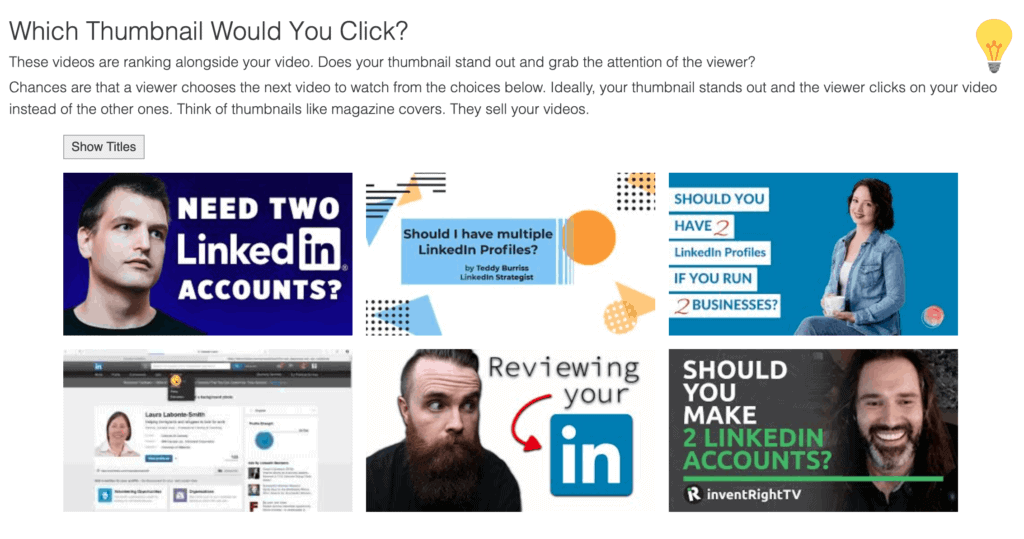
Perform a YouTube search for the keywords you want to rank for and see how you can improve the design of your thumbnail to visually stand out from the other videos in the YouTube search results.
Optimize your YouTube video titles for clicks
Now that you have a click-worthy video thumbnail, let's work on your title.
It should match and compliment your thumbnail.
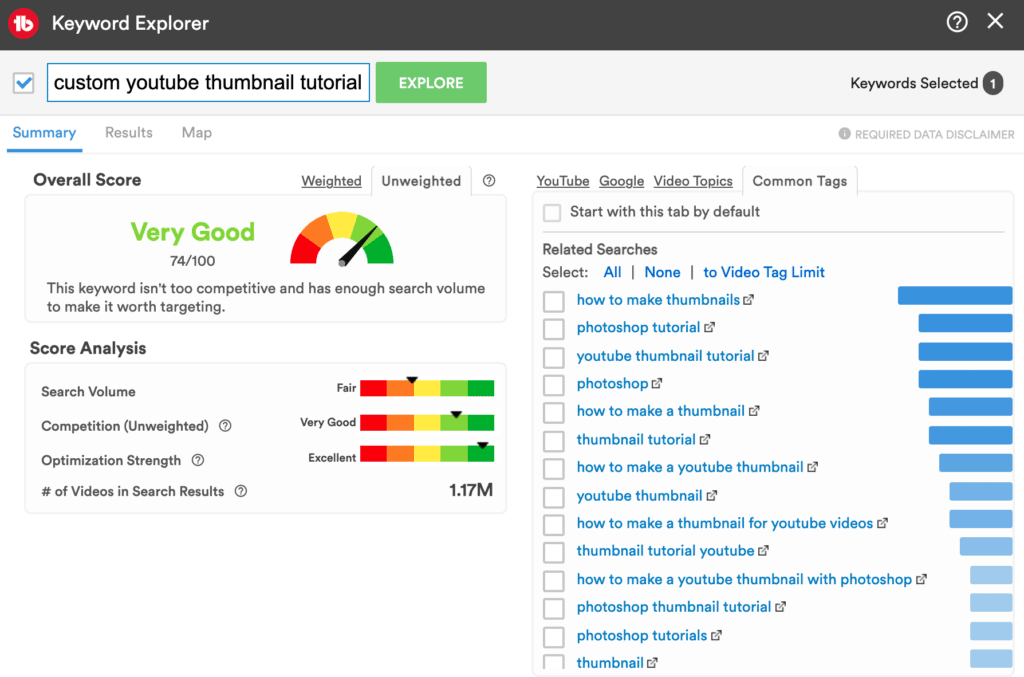
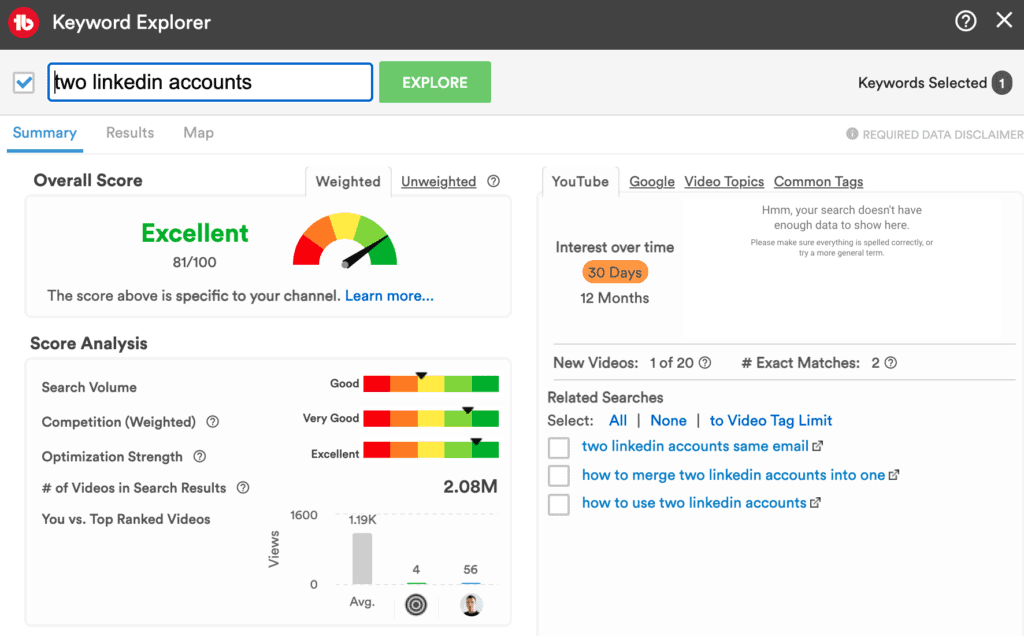
If you want to write the perfect YouTube titles that get more clicks on your videos, you have to master YouTube keyword research first.
For example, you can use YouTube's auto-suggest feature to find interesting ideas for video titles.
My all-time favorite tool for keyword research is called TubeBuddy. It allows you to identify Youtube search terms that are in high demand and have little to no competition for matching video recommendations.
Ideally, you want to start working with TubeBuddy before you map out your YouTube video script, but it is just as powerful to find the right keywords for your video title.
Another great resource for finding great video titles is Google. Type in your target keyword phrase into Google and review the top results on pages one and two for interesting title ideas.
You can also use Google's auto-suggest feature to explore related keyword searches.
I also like to explore Google Trends to find interesting trending topics within my niche.
A great tool for YouTube and blogging is called SEMRush, especially its Keyword Magic Tool. SEMrush is a bit more pricy but you can sign up for a free 1-month trial to map out your content strategy for the next year.
I also use another app called Writefull for keyword research. It has a ton of cool autocomplete phrases that allow us to find interesting title variations.
Quora is also a very useful keyword research tool to find potential video titles.
Check out Answer The Public to get inspired by questions that people around the world are searching for.
Or have a look at one of the many YouTube videos title generator and headline formulas.
If you want to learn more about how to optimize your YouTube video title and how to find the perfect high search volume, low competition keywords for your next video, check out my articles where I go into details about "How to title your YouTube videos to get more views" and how to optimize your YouTube video titles (to make them more catchy!).
Optimize your YouTube video keywords to get more clicks
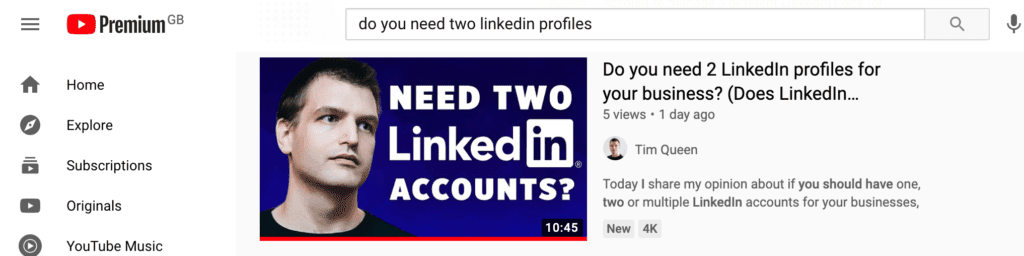
Find your competitor's video keywords and mimic keywords and titles to show up in the suggested video section next to their video.
Optimize for YouTube search and suggested videos
As we discussed earlier, the higher the intent of potential viewers, the better the click-through rate to one of your videos.
If you have a new channel, the majority of your views will come from YouTube searches. That's why you have to optimize your thumbnail and video title for search placement.
You have to assume that most people who search for a specific problem or solution don't know anything about you and that they don't have the context of understanding the style videos.
That means that you have to be as specific and descriptive as possible when you're describing your videos both in title and thumbnail.
Never rely on inside jokes that only your most loyal fans would understand and click.
People may not know you but they will still respond to emotional triggers such as seeing someone's face.
Make sure that your face is zoomed in closely, so new viewers will start to remember your face so they are more likely to click on future videos when they recognize your face on one of your other video thumbnails.
Generally speaking focus on communicating the VALUE of your video. What is in for the viewer if they decide to watch it? Will they learn something specific? Maybe find a solution to one of their problems? Will they feel entertained?
This will help you to increase your click-through rate on the homepage and suggested video recommendations.
Optimize your YouTube posting time to attract more clicks
Believe it or not, your posting schedule on YouTube is very important.
People quickly get used to patterns and form new routines.
For example, imagine you were uploading a new video every week, Monday at 3 PM Eastern time.
Someone watches one of your videos for the first time, they love it and want to see more, so they continue to watch some of your past videos.
YouTube starts to understand that this person is really engaged with your content and recommends more of your videos to this person.
Next time you upload a video it will pop up on their YouTube homepage. Over time this creates a subconscious habit.
And that's when you win!
A new habit has been formed and now this viewer is subconsciously scanning their YouTube homepage for your thumbnail every Monday afternoon.
And all you have to do is to stick to an uploading schedule and to keep your thumbnail consistent and recognizable, for example by putting a photo of your face on every thumbnail.
Other YouTube tips to improve your click-through rate
Here are a few more ideas on how to increase your YouTube click-through rate. Think about creating a series of videos.
For example, how to make the perfect burger series in five parts. If someone watched part one, they are most likely to click on part two when it becomes available.
You can also recommend other videos to your audience at the end of each video.
For example, give them a teaser about next week's upload and let them know what they can expect.
If you can get them super excited they will look out for that video and click on it. This will turbo-boost your click-through rate.
Pro tip: Design the thumbnail for next week's video at least one to two weeks ahead of time. This way you can show them a preview of the actual upcoming video thumbnail in this week's video.
This works even better because now they have created a mental imprint of what exactly to look out for getting you, even more, clicks on your videos.
Next Steps
In summary, I highly recommend you get a Tubebuddy subscription if you are really serious about turbo-boosting your click-through rate. It has all the amazing functions to guide you on your click-through rate optimization journey.
Don't forget to check out my step-by-step YouTube Upload Checklist article to give your videos the best possible start by optimizing your videos from start to finish.
Good luck with your YouTube journey!


