What Are Tag Lists in Tubebuddy
TubeBuddy allows you to create collections of keywords and save them as so-called Tag Lists.
This allows you to do your keyword research in advance and to save all of your target keywords ahead of time.
You can use your list of keywords to write your video script.
Once you uploaded your YouTube video, simply add all keywords from your Tag List to your final video with the click of a button.
Why Video Keywords Important
By identifying the top tags for each video, you increase your chances of ranking high in YouTube search results.
Getting your keywords ready before you upload your video ensures that your uploading process runs smoothly without any unforeseen delays.
You can do this by doing your tag research ahead of time and saving them in several TubeBuddy tag lists grouped by topics.
How to Create a New List in Tubebuddy's Keyword Explorer
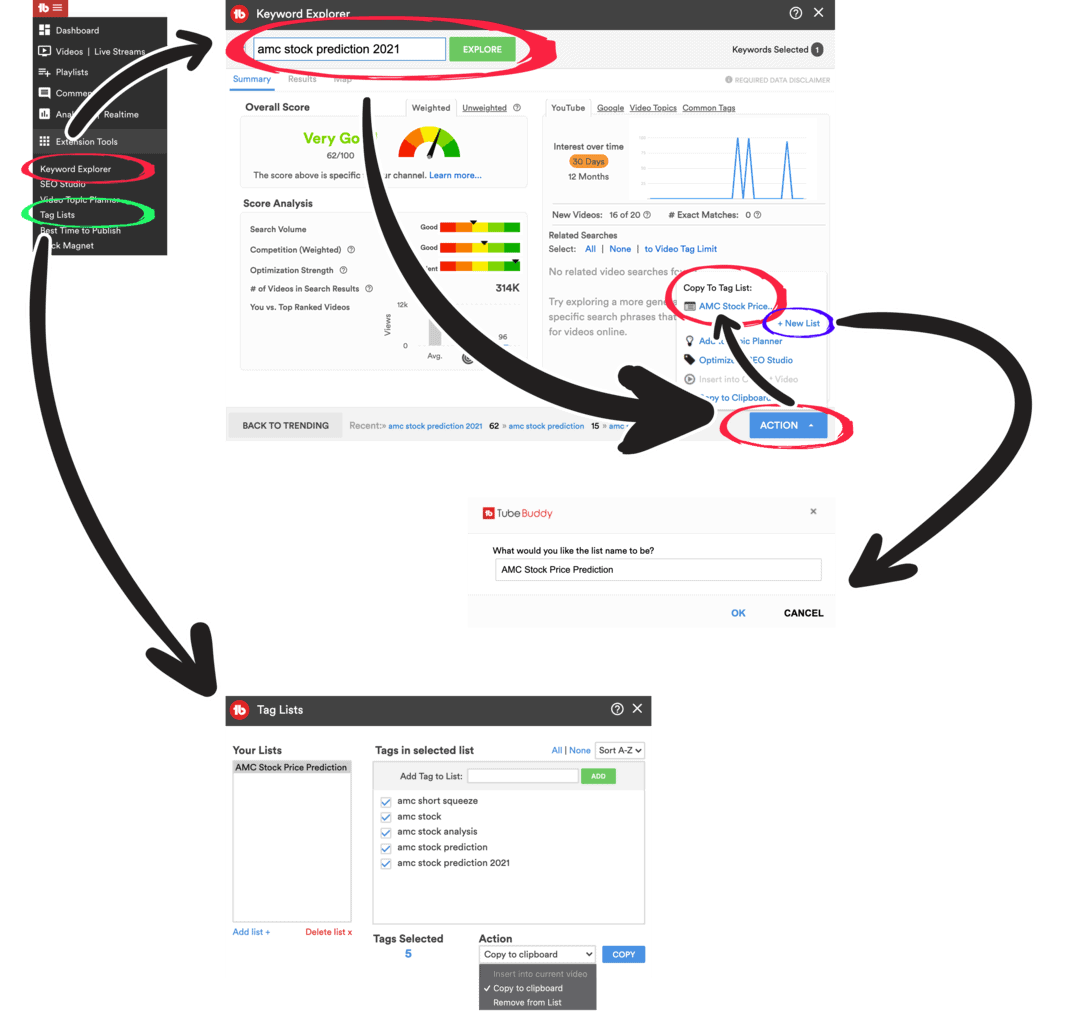
To create a Tag List open TubeBuddy's Keyword Explorer tool.
Type in a new keyword to start and then narrow it down till you get a good, very good, or excellent keyword score.
Click on the upwards triangle ▲ on the right side of the blue Action button to open up the menu.
If you already created Tag Lists in the past, you can add your keyword to any list by clicking on the name of your list.
To create a new list, click on the New List at the top right corner.
Give your list a name and press Ok to save it.
Now you can add new keywords to your TubeBuddy list.
How to Manage Your Tubebuddy Tag Lists
You can see an overview of all keyword collections by visiting YouTube Studio and then opening the TubeBuddy menu at the top.
Navigate to the Extension Tools section and click on Tag Lists.
You will see a list of all Tag Lists on the left sidebar. Click on any list to see which keywords and phrases have been added. You can add new keywords to any list by using the form at the top. I recommend using the Keyword Explorer tool to ensure that each keyword has a good YouTube SEO score.
Tag Lists Best Practices
I recommend creating a new keywords collection for each video.
Then populate it using the Keyword Explorer Tool with the highest ranking keywords.
How to Import Tag Lists and Add Them to Your Videos
During the upload process of your video, simply locate the TubeBuddy Tag Tools feature and click on Import.
Next, select your desired list and add the tags to your video.

Next Steps
Using the TubeBuddy Tag Lists feature has many benefits. You can use them to brainstorm ideas for new videos, plan out important keywords for your video script, or simply use them to optimize new videos for YouTube SEO ahead of time.
If you want to learn more about how TubeBuddy can help you to grow your YouTube channel, make sure to read by full TubeBuddy review.


