What Is the Tubebuddy Videolytics Tool
I love to TubeBuddy's Videolytics tool!
It's super useful when you're checking out your competitor's YouTube channel, and gives you a bird' eye view of their videos' performance, the tags they are using, how often their videos have been shared, and much more.
Most notably, you can even see a video SEO score on how well a particular video is positioned on the search and if I stand any chance to outrank them.
How to Use the Videolytics Panel
The tool works on any YouTube video watch page. After a few seconds of opening the video page, a new panel will appear on the right sidebar that looks like this:
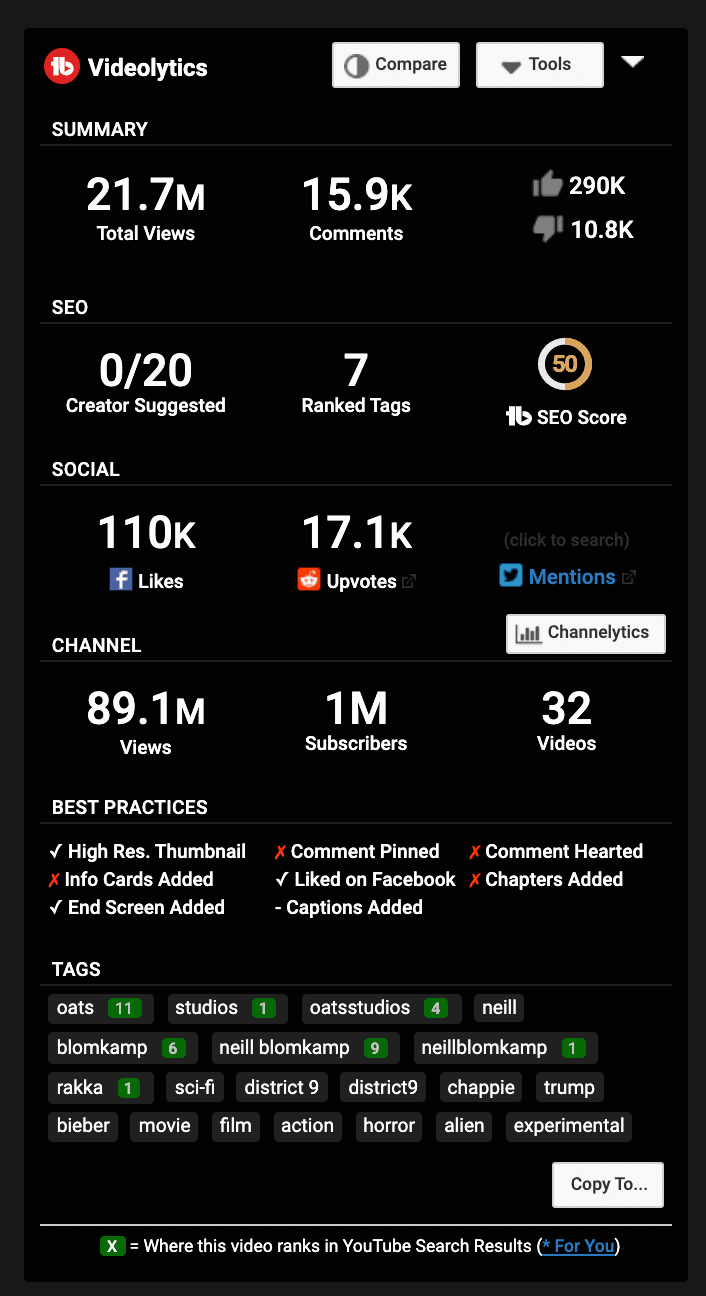
At the top you get the big-picture summary with total views, comments, likes, and dislikes.
In the second row from the top you see the video's SEO performance. Creator Suggested shows how many of the first 20 suggested videos are from the same channel as the current video. Ranked Tags counts the number of video tags for which this video shows up in YouTube search results. And the SEO Score is based on TubeBuddy's SEO Suite and shows you how optimized this video is for search.
Under Social you can see Facebook, Reddit and Twitter shares.
Channel reveals the number of subscribers, videos and total video views of the entire channel.
Best Practices checks for specific recommendation and if the current video has implemented them.
Finally, you will see a list of all video tags.
Next Steps
Videolytics is a very useful tool that allows you to keep on top of your competition by spying on their videos and tags.
I use the Best Practices checklist occasionally when I am reviewing some of my videos to see if I missed anything.


