What Is the Tubebuddy Health Report
The TubeBuddy Health Report is a great way to figure out what is working on your channel, as well as to get quick insight into demographics, search traffic, related videos, watch time, or to improve your channel based on data insights.
In essence, it's a mini version of your YouTube Studio Analytics, with some of the most important insights all neatly arranged on one dashboard.
How to Access the Health Report Tool
You can access it by visiting YouTube Studio and opening the TubeBuddy menu at the top-right.
Open the Website Tools tab and click on Health Report to open it.
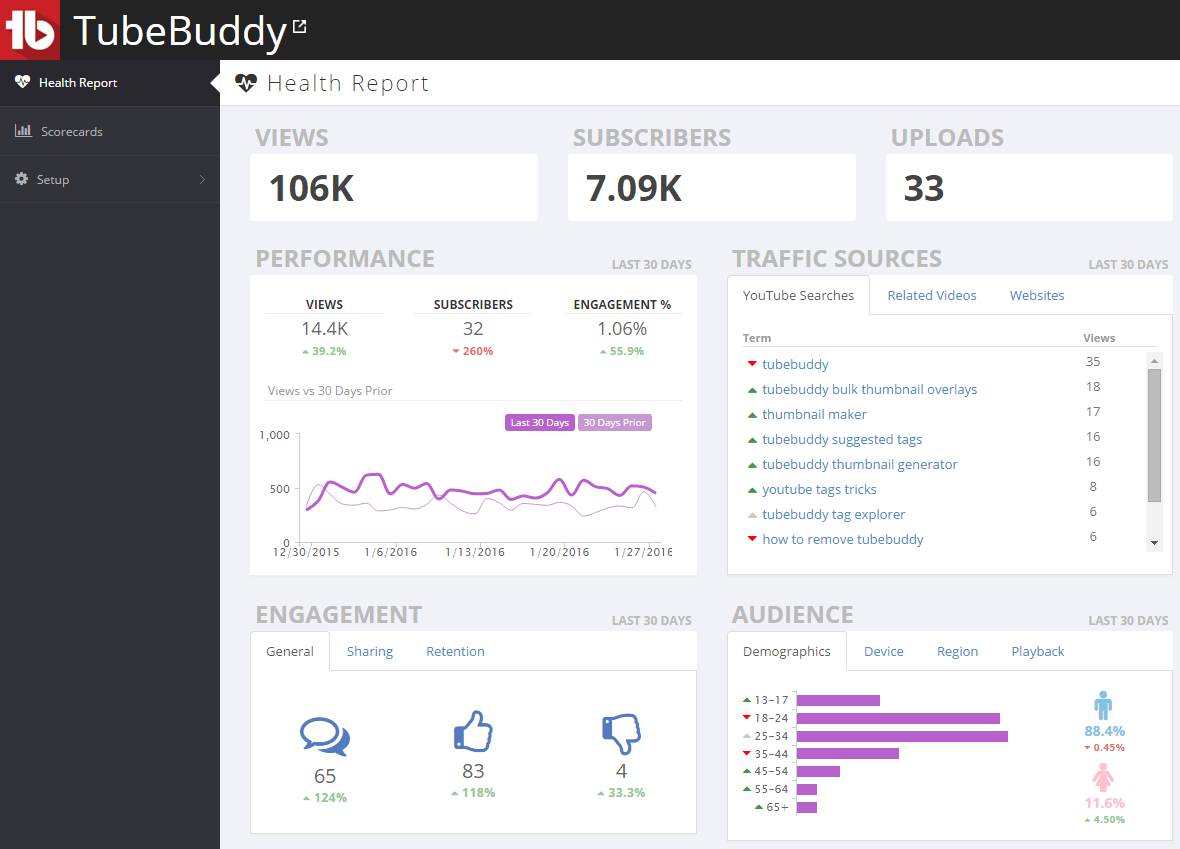
This is how it looks like in action:
How to Evaluate Your YouTube Channel With Tubebuddy's Health Report
At the top you'll see an overview of your views, subscribers and uploads.
There are four insights panels below.
Performance shows you how your views, subscribers and engagement has improved over the last 30 days.
Under Traffic Sources you'll find three tabs for YouTube search keywords, videos that recommended your videos, and websites that were linking or embedding your videos.
In the Engagement you can see your comments, likes and dislikes over the last 30 days, how many people shared your videos and via which channels, as well as number of minutes watched, average view duration in minutes and in percent.
The Audience section gives you an overview of your demographic, grouped by age and gender, devices, countries and how your videos were played.
Next Steps
TubeBuddy's Health Report is a very useful tool that allows you to quickly find the most relevant information without the need to learn how to navigate the Advanced Mode in YouTube Studio Analytics.
If you short on time and want to get a big picture on your channel growth, this is a real godsend.
Also check out my TubeBuddy review for even more cool features.


