What is a LinkedIn URL?
The LinkedIn URL is the address of your LinkedIn profile that someone has to type into their browser address bar to visit your profile.
Here is how my LinkedIn URL looks like: https://www.linkedin.com/in/iamtimqueen/
All profile URLs start with https://www.linkedin.com/in/ followed by the LinkedIn username, which in my case is iamtimqueen.
In this article, I am going to show you the benefits of personalizing your profile URL and show you how to change your LinkedIn profile URL step by step.

Benefits of a custom LinkedIn profile URL
It's easier to remember
By default, LinkedIn will assign each LinkedIn profile a unique username based on their first and last name combined with a random string of ASCII characters.
That's why the default LinkedIn URLs don't look very nice and are difficult to remember.
Let me give you an example. Which of the following usernames do you think is easier to recall?
My actual LinkedIn profile URL? https://www.linkedin.com/in/iamtimqueen/
Or a randomly generated example such as this? https://www.linkedin.com/in/tim-queen-a8nf76dkds93nd783h/
Now think about how much more business you could have because more people you met at a conference were able to look you up on LinkedIn...
I think the answer is very clear: Get a custom LinkedIn URL!
It's less prone to errors
Do you know the difference between 0 and O? Zero and the letter O.
How about I or l? Capital letter i and lower case L.
When LinkedIn adds random characters at the end of your LinkedIn username, it typically doesn't think that people might be able to confuse similar-looking characters.
By choosing a unique profile link you can avoid any confusion and make sure that people will be able to find you without accidentally believing that you deleted your profile because they typed in the wrong character.
It can be used in professional materials
Having unambiguous characters in your LinkedIn profile URL is especially important in print, where people have to read the URL with their eyes and then type them by hand into their browser.
It also looks much more professional to have a bespoke username and demonstrates that you put a great deal of care into everything you do, from selecting your profile URL to designing an outstanding business card.
This is true for all professional materials, from the printed business cards, PDF proposals, or email footers in your business email addresses.
It helps you with your personal branding
You are not limited to using your name. Your username can contain anything you want, as long as it fits within 3 and 100 characters.
That means you don't have to limit yourself to just using your name.
You could add a personal slogan or personal title to your URL. Some people don't use their names at all and just use their brand names.
This would allow you to create amazing looking headlines such as:
https://www.linkedin.com/in/tim-queen-your-knight-in-shining-armour/ 😍 or
https://www.linkedin.com/in/the-most-popular-linkedin-profile-according-to-me
It boosts your credibility
Do you know who doesn't put in the effort to personalize their LinkedIn profile link? Spammers and bot accounts!
Choosing a personal profile URL shows others LinkedIn members that you are a real human being who put some thought into customizing your URL.
It's a small thing that can instantly make you appear more credible on LinkedIn.
How to find your LinkedIn URL
To look up your own LinkedIn URL log into your LinkedIn account and visit your profile by clicking on your small profile picture icon in the menu bar, then click on View My Profile.
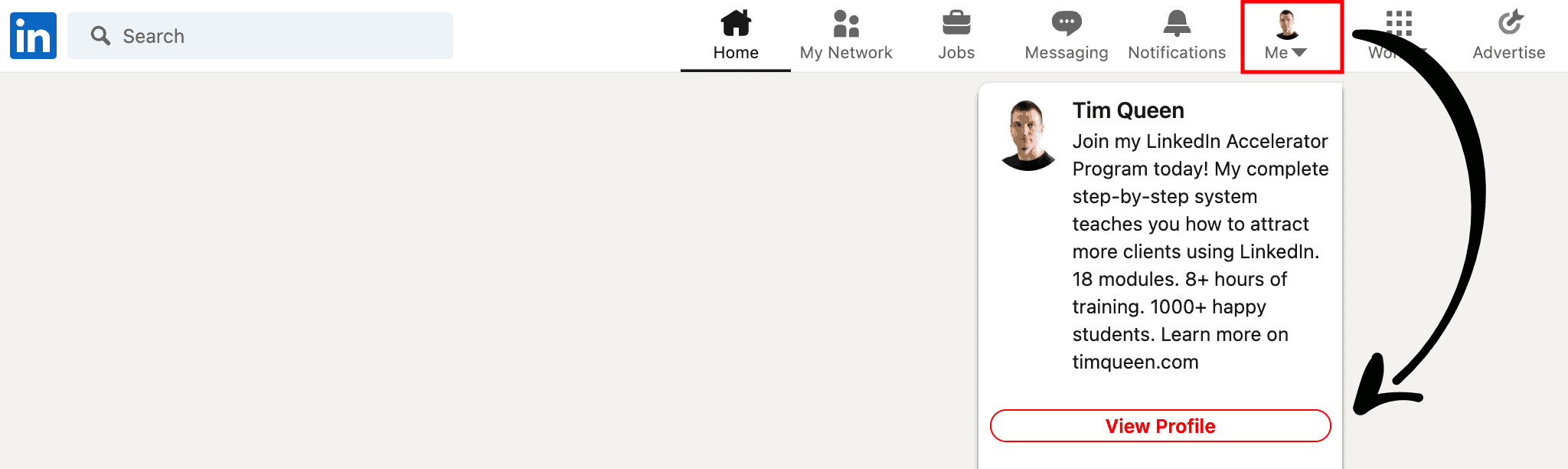
On your LinkedIn profile, check out the URL in your web browser. That's your LinkedIn profile URL.

How to create a custom LinkedIn URL
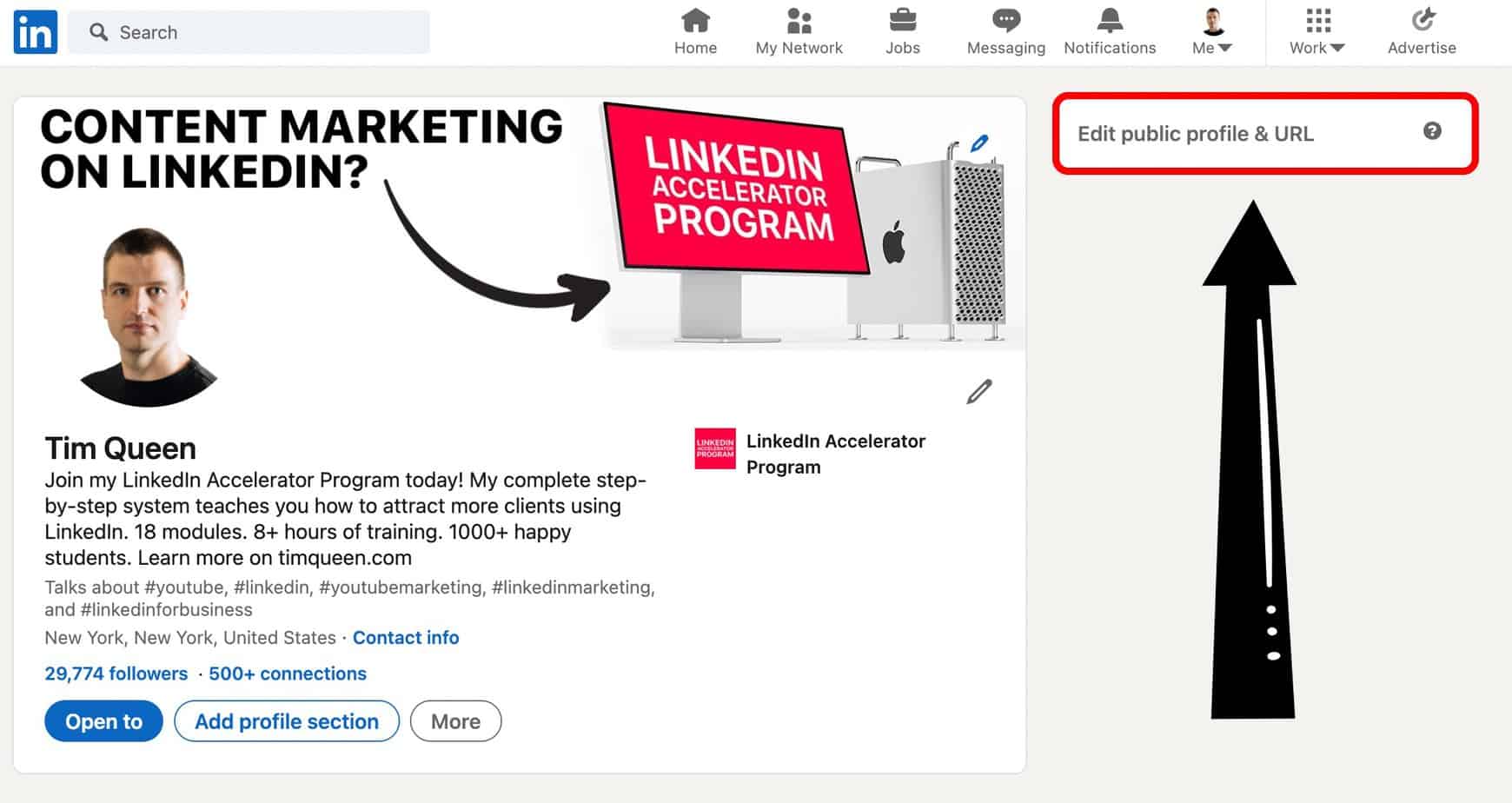
To create or change your LinkedIn URL, you have to visit the Edit Public Profile & URL page.
It's located in the right sidebar on your LinkedIn profile at the very top. Click the link and wait for the page to load.
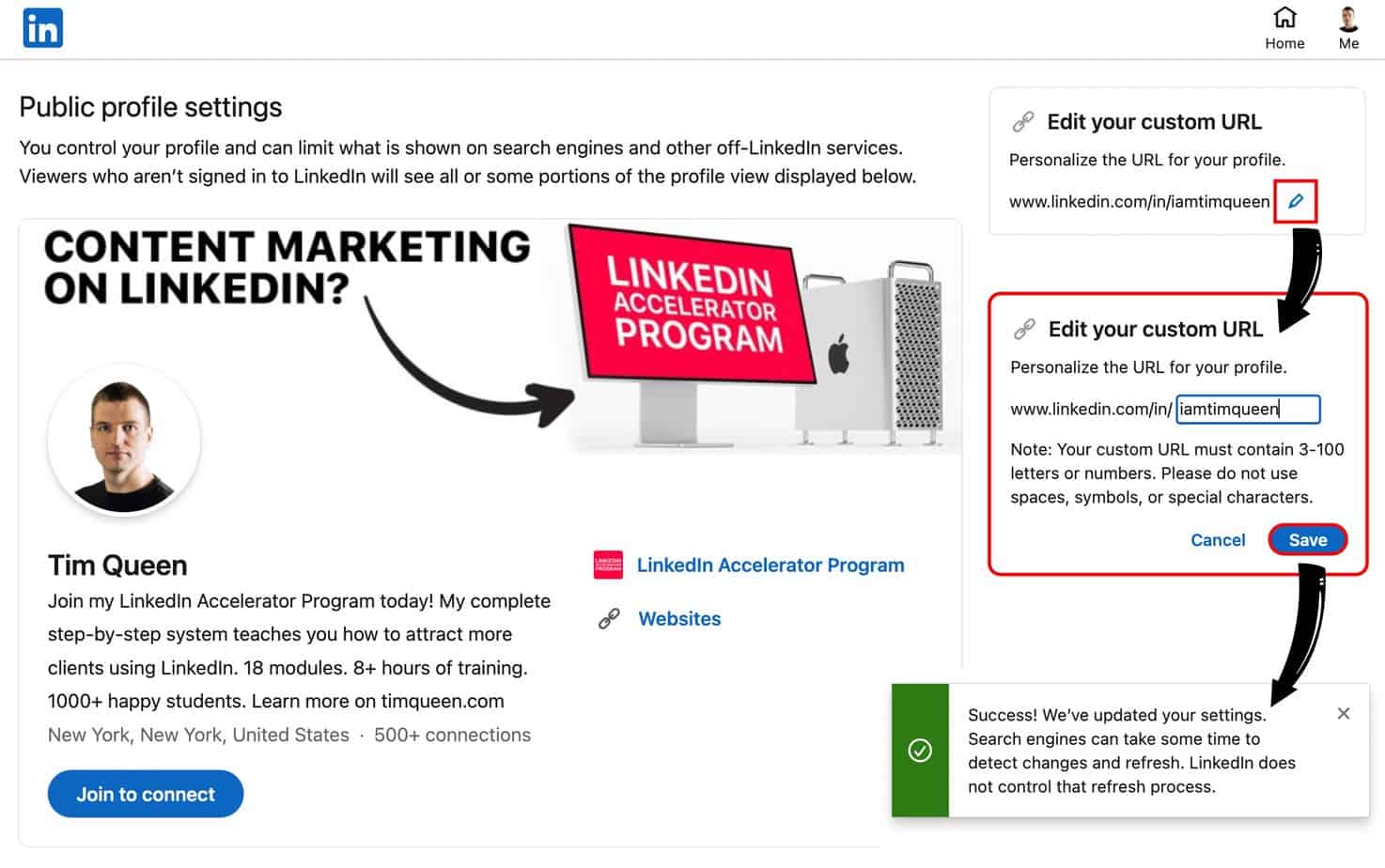
On the Public Profile Settings page, find the Edit Your Custom URL panel on the right sidebar and click on the pencil icon.
Now type in any username of your choice into the text input field and click Save.
If your desired LinkedIn username is already taken, LinkedIn will display an error message.
If all went well, you will be greeted with a green success message that reminds you that it will take a while for your LinkedIn profile URL to update in Google.
Downsides of changing your LinkedIn URL
LinkedIn won't forward visitors of your old profile URL to your new address.
That means that if your profile is indexed on Google, it might take a few weeks for Google to update your link. In the meantime, anyone who clicks on your profile URL will see an error page on LinkedIn that the requested profile wasn't found.
If you are speaking at events or podcasts, or are an active guest blogger, you know that it is very common for hosts to share links to your social media channels.
If you change your LinkedIn URL, all of the links to your previous LinkedIn profile address will instantly stop working.
To fix this you would have to write individual emails to each website or editor to get your outdated URL replaced.
This can be very time-consuming and some people might not be too happy if you regularly change your URL.
If you're just getting started I recommend asking organizers to always share a link to your website instead. And then on your website, you only have to update the link to your LinkedIn profile once.
Therefore it is highly recommended to put a lot of thought into selecting your profile URL at the start so you won't have to change your URL later.
How to change your LinkedIn URL
If you want to change your LinkedIn URL you follow the same steps as outlined in the "How to create a custom LinkedIn URL".
You log into your LinkedIn account, visit your LinkedIn profile, then click on "Edit Public Profile & URL".
Then you click on the pencil icon in the "Edit your custom URL" panel and hit save.
How to grow a strong personal brand on LinkedIn
Having a cool LinkedIn profile URL is just the first step to building a powerful brand on LinkedIn that allows you to attract new clients and customers.
To create the best first impression on LinkedIn, you also need an impressive headline to grab the attention of other LinkedIn users. In my article, I share various ways to construct an attention-grabbing headline that conveys the value of what you do - check it out: How to write the perfect LinkedIn headline.
To learn more check out my LinkedIn blog and read my free LinkedIn Hashtag Guide.
You can also have a look at my LinkedIn Accelerator Program which teaches you how to build a complete LinkedIn sales funnel with content marketing.