Why Is LinkedIn a Fantastic Platform for B2B Marketing?
Today, I am going to show you how to optimize your LinkedIn profile for LinkedIn SEO to show up at the top of Google and LinkedIn search results.
Over the last few years, LinkedIn has become the most important platform for doing business, networking, and finding like-minded people worldwide.
Today, companies and business owners access LinkedIn for virtually any concern relating to their business.
In terms of B2B lead generation, LinkedIn remains the top choice for businesses all over the world:
- LinkedIn is used by 1.1 billion people every day.
- LinkedIn has 72.3 million official company pages.
- A total of 200 countries are represented on LinkedIn.
- More than 1 billion interactions take place on LinkedIn pages alone every month.
- The amount of user-generated content on LinkedIn has increased by more than 60% in the past few years.
- The number of conversations between LinkedIn members has increased by more than 55%.
- LinkedIn message volume has increased by 23%.
- LinkedIn is used by 96% of B2B marketers to distribute their content.
According to Business Insider, LinkedIn has been the #1 most trusted social media platform for three consecutive years and is among the world's top 10 fastest-growing brands!
B2B marketing is the process of reaching out to other businesses with the intent of leveraging those companies as potential clients for your business.
To succeed on LinkedIn, you must have a strong network of prospective clients.
To accomplish this, you must optimize your LinkedIn profile using LinkedIn SEO.
Let me show you how LinkedIn SEO works, what LinkedIn SEO is all about, and how you can rank your LinkedIn profile on the first position in Google and LinkedIn searches so clients you want to work with come knocking at your door.
Let's find out while I walk you through my step-by-step process.
Benefits of Leveraging LinkedIn for Your Business
In terms of business-to-business marketing, LinkedIn is one of the most effective platforms.
I've outlined some reasons why LinkedIn should be integral to any B2B company.
Brand awareness
For many businesses, the purpose of using social media is brand awareness.
LinkedIn is a wonderful platform for building brand awareness, but not how most people, especially companies, think.
Unless your company is Nike or Coca-Cola, you probably can't afford to burn money on LinkedIn Ads until every John and Jane Doe knows your brand.
It just doesn't make any sense.
A much better approach is to share valuable content useful for top-of-the-funnel people within your customer journey.
Focus on creating problem and solution awareness first, and then by proxy, brand awareness after people are convinced and trust you because of your valuable content.
Lead generation
By utilizing LinkedIn SEO and turning your LinkedIn profile into the first step of your LinkedIn sales funnel, you can easily convert LinkedIn users who are already problem-, solution-, and brand-aware into high-quality leads.
You can build a fully automated lead generation machine on autopilot by providing smart lead magnets that allow you to qualify and segment potential customers.
I share my entire LinkedIn sales process in my LinkedIn Accelerator Program.
Networking
Networking is of great value to most businesses, particularly to those in the B2B sector.
Unfortunately, meeting and networking in person are often impossible because of time constraints, travel restrictions, and other limitations.
Thanks to its built-in networking features, LinkedIn provides us with an easy way out by sending private messages and scheduling video calls directly from within the LinkedIn platform.
How Does LinkedIn SEO Work?
In a nutshell, search engine optimization (SEO) is all about keywords.
People use specific terms and phrases to find relevant information on solving various business challenges using Google or other internet search engines, including LinkedIn.
Search engines index webpages, LinkedIn pages, and personal LinkedIn profiles alike and then compare a user's search phrase with the keywords and phrases found on each page to determine which results to display and in what order.
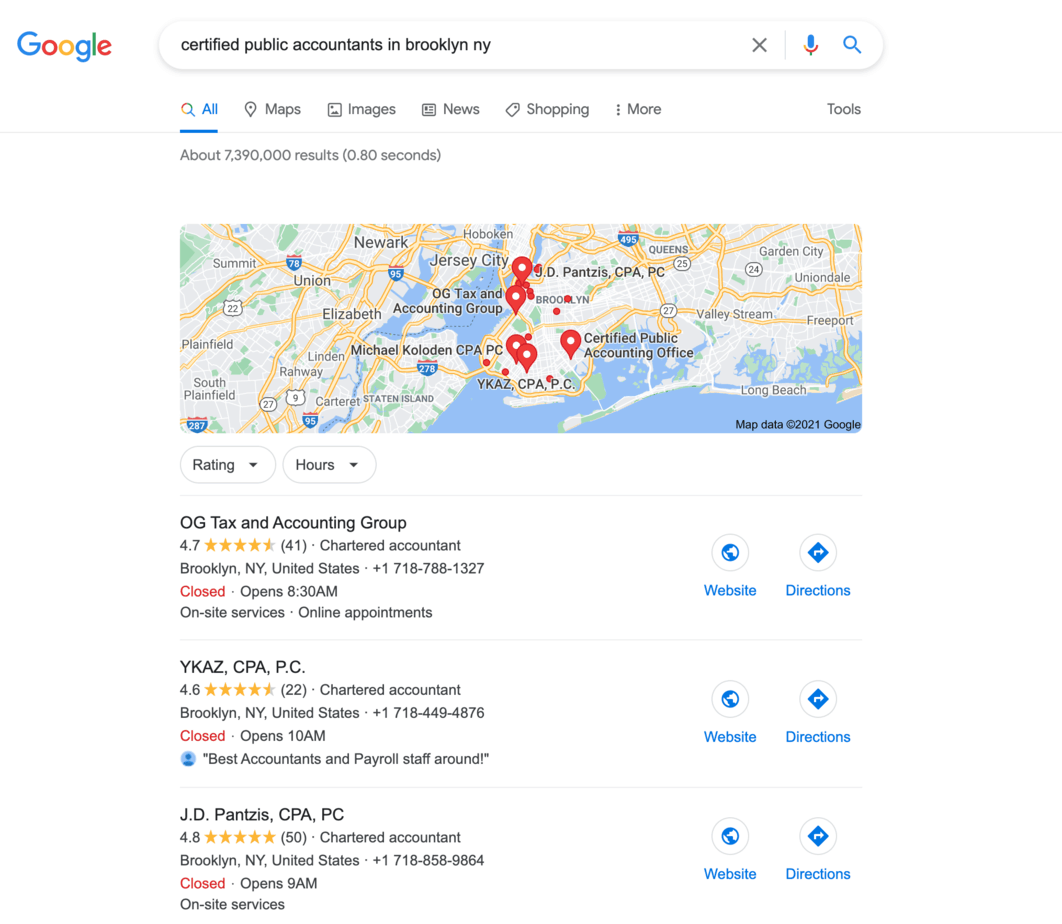
When searching for "Certified Public Accountant in Brooklyn" on Google, several results appear on the browser page.
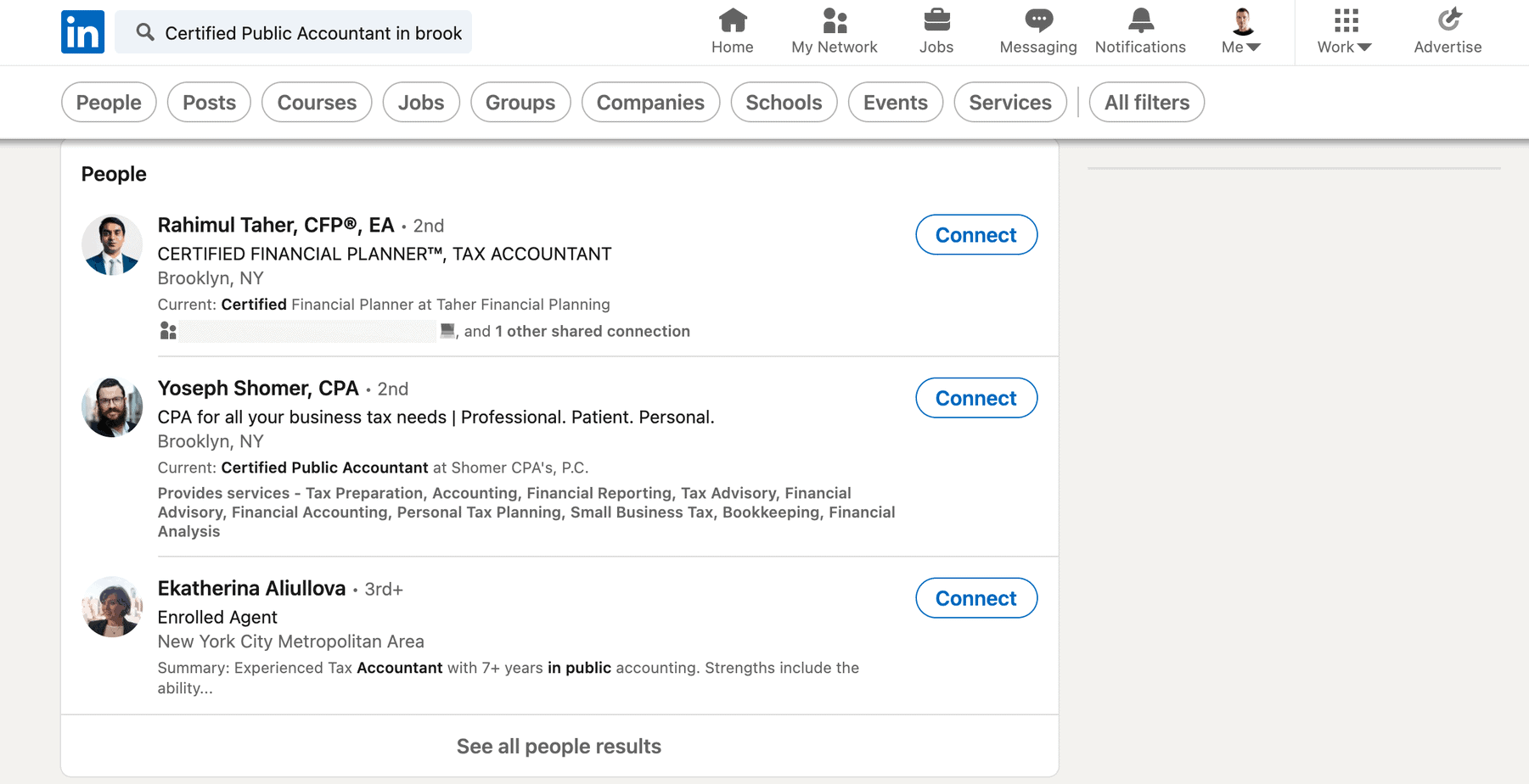
You perform the same search on LinkedIn.
You can perform the same search on LinkedIn for individual people by their role titles.
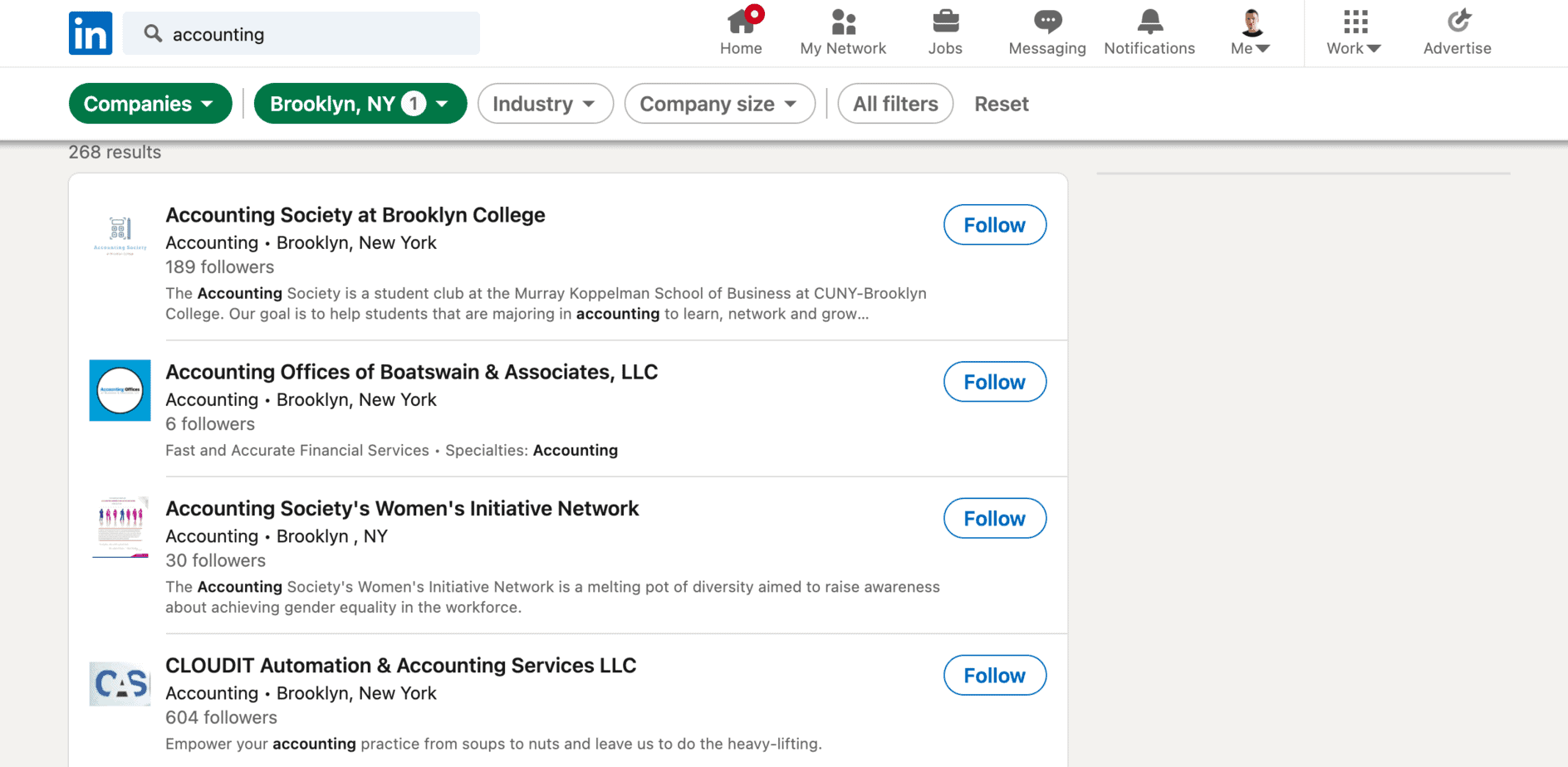
Or you can search for companies on LinkedIn within a specific industry.
LinkedIn SEO is all about understanding which keywords and phrases to include in which sections of your LinkedIn profile so your name and photo appear at the top of search results.
To avoid being penalized for over-optimizing your LinkedIn profile for SEO, it's equally important to understand how to balance keywords and relevant synonyms and the density of keywords.
What Is the Best Way to Win the LinkedIn SEO Race?
Make your LinkedIn profile visible to the public.
The first step to optimizing your profile for LinkedIn SEO is making it public.
Otherwise, LinkedIn or Google will not index your profile in their search results or severely limit your visibility.
Even if you managed to get indexed, your search results would look like this.
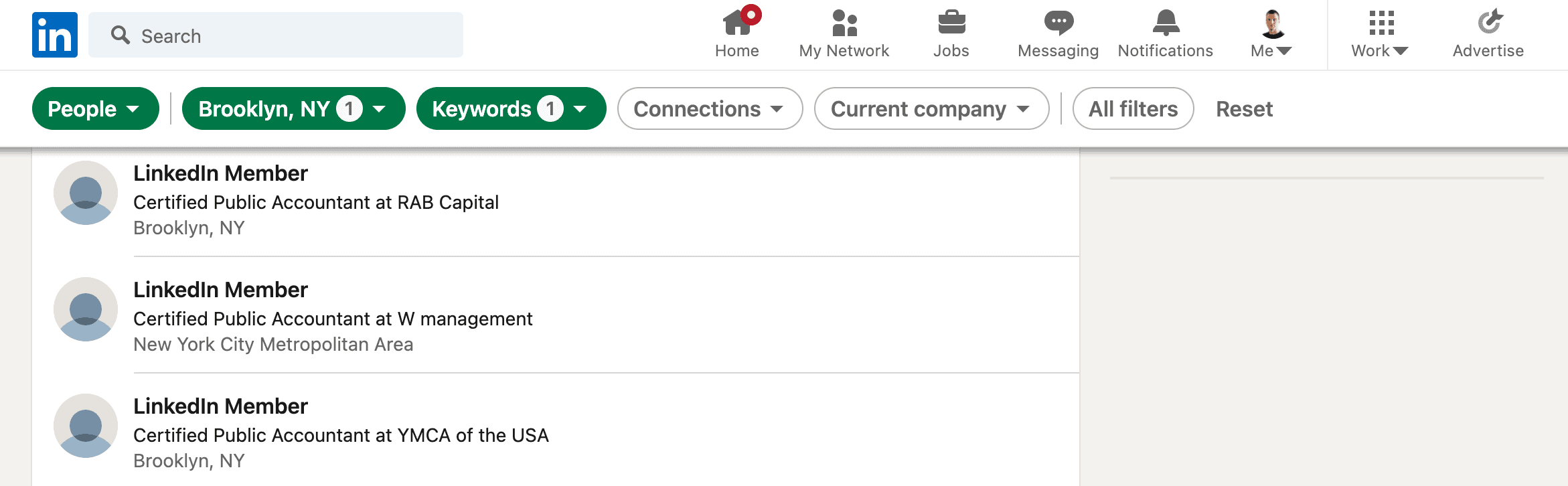
Let's be honest.
Nobody would ever click on any of these LinkedIn search results without a name or photo.
To make your profile public, visit your profile. Then click on "Edit public profile & URL" at the top-right corner.
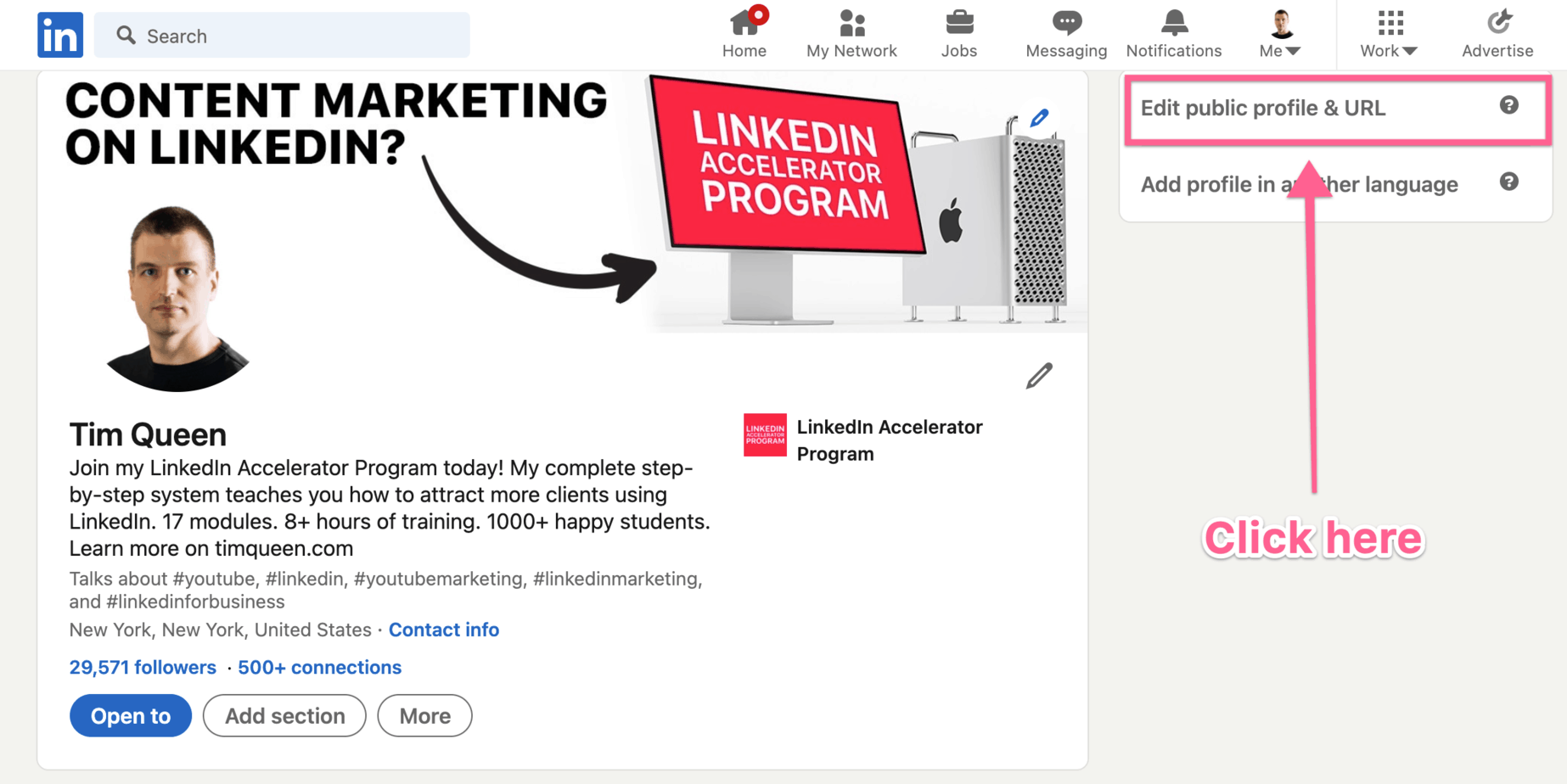
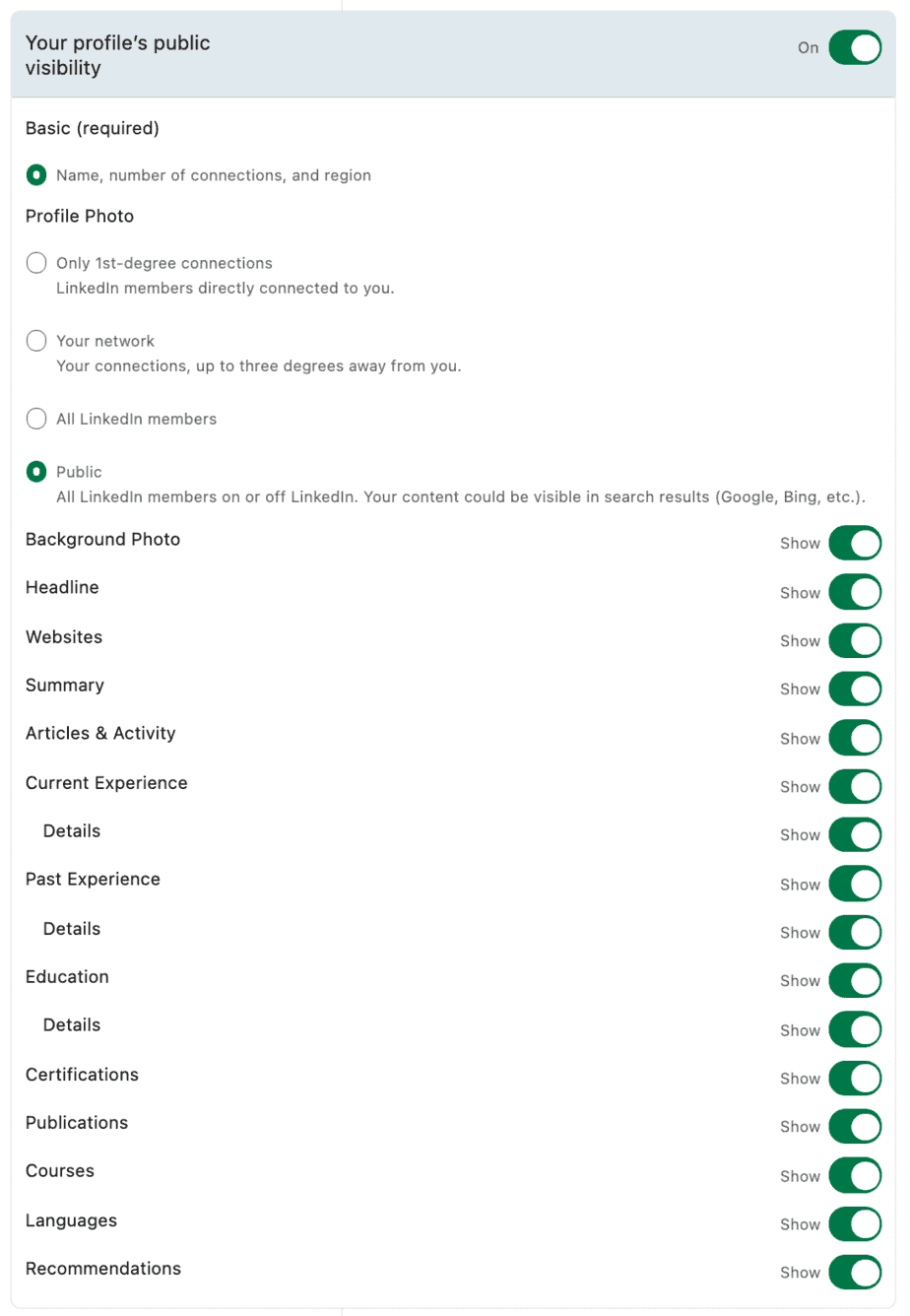
Next, locate the "Edit Visibility" section on the right and change your settings to this:
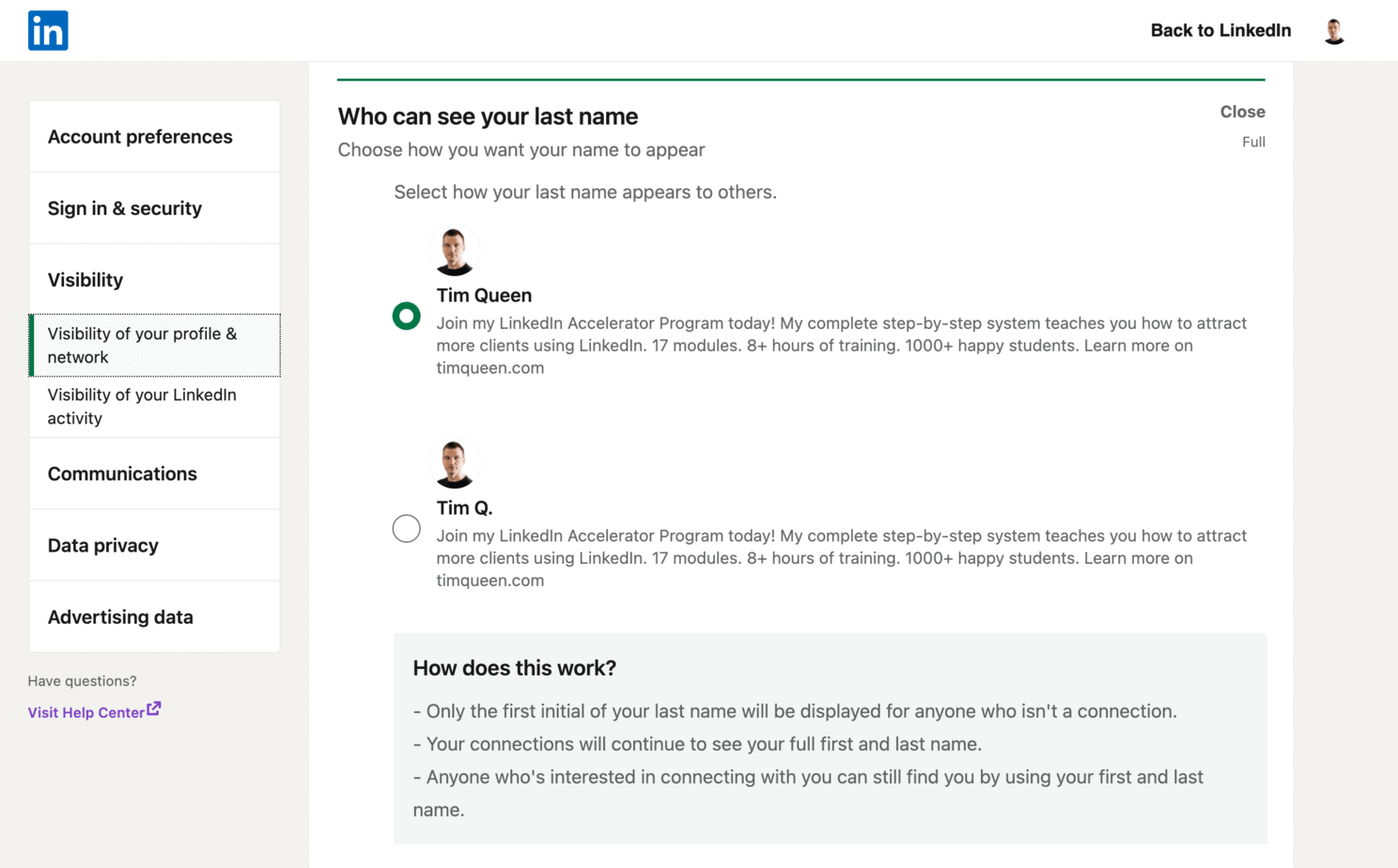
Next, open your LinkedIn settings page, and open the Visibility tab and make sure that you select "Full" so your full name shows up in searches.
Create a keyword-rich profile
What is the best way to create a LinkedIn profile that is keyword-rich?
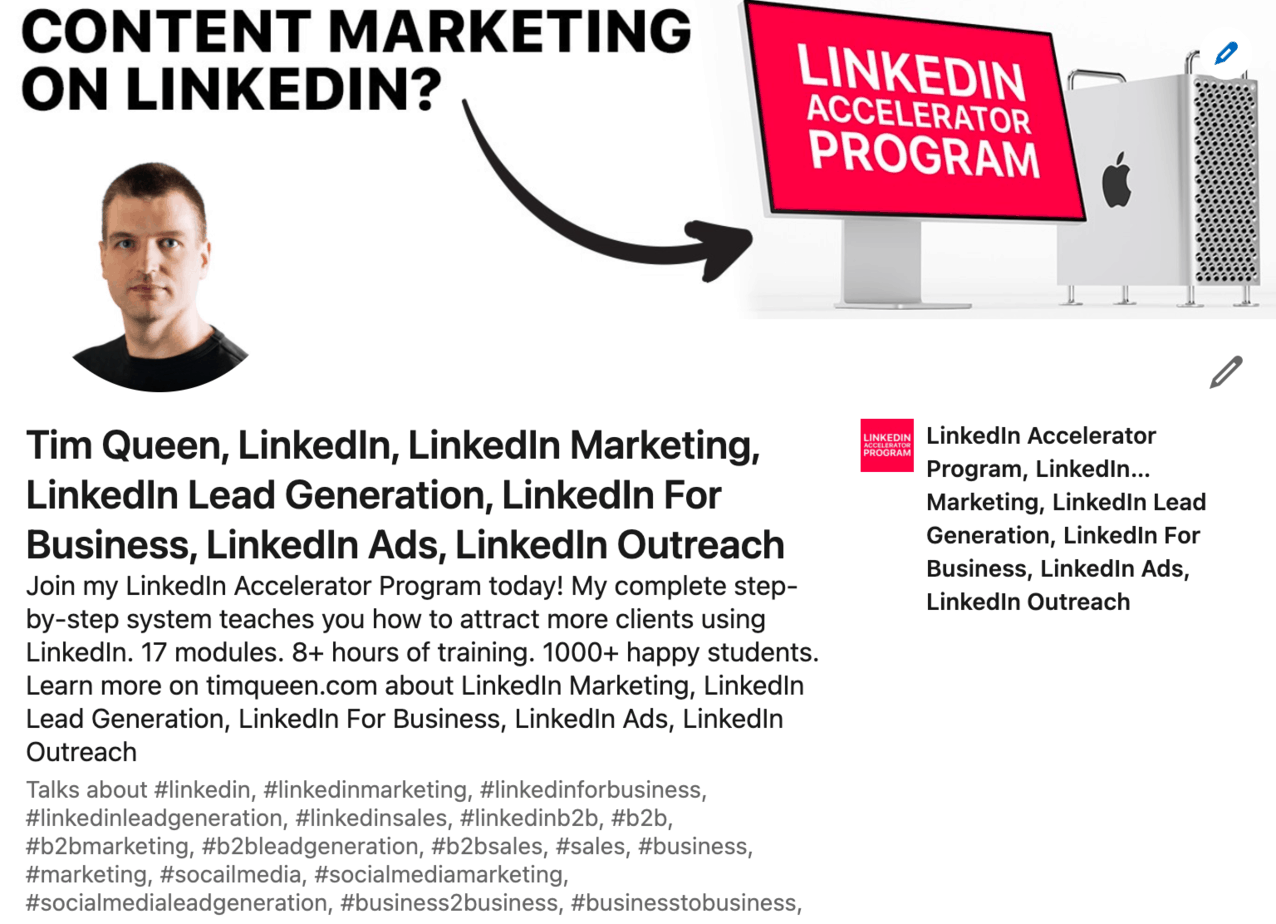
What you should never do is stuff in as many keywords as possible.
Not only will it look silly and be bad for your profile readability, but it won't work either because of the unnatural keyword density.
LinkedIn and Google will flag your profile as keyword spamming and hide it from search results.
Here is an example of how keyword spamming might look like on my LinkedIn profile.
The best way to add keywords to your LinkedIn profile is by embedding them in natural language.
Remind yourself. You are a human being, so don't write as if you were a robot.
How would you explain what you do to a friend?
For fun, let's say you were a plastic surgeon.
Instead of writing down a long bullet point list of all your services, you could explain some of the most common misconceptions about plastic surgery and then transition to explaining some of your other equally important services.
This way, you still include important keywords such as rhinoplasty or any relevant synonyms such as increasing or reducing the size of the nose.
Still, you do it in a very natural way by explaining complex ideas through storytelling.
Use hashtags
If you have activated LinkedIn Creator Mode for your profile, you can add up to five hashtags to your profile.
Besides other cool features and benefits such as switching your default button from Connect to Follow and reorganizing the layout of your LinkedIn profile, LinkedIn Creator Mode also offers you to select up to five hashtags to highlight topics that best represent your business and brand.
Make sure to select broader hashtags that potential customers would be interested in.
As an example, if your company is working in the field of artificial intelligence.
You are more likely to find more LinkedIn users engaged with posts containing hashtags such as #ai or #machinelearning.
More specific hashtags such as #gpt3 or #skynet are always less popular and might prevent LinkedIn from understanding interested correlations due to a lack of data points.
Therefore, your profile might be shown and recommended to fewer people.
To learn more, do check out my article on how to find the best hashtags to use in your LinkedIn content.
Search the most appropriate keywords for your LinkedIn profile.
To find SEO keywords for your profile, start with an in-depth keyword research, as you would do for your business website.
Here are some of the tools that I use for all of my keyword research:
- TubeBuddy Keyword Explorer
- Google and YouTube autocomplete
- Google Trends
- SEMrush Magic Keyword Tool
- Quora
- Answer The Public
- Google Ads Keyword Planner
For more ideas on finding the perfect keywords for your LinkedIn profile, you can check out my article on building your content cluster strategy to boost your profile, and my free LinkedIn Hashtag Guide will help you find the best hashtags for organic reach on LinkedIn.
Optimizing Your LinkedIn Profile for SEO
Optimize the most important LinkedIn areas of your profile.
Your name
Consider adding a mini title after your last name.
Add a comma, followed by your title.
For example. John Snow, CPA
This is especially useful if your title or qualification is a frequently searched term on LinkedIn or Google.
Headline
Your name and headline are part of the above-the-fold content of your LinkedIn profile.
As such, readability is more important than keyword optimization.
For beginners, I recommend a simple three-part headline formula.
Who + Problem or Solution + Benefits.
I help startups get featured in press and media to drive brand awareness and sales.
Follow this with a divider and a list of keywords.
I help startups get featured in press and media to drive brand awareness and sales. | Talk to me about PR Outreach, Media Relations, Sponsored Content, and Crisis Communications.
You can learn more about writing an outstanding, keyword-rich headline in my recent article. I have compiled the most comprehensive collection of LinkedIn headlines with over 39 unique headline formulas and examples for entrepreneurs, professionals, and job seekers.
About section
Your About section allows you to add a detailed introduction about yourself to your LinkedIn profile.
As with most sections of your LinkedIn profile, Initially, only the first two to three sentences will be visible until a viewer clicks on "Read More".
That, however, doesn't affect your LinkedIn SEO.
Google and LinkedIn will always consider the full length of every profile section.
There are two hidden opportunities with limited visibility that have a huge impact on your LinkedIn SEO.
LinkedIn and Google will use your industry and your location to display your profile in context.
Depending on the search term and context, a chemical engineer who works in the pharmaceutical industry might not be as relevant as a chemist working in food processing and vice versa.
So, make sure that your LinkedIn industry reflects what potential customers are looking for.
The same is true for your location.
People and companies frequently consider geolocation in their searches.
Always make sure to keep your location up to date.
Featured section
Your featured section allows you to attach rich media such as photos, videos, PDF documents as well as URLs to an external website right to your LinkedIn profile.
(Side note: if you need ideas to create PDF documents (also known as carousel posts) on LinkedIn, my "How to create LinkedIn Carousel Posts with Canva" would come in handy.)
To optimize your profile for LinkedIn SEO, I recommend taking advantage of the media title and description field to add relevant keywords to your profile.
Experience / Education
Your experience and education sections allow you to add most of your profile keywords without being considered spammy.
Instead of limiting yourself to using only your job or role title, consider making it more descriptive by adding more keywords.
You can also apply the same recommendation for your About section and incorporate storytelling into the description of each role or study.
Pro-tip: If your company hired you under the umbrella of "one role title", but you actually did the work of three different role titles, why not add a new section for each virtual job title under the same company to reflect your extended expertise and experience.
This way, you can also add three times the number of keywords under the umbrella of one company.
Remember, it's not about being 100% accurate.
It's about telling a coherent and relevant story for your target audience on LinkedIn.
That might require updating and rewriting your experience and education section occasionally to reflect your updated goals.
Licenses & certifications
The licenses and certifications section is the spot to display your professional expertise and achievements that are highly recognized and valued in your field.
For specific industries where continuing certifications are highly regarded, this is the place to showcase the level of knowledge you’ve attained and the consistency in updating your knowledge in the space.
For example, if you are running a bookkeeping or accountancy practice in the UK, you can add an ACCA (Association of Chartered Certified Accountants) practicing certificate, while a similar equivalent in the US would be a CPA (Certified Public Accountant) certification.
Skills
Although this part is lower down the page, it is specifically designed for SEO.
Your talents are almost certainly also relevant keywords.
Include the products and services you offer here.
As an example, if you have your own accounting firm, the skills you can include would be Financial Planning & Analysis, Tax Preparation & Audit, and International Tax Regulations, etc.
Recommendations
Recommendations have many benefits. It allows customers to build trust with you quicker through social proof.
It's an incredible source to enrich your profiles with more keyword-focused content.
So, how do you get your customers and clients to write recommendations with relevant keywords?
Prewriting recommendations for them has two huge advantages.
It makes it much more likely that your customers will agree to write a recommendation for you in the first place and to finish it, rather than letting an unfinished draft rot away in procrastination purgatory.
It also gives you full control and includes all relevant keywords that your customers might not know would be important to enrich your profile with even more keywords.
Here is how to structure your pre-written review templates.
Part one, what was your customer struggling with before they found you, using problem-specific keywords.
Part two, how did your customer find you and why they decided to work with you, using relevant, product-, and solution-specific keywords.
Part three, what results did your customers achieve by working with you using benefit- and results-specific keywords.
Accomplishments
Publications
This section allows you to showcase your work and contributions in articles and respected industry publications. Make sure to highlight keywords about the topic, theme, and content of each publication.
If you are a published author, create an entry for each of your books and include the table of contents in the description and the book description.
Patents
If you published any patents, make sure to include them.
Not only will this raise your authority, but it also allows you to add a ton of hyper-specific, industry-specific keywords to your profile.
Make sure to start the introduction with a layman's version of your patent, and then go into more detail and a more technical description further down in the text.
Courses
Have you completed any industry-specific courses outside your formal education?
Then add them as individual courses in the Accomplishments section of your profile.
You can include an outline of each course and the course description to add relevant keywords to your profile.
Projects
This is a great section to highlight important projects from your work, education, and life in general.
Maybe you volunteered for a remarkable project, and you learned valuable work-related skills that allow you to add interesting keywords to your profile.
Or you were in charge of a work project that made a huge impact on many people and was featured in different publications. Add it!
You can also add your own private projects outside of work if relevant.
Projects are a great addition to your LinkedIn SEO toolkit that allows you to add many relevant keywords by spacing them out over many sections of your LinkedIn profile.
Honors and awards
Any industry-specific honors and awards can boost your visibility and success on LinkedIn.
They instantly raise your authority as an industry leader and also allow you to add super-relevant keywords to your profile.
Let's say you are a designer and have been rewarded with the Red Dot Design Award.
Explore the About section on the Red Dot website and then rewrite and explain what this award is about, why it's such a great honor to receive it, and in which category you've been recognized.
Test scores
Test scores and results are usually most relevant for job seekers and not for business owners.
But if the title of a specific test includes relevant keywords, why not include it in your profile?
Languages
If you are proficient in more than one language and would love to have international clients, this is your chance to shine.
If you can speak and understand languages of native or business proficiency level, put them all in.
This also increases the probability of your profile showing up in Google and LinkedIn searches from different geographic regions.
So make sure to include any languages you speak fluently.
Next Steps
LinkedIn is one of the most effective Internet platforms to connect with new clients.
By optimizing your profile for LinkedIn SEO, you maximize the chances to show up as one of the top page one results on Google and LinkedIn searches, whenever a potential client is seeking a solution for a specific business challenge.
If you are interested in learning more about how to create a successful LinkedIn sales funnel for your business, have a look at my LinkedIn Accelerator Program.
You can also download my free LinkedIn Hashtag Guide which helps you find the best hashtags for your LinkedIn profile and LinkedIn posts.