What It Takes to Become an Expert on YouTube
Let's say that you want to become the go-to YouTube channel for a specific niche that offers products and services for sale on your YouTube channel.
For this to happen, YouTube has to perceive you and your channel as an authority on a specific topic for this to happen.
In other words, if you don't get into YouTube's good books, the potential for exponential growth on YouTube is zero.
To attract potential buyers who are eager to watch your YouTube videos, you need to create relevant, high-quality, and in-demand videos that address some of their most pressing business challenges.
These videos not only have to perform well in terms of getting a high number of YouTube views, achieving a high retention rate - of getting viewers to stick to the end, they also have to be useful to potential buyers.
The more you are able to cover a wider range of specific topics, the better YouTube's AI will be able to categorize you as an authority in your field.
Otherwise, your organic growth on YouTube will be limited.
I recommend publishing at least one new YouTube video per week, or about 50+ per year.
Ideally, it would be best if you planned your content strategy in advance to cover the next 3 to 12 months before you even pick up your camera.
Creating topic clusters for your channel niche is the best way to accomplishing this without getting overwhelmed.
Content clusters work similarly to Amazon's "People who bought this product also bought these other products".
YouTube assumes that people interested in one content cluster are almost always also interested in nearby clusters.
Once YouTube has enough data, it might suggest new and unrelated content clusters to viewers based on viewing data from other YouTube users who share a common interest in 2 or more content clusters.
By creating a good YouTube content strategy based on content clusters, you are able to create a large amount of content in bulk, which will help build trust with your prospective customers, and as an added bonus, shortens the time it takes to join the YouTube Partner Program significantly.
Avoid Inconsistent and Unrelated Video Ideas.
Many YouTubers who are just getting started on the platform don't know how to create a YouTube content strategy for their videos.
They always live from hand to mouth when it comes to video ideas.
If you allow yourself to be guided solely by intuition and spontaneous ideas, your videos will be random and all over the place.
This causes content to be inconsistent and unrelated, which hinders your channel growth.
Another downside of mapping out individual video ideas without structure is that YouTube doesn't recognize your channel as an authority in your niche.
Let me give you a good analogy with puzzles!
Think of each video you publish as a puzzle piece. The more videos you publish, the more puzzle pieces are put on the table.
If you show Google enough puzzle pieces from the same puzzle, it will eventually be able to see the whole picture, even with incomplete information.
On the other hand, if you were to pick random pieces from various, unrelated puzzles, Google would be very confused.
If they don't know in which expert bucket to put you, they don't put you into any bucket at all.
It's absolutely vital that Google puts you in the right expert bucket.
Otherwise, organic growth stagnates because YouTube doesn't understand to show your videos to.
How Does YouTube Determine Who Is an Expert and Who Isn't?
YouTube uses its AI to map out any possible area of expertise imaginable.
You can think of this as a gigantic mind map, where each branch of each tree splits up into hundreds of thousands of smaller branches.
The further down you follow a branch, the narrower a niche.
Every day the AI learns, becomes smarter, and adds and refines new areas of expertise.
For example, a few years ago, the area of expertise, "TikTok marketing," didn't exist. Today, it's a well-defined niche.
YouTube takes this expertise map and compares your YouTube channel against it to see if you fit in somewhere.
It accomplishes this by comparing each of your videos against the global expertise map.
Every time your video matches, a checkmark is added to all matching tree branches, including all parent branches.
You would get bonus points if your video performed very well in the matching category, for example getting a ton of views, high watch time, likes, comments, shares, etc.
Eventually, some branches will have more points than others.
These are the branches in which YouTube believes that you are an expert.
To be perceived as an expert in a broader category branch, you have to have points in multiple subtrees.
The higher your score, the more likely YouTube will recommend your videos to your ideal audience, thus boosting the growth of your channel.
Sounds complicated?
It's not. Let me explain!
All you have to do is to take a really good guess about how YouTube's secret expertise map looks like and then proactively create videos for various, specific branches you want to be perceived as the expert for.
I call this process building a YouTube Content Cluster Content Strategy.
What Are YouTube Content Clusters?
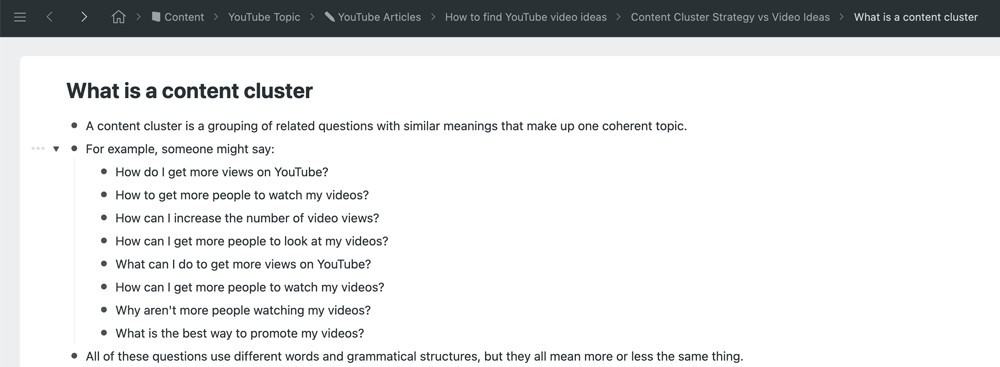
A content cluster is a group of related questions with similar meanings that form one coherent topic.
For example, someone might say:
- How do I get more views on YouTube?
- How to get more people to watch my videos?
- How can I increase the number of video views?
- How can I get more people to look at my videos?
- What can I do to get more views on YouTube?
- How can I get more people to watch my videos?
- Why aren't more people watching my videos?
- What is the best way to promote my videos?
All of these questions use different words and grammatical structures, but they all mean more or less the same thing.
Luckily for you, YouTube and Google have both incredible AI algorithms capable of identifying the intent for each search query to put them all together under the roof of one content cluster.
Someone who owns a YouTube channel wants to learn how to get more people to watch their videos.
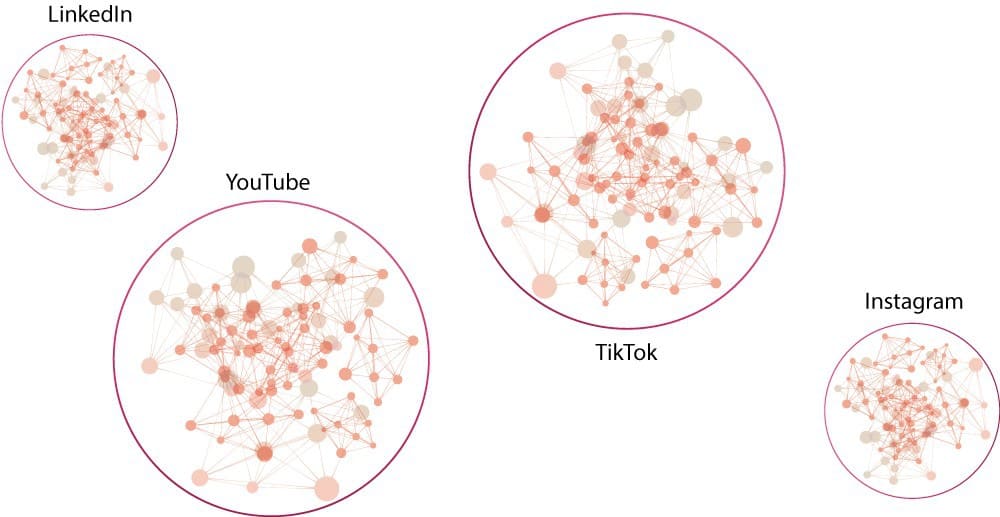
Disconnected content clusters
You can think of content clusters as bubbles.
Each content bubble contains everything there is to know about ONE topic, for example, all possible questions and answers.
Content bubbles with similar topics and ideas are closer to each other.
For example, "getting more video views on YouTube" and "getting more watch time on YouTube" are very closely related, while "getting more video views on YouTube" and "what is the best camera for YouTube videos" are not, and thus are further apart.
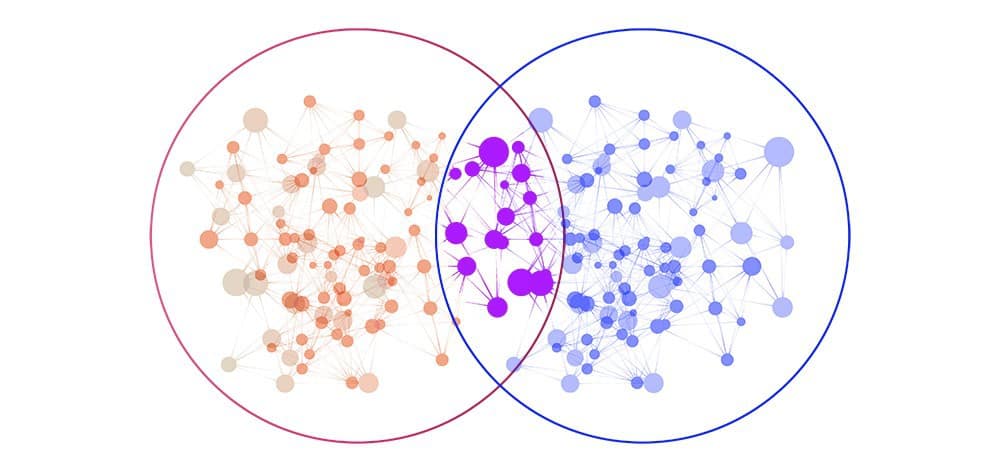
Connected content clusters
It is typically the case that content clusters that are close to each other overlap to a certain degree.
Increasing YouTube views and increasing YouTube watch time, for example, use some of the same strategies, such as optimizing video titles and video thumbnails.
Additionally, optimizing video titles intersects with other content clusters, such as "optimizing videos for YouTube SEO".
My recommendation is to create a new content cluster every time two existing content cluster bubbles intersect in a significant way.
Sub clusters
It is possible to break down each content cluster into smaller sub-clusters that exist within the parent cluster.
Getting more watch time on YouTube, for example, could have two sub-clusters explaining "absolute watch time in minutes" and "relative watch time in percent".
If a content cluster represents a specific problem, some of its sub-clusters could represent individual solutions. Each solution sub-cluster could include specific instructions, steps, processes, and tools.

Do I Really Need a Content Cluster Content Strategy for My YouTube Channel?
You may ask yourself. Is all of this work really necessary? Can't I make videos about things I like?
Anyways, I already have enough on my plate, working hard on getting 1,000 YouTube subscribers and 4,000 hours of watch time to finally join the YouTube Partner Program.
Spending time designing amazing YouTube thumbnails, optimizing the click-through rate of my YouTube video, and so much more.
And yes, you are absolutely right.
Becoming a professional YouTuber requires a lot of time and effort.
But you want to be smart about it.
If you create 1000 random videos, it might take 10 years to see tangible results.
On the other hand, YouTube channels with a smart content cluster strategy often achieve good results with just 10 to 100 videos.
If you are serious about growing your YouTube channel, you have to treat YouTube as a business.
Your goal is to figure out what type of content you have to create that has the potential to attract an audience of ideal future customers.
What are the specific themes and topics these ideal buyers are interested in?
Understanding these topics will allow you to map out all relevant content clusters that you need to cover.
Once you have mapped out your content clusters, you can easily generate thousands of fun and super targeted video ideas that are tailored towards helping you grow your YouTube channel with ideal customers.
An effective content cluster strategy will make your life a lot easier and will provide a solid foundation for your YouTube success.
Developing Your YouTube Content Cluster Content Strategy
There are two great options when it comes to mapping out content clusters.
You can use pen and paper or use software and apps to accomplish the same digitally.
Using paper to brainstorming and map out your content clusters has a lot of advantages. You can use physical space to move ideas around and to restructure clusters with ease.
This is especially useful for people who favor a hands-on approach that allows them to use physical space to sort out their thoughts.
The downside of paper is that it's challenging to search for something at a later point unless you want to flip through hundreds of pages.
Digital apps do a much better job when it comes to organizing and finding ideas with built-in search tools.
I personally love both. I started with paper and today use apps almost exclusively.
Have a look at my personally recommend methods for both paper and digital.
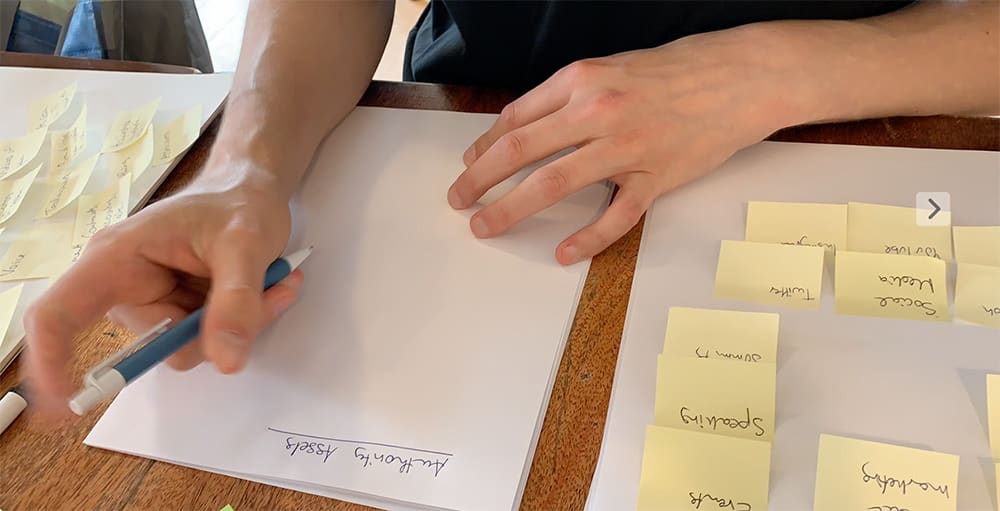
Paper Content Cluster Workflow
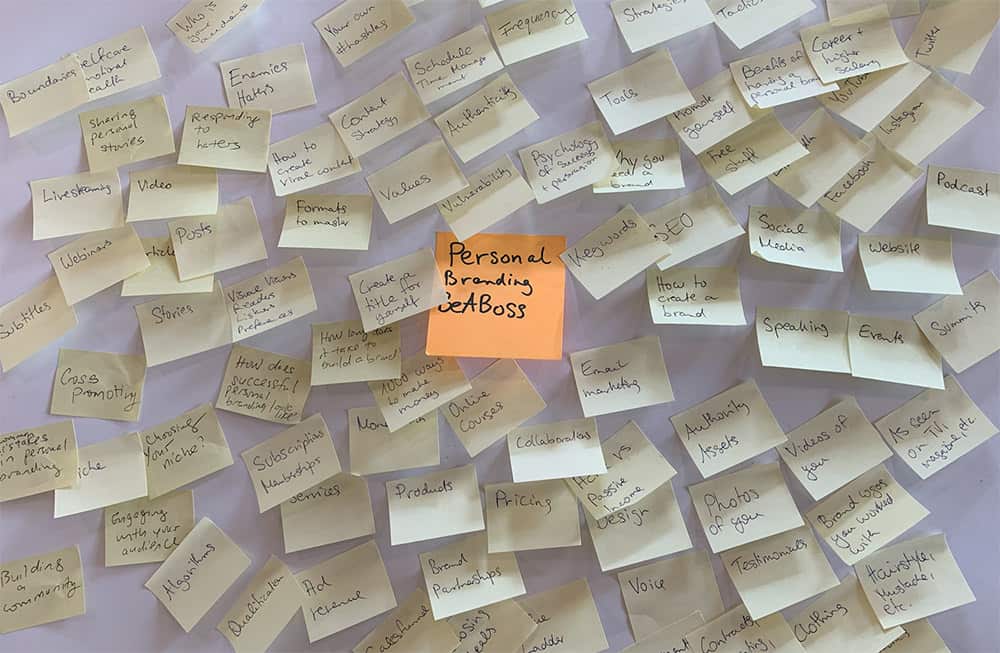
Use flashcards or post-its
Purchase a box of flashcards or Post-it notes to get you started.
For each content cluster, create big-picture title cards using different colored paper or colored pens.
Using a different color, create broader topic themes and ideas within each cluster.
Place all cards or Post-its on a big table or on the floor and arrange them by similarity. Cards with similar topics are placed closer together. You can also separate different content clusters by adding space between them.
There will be times when you will find your initial cluster name is too restrictive. It can make sense to break up one larger cluster into two or more smaller clusters in these cases.
Rename your original content cluster title, and add additional title cards for your new clusters. Move sub-cluster cards around and sort them into the new categories.
After you have mapped out your content clusters, pull out your phone and take a picture of each one.
I recommend using transparent punched pockets to keep all sub-clusters within one larger content cluster together.
You can also think about wrapping each stack of cards with a rubber band as an extra layer of protection so cards don't get lost.
Make sure to put the title card of each cluster on the top, so you can quickly flip through your collections.
Use a binder to stack all related content clusters on top of each other. You can use divider cards to add a third content cluster hierarchy level to your folder.
How to turn your flashcards into videos
When making a new video, grab a content cluster you like, remove the rubber and then go through each card one by one.
Decide which ones you want to make a video about, then write a bullet point outline on the other side of each card.
Make a new stack with today's filming list, wrap it in a rubber band, and bring it with you.
It's quite easy to go through your stack from top to bottom to get everything done in time, and it allows you to reread your most important bullet points before filming begins.
Use a whiteboard
A whiteboard is another great tool for brainstorming your content clusters.
Start by setting yourself a goal for how many content clusters you want to create, and then divide your whiteboard into equal sections.
I recommend aiming for no more than 6 to 10 content clusters at a time.
Write the content cluster title at the top of each square in one color, then use a different color to add sub-cluster ideas below the title.
If you have to re-arrange topics, erase them with a whiteboard erase and write them down in another square.
Due to the nature of whiteboards, the only way to conserve your content cluster is by taking photos of them.
Once you are clear about your big picture content clusters, I recommend switching from whiteboard to flashcards or digital tools.
Use drawing paper or a flipchart.
Another alternative to working with flashcards is using big pieces of drawing or flipchart paper.
Paper sheets work very similar to whiteboards, so you have to guestimate the number of potential video clusters and space them out on your paper accordingly.
I recommend splitting each sheet into 2, 4, 6, or 8 columns max. If you need more columns, add a new sheet of paper instead.
You can use a pencil and a ruler to draw thin, separating lines between each column.
Write the name of each content cluster at the top. I recommend using a color pen or underlining the content cluster name for visual clarity. Then write down one video idea in separate rows below.
Since you're using paper and note cards, you can't move one video idea from one cluster to another. Instead, strike it out and then add it as a new line to the correct cluster.
If you run out of space, consider the following approach.
Cut your paper along the divider lines to separate different content clusters. Then open another piece of paper. And add the same content cluster headlines again. You can then use paper clips to *drumroll* clip two or more pieces of paper for the same content cluster together to stay organized.
As with all pen and paper techniques, I recommend taking pictures of your final results.
Since you are using sheets of paper, you can also keep all sheets as a backup by adding them to a binder.
Carrying around a content cluster notebook
Another way to map out content clusters using paper is to use traditional notebooks. Lined notebooks are recommended.
You can carry a notebook wherever you go so you can capture ideas as they come to you.
Notebooks for video ideas also work great on your bedside table. Before you go to bed, set your intentions for the night: "I am going to wake up with some amazing video idea." Your subconscious will pick up on it, and you will likely wake up with amazing ideas.
Just be quick when you wake up and quickly write them down before they begin to fade away.
Here is how they work:
Instead of columns on a sheet of paper, notebooks allow us to think in terms of a number of blank pages.
In that sense, notebooks are more restrictive than loose sheets of paper since we don't have the option to add additional pages in between.
Take an educated guess how small or large you want each content cluster to be, and then reserve an appropriate amount of pages for each content cluster.
As a workaround, you can also use a ring binder rather than a notebook. A huge advantage of this is you can reorder and add new pages at any time by using readily available printer paper and a hole punch.
Before you pick up your notebook, map out your big picture content clusters on a regular sheet of office paper.
Write down the titles of all big picture content clusters, then look at the total number of pages in your notebook and assign each content cluster a specific number of pages based on importance.
Make sure to add one extra content cluster for random and miscellaneous ideas. This will allow you to capture any ideas that don't fit into a specific category.
Your core content clusters should take up more space than smaller topics.
I recommend always writing content cluster names on the right page, so it's easier to flick through the pages to find a specific topic.
Write each title in big letters to make them stand out. You can also use a unique color pen to emphasize each cluster title even more or even draw something on your title pages.
Adding a content sub-cluster is as simple as finding the correct content cluster name, flipping one page to the right, and adding one idea per line.
Digital Content Cluster Workflow
Workflowy
Workflowy is easily one of my favorite tools.
In fact, I mapped out this article and all of my video scripts in Workflowy.
It's an outlining tool that allows you to organize your content clusters and video ideas into infinitely deep hierarchy levels.
Workflowy offers a free plan that allows you to grow your monthly allowance by referring new users to the platform. If you sign up via my referral link, both of us get 100 extra free items every month for life. If you refer 10 people, that's 1,000 additional items per month.
The paid plan offers unlimited items for $49 per year.
To create a content cluster, create a root node and give it a proper name, for example, YouTube Content Cluster Content Strategy.
Next, click on the dot icon on the left side of your root node. This will turn the selected node into the new top node.
This feature alone is the top reason I am using Workflowy for all of my video outlines, as it allows me to Zoom in to any level for distraction-free writing.
Ok, let's get started.
Locate the empty bullet point below the title, and click on it.
Type in your first content cluster name, then press ENTER and continue by typing out the following content cluster name.
If you want to add sub-clusters within a content cluster, add a new line below it, and press the TAB key to indentation to the right.
Type in as many sub-cluster names as you like, and complete each row by pressing ENTER.
If you wanted to, you could go hundreds or even thousands of layers deep into a single content cluster.
I recommend zooming in into each new layer to keep your hierarchy flat so you won't get distracted or overwhelmed by looking at all related content cluster titles.
I also recommend collapsing nodes that you are not working on for extra clarity.
Organizing content clusters in Workflowy is super easy. Just hover your mouse over one of the dots, press your left mouse button and drag it anywhere you like.
You can re-order items within the same level or push things, including all of their child nodes up or down. If you put a video idea into the wrong content cluster, move it from one cluster to another.
Workflowy also has built-in productivity tools that allow you to look at your items as a list or ClickUp / Trello style board view.
You can click on the three dots on the left side of a dot to access additional features, for example, marking an item as completed. This is super useful when you're out filming and want to check off videos ideas you already completed.
Clickup
ClickUp is my all-time favorite productivity tool.
My favorite part about ClickUp is that it lets me map out my entire content production process, from content clusters to video ideas to filming, editing, and promoting each video.
It offers both a generous free plan and very affordable paid plans starting from $5 per month.
Let me show you how I have mapped out my content clusters with ClickUp.
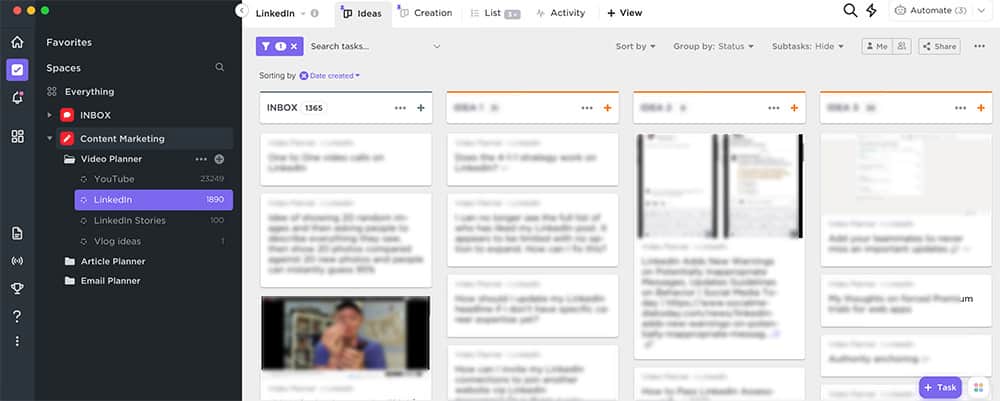
ClickUp offers three main ways to keep your content organized: Spaces, Folders, Lists, and Tasks.
I have one space for all of my content projects called "Content Creation". It contains folders for unique content categories such as articles, videos, social media posts, and emails.
This way, I can define one content production process per folder unique to each content type. For example, articles have "proofreading" and "grammar-check", while Videos have "video editing" and "subtitle transcriptions".
Each folder contains individual Lists for my big-picture content clusters such as LinkedIn, YouTube, and Systems & Processes.
For sub-clusters within each of my primary topic categories, I use the Custom Field and Labels features.
When I create a new item in one of my main content clusters in ClickUp, I can narrow down the subtopic by selecting one of my predefined labels.
ClickUp also allows me to filter my Lists and only display items with a specific subcategory Label.
To map out more complex content clusters, I highly recommend mapping out the details of specific articles or video ideas in Workflowy.
Conclusion
Developing a YouTube Content Cluster strategy for your channel will help you to make you the go-to YouTube channel for your specific niche.
I recommend experimenting with both the pen & paper strategies as well as exploring some of the software solutions.
My personal recommendation is to use both ClickUp and Workflowy together to get the best of both worlds, especially if you are planning to outsource some of your YouTube channel tasks in the future and automate your channel growth with systems and processes.
Growing a successful YouTube channel requires a lot of other strategies as well.
I recommend you check out my article on how to get more YouTube shares to grow views and subscribers, how to write the perfect video title, and my review of the best YouTube growth tool - TubeBuddy.
And if you are looking for some easy-to-implement content ideas, check out my article on how to create unlimited Q&A questions content ideas for a YouTube vlog.


