What is Morningfame?
I review how MorningFame compares to TubeBuddy and other YouTube growth tools and how to get the most out of it for growing your own YouTube channel.
If you are a person who is interested in growing a successful YouTube business based on data-driven decisions based on insights from YouTube Analytics, including optimizing your videos for YouTube SEO with one of the best keyword optimization tools, Morningfame might be perfect for you.
Other than many other YouTube tools such as TubeBuddy or VidIQ, Morningfame doesn't have a browser extension.
It's a standalone web app that directly connects to your YouTube channel and processes the performance of your channel and videos using data from the YouTube API.
Morningfame Invite Code
Morningfame is currently an invitation-only YouTube growth tool. If you want to test it, you have to be invited by an existing user.
So, if you want to look behind the curtain and experience Morningfame's interface firsthand, you can use my personal Morningfame invite link to sign up for a one-month free trial of Morningfame. No credit card is required.
Type in my invite code TIMQUEEN on the Morningfame homepage, or use my special invite link here.
Morningfame features
Morningfame focuses on two primary features that it does exceptionally well.
The Morningfame Traction tool acts as your dashboard, which you see after you type in your details on the login page.
It's an amazing keyword-planning tool and a great video analytics tool that will help you find actionable insights based on the performance of your most recent videos.

Morningfame Traction Tab
To grow into a successful YouTube channel, you need to improve your numbers step by step.
The Traction tab is at the core of your channel's growth and allows you to look at your numbers and tells you if you are indeed moving forward.
Channel performance
The first section gives you a high-level overview of your channel's performance.
At the top, you can see how well your YouTube channel is doing and how it compares to other channels:
- Is your channel's growth speeding up?
- Do you get enough video views?
- Are viewers and subscribers returning to watch more of your videos?
- How long is your average view duration per video?
- How many likes do you get on average?
- How many people comment on your videos?
- How many subscribers do you gain per upload?
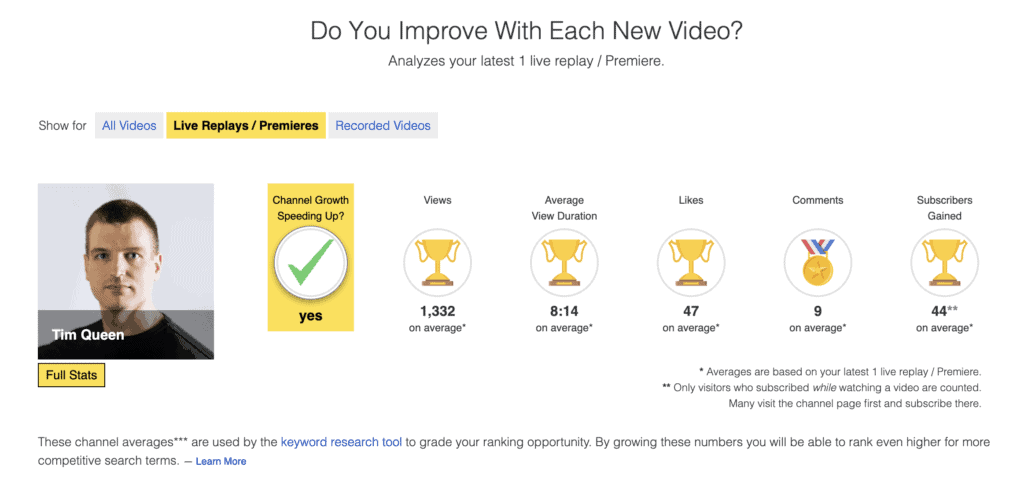
You can further break this down by all videos, live replays & premieres, and recorded videos.
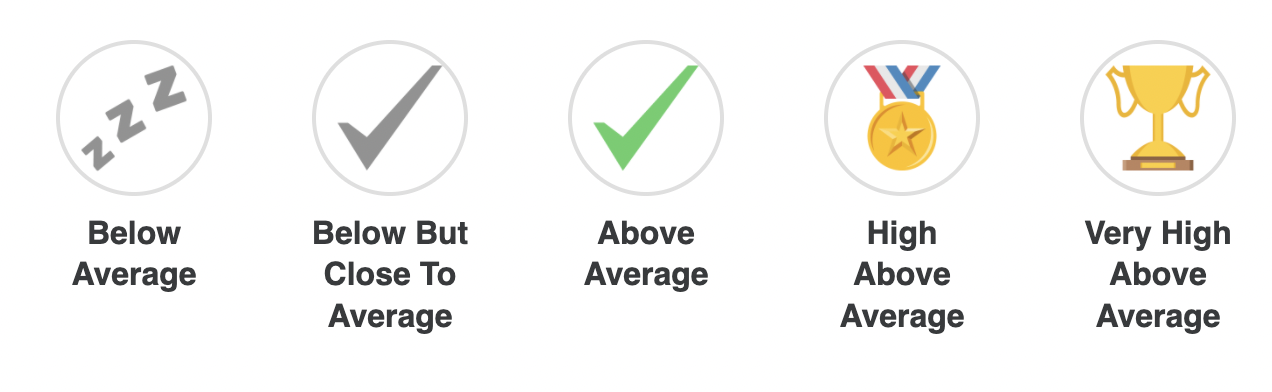
What's great about Morningfame's approach is that it uses colorful icons to explain if a specific number under- or overperforms.
This makes it super simple to understand the big-picture progress of your channel and videos in seconds without deep-diving into the numbers.
Video performance
Further down the page, you'll see your video performance section, where Morningfame analyzes your most recent video performance.
When you first sign up for Morningfame, it will import your last 50 videos and then add and analyze all new videos going forward.
The video section offers a vast number of filters and allows you to sort your results.

Here is an example of one of my videos.
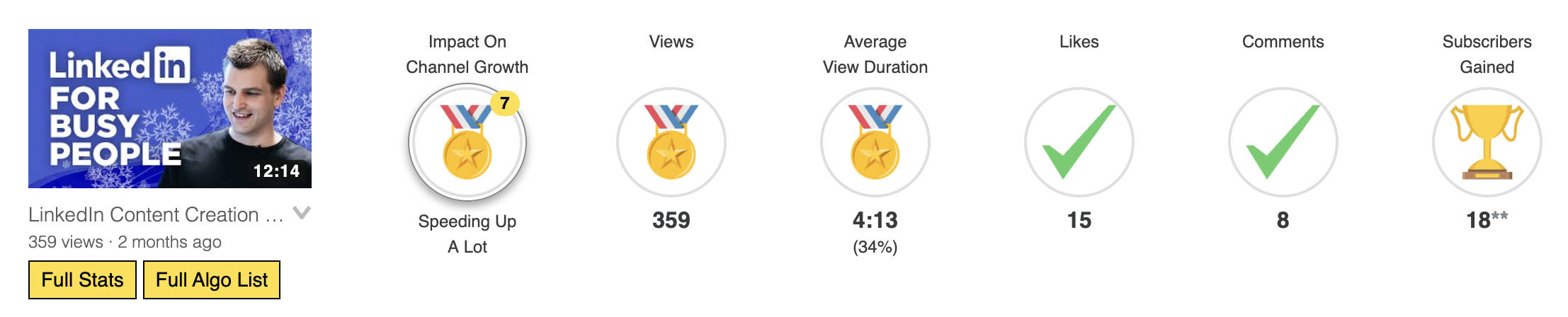
Whenever Morningfame observes something special or out of the ordinary, it will offer additional commentary and link to other tools and resources.
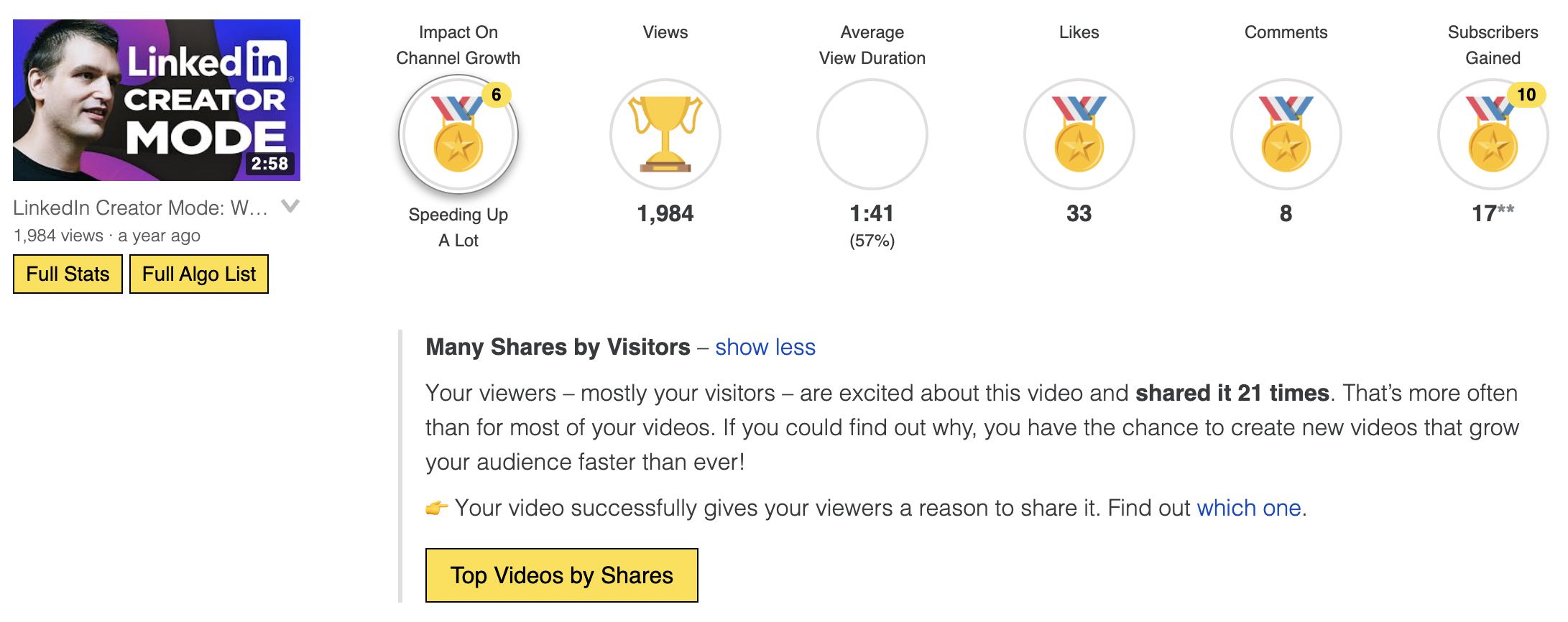
Full Stats
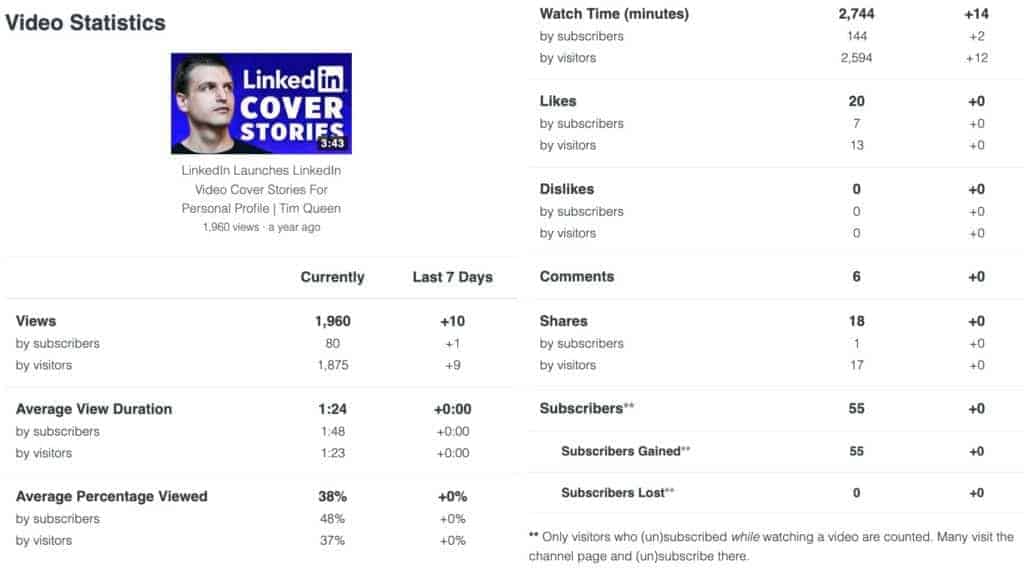
You can click on the Full Stats button under the video thumbnail for a detailed breakdown of the video performance metrics that Morningfame used to calculate the ratings.
Each column displays the total number of a specific metric and how it has changed over the last seven days. This number is then broken down into subscribers and visitors.
- Views
- Average view duration
- Average percentage viewed
- Watch time in minutes
- Likes
- Dislikes
- Comments
- Shares
- Subscriber
- Total
- Gained
- Lost
Full Algo List
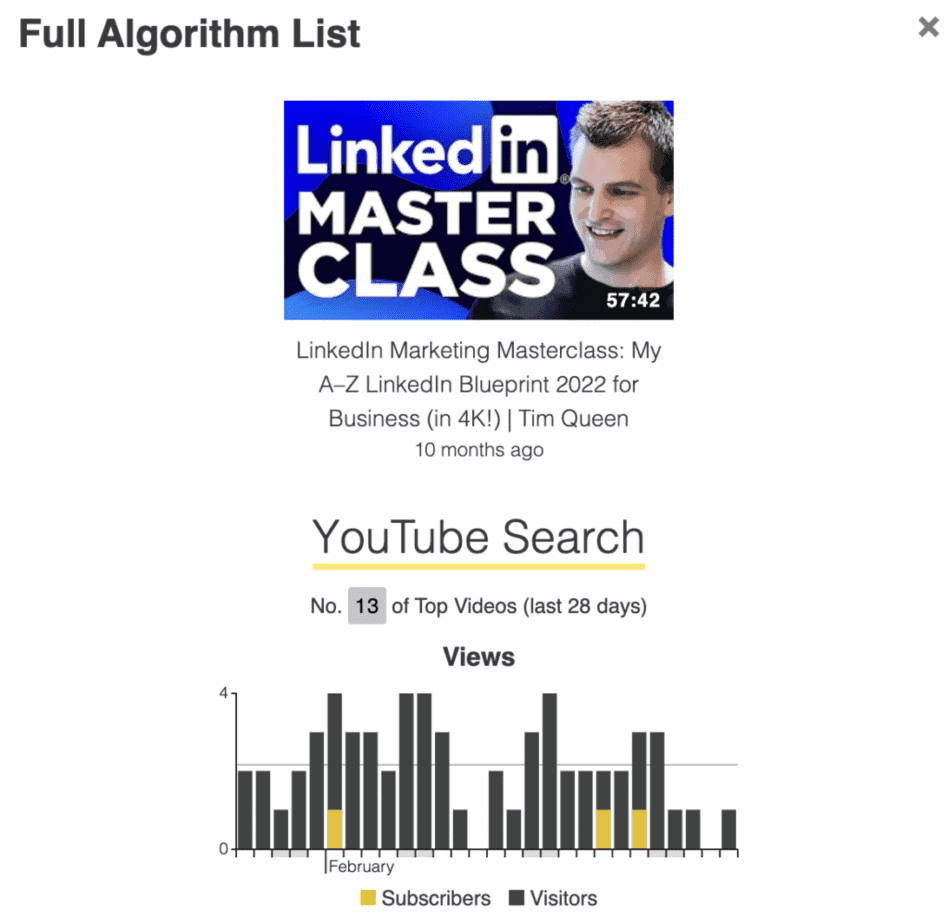
The Full Algo list is one of the most interesting Morningfame features.
It breaks down the video traffic over the last 28 days and helps you understand how different video traffic sources have contributed to the performance of your YouTube videos.
How many video views did you get from the following channels?
- External traffic
- Google search
- Homepage suggestions
- LinkedIn content
- Shorts
- Subscriptions
- Suggested videos
- Trending
- Video notifications
Each traffic source is further ranked by traffic source. For example, a specific got the second most views from notifications, but only made it to tenth place for Google traffic, etc.
Morningfame Strategy Tab
Morningfame's Strategy Tab allows you to review and refine your YouTube growth strategy once a week.
- What is the next step to further growing your channel?
- What are the things you should improve?
- What video topics should you cover more often?
Remember, your success does not always depend on just your numbers. Working on and improving your skills is equally important:
- Learn how to increase your video watch time.
- Improve the number of views per video.
- Increase the number of likes and comments for each YouTube video.
- Optimize your call to action to get more people to subscribe to your channel.
- Refine your YouTube content strategy based on your top-performing videos to keep your viewers coming back for more.
- Evaluate why some videos performed poorly and what you can learn from them.
Morningfame Workshop Tab
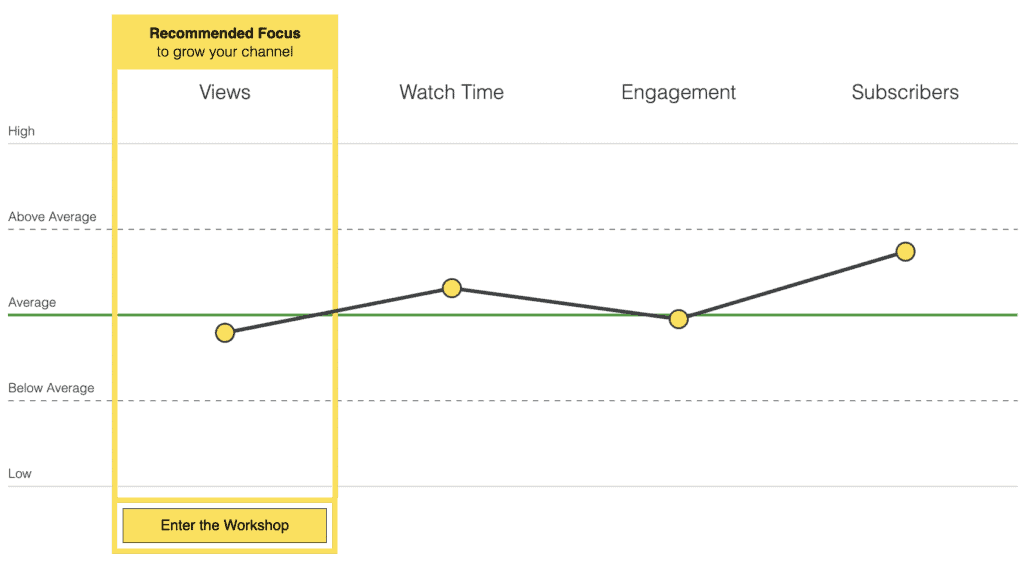
In the workshop tab, you can see what you need to do next to grow your channel faster, for example, increasing your watch time.
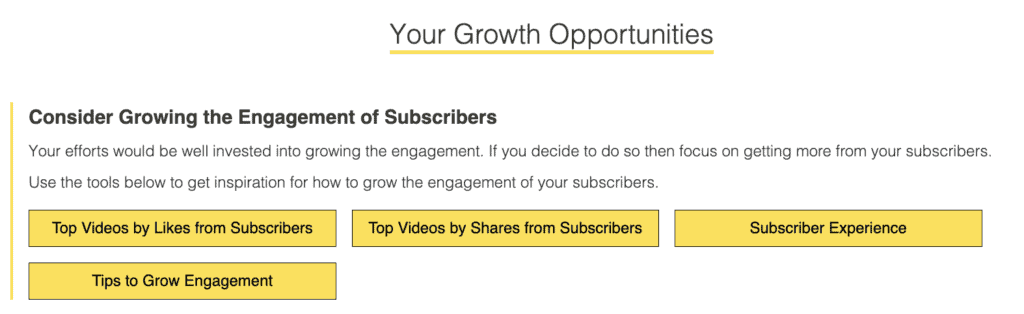
Morningfame breaks down your channel's performance into:
- Views (views within last seven days, views from subscribers/visitors)
- Watch time (average view duration from subscribers/visitors, watch time in minutes)
- Engagement (likes from subscribers/visitors, comments, shares from subscribers/visitors)
- Subscribers (per video, active and returning subscribers)
Morningfame will present you with a bespoke set of growth opportunities based on your video and channel performance for each of these categories.
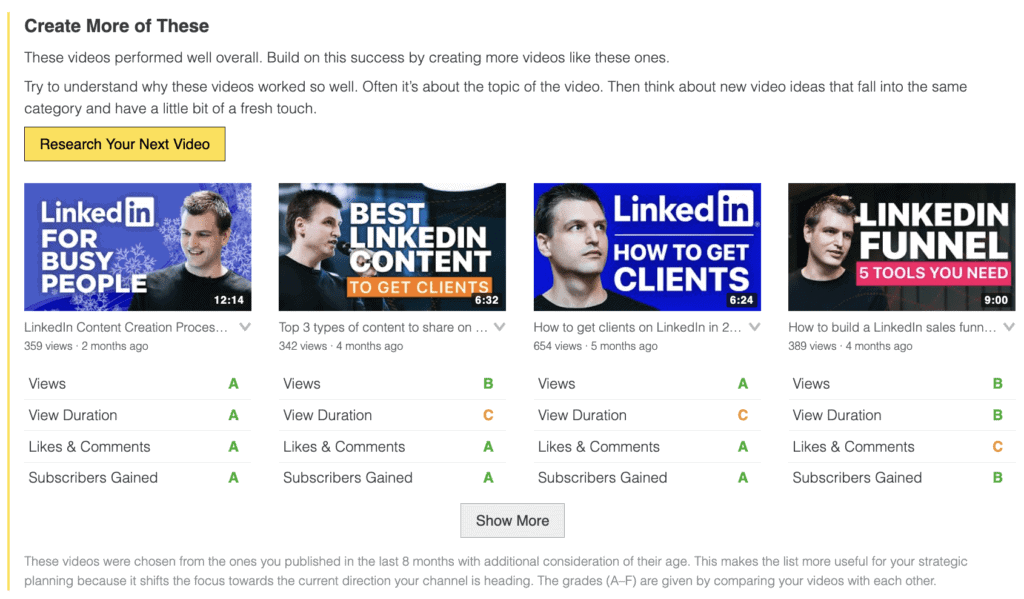
For example, it might give you a list of your best-performing videos in terms of high watch time percentage so you can review these videos for ideas and inspiration on making future YouTube videos more engaging to improve your overall number of watch hours fast.
Morningfame Velocity Tab
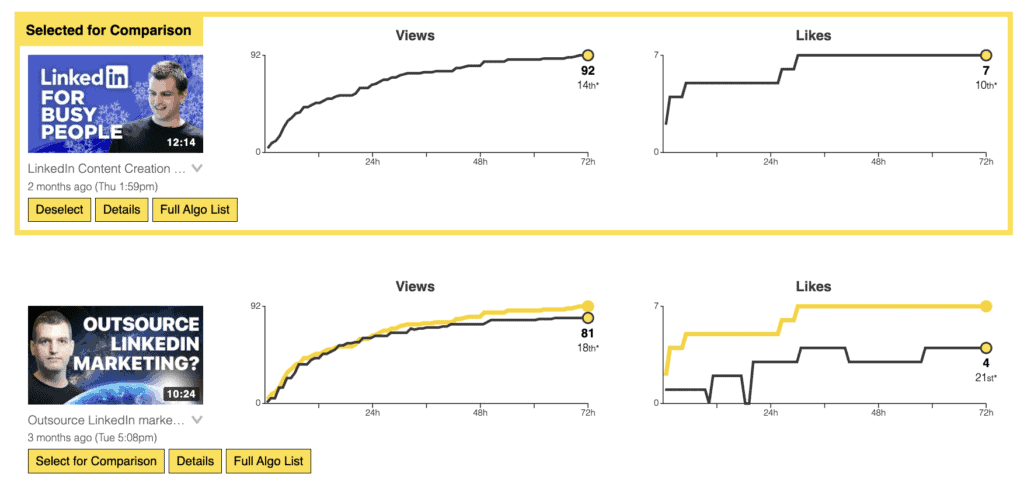
The Velocity tab allows you to compare your 50 most recent YouTube videos' initial performance over the first 72 hours against each other.
The video performance within the first 72 hours is very significant for the YouTube algorithm. It often provides a good indication of how each video will do in the future.
Morningfame displays two graphs for each video for how views and likes have sped up or slowed down over time.
By clicking on the Details button, you can see more details, such as the number of comments and dislikes over the same time.
You can also select any video for comparison. A new yellow line, representing your selected video's performance, will be superimposed on every other video, so you can quickly analyze any pair of your choice.
Appealing Thumbnails Tab
Morningfame makes it super easy to get a better idea of how to optimize your YouTube thumbnails.
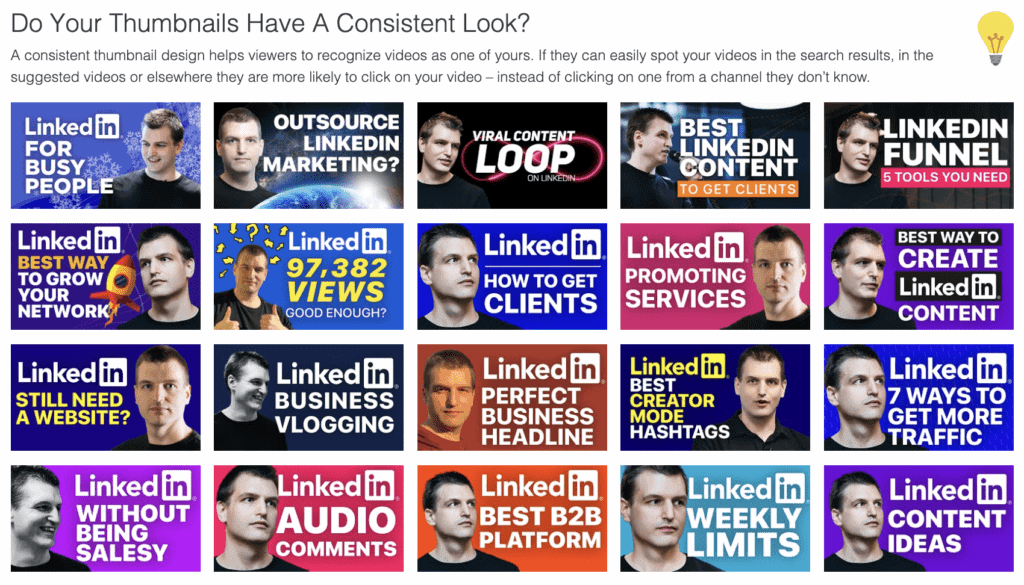
Do Your Thumbnails Have A Consistent Look?
A consistent thumbnail design makes it easier for viewers to recognize one of your videos. This increases the chances that they'll click on one of your videos - rather than on one from a channel they don't know.
Morningfame will show you a grid with your 20 most recent videos so you can quickly compare if your thumbnails have a consistent look that makes it easier for viewers to recognize and remember your design.
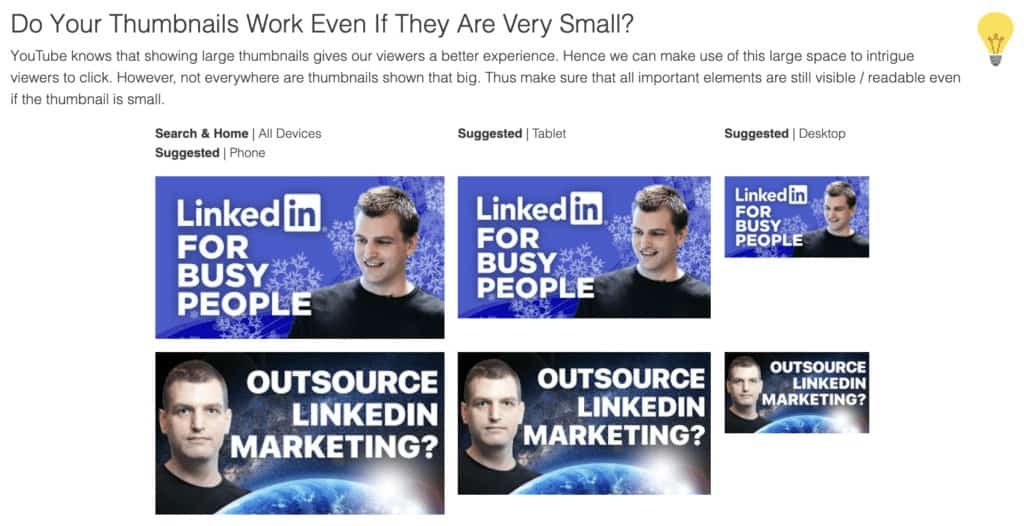
Do Your Thumbnails Work Even If They Are Very Small?
YouTube knows that large thumbnails give viewers the best experience, but depending on whether or not a viewer is watching a video at their desktop computer, on a tablet, or a phone, the thumbnail size might be much smaller. That's why it's important to design YouTube video thumbnails with this knowledge in mind and make sure that whatever you put on your design will be visible and readable no matter how big or small your image is displayed.
Morningfame allows you to experience this effect firsthand by seeing each of your recent video thumbnails in big, medium, and small resolution.
This gives you valuable insights on how to improve your internal thumbnail design guidelines and actionable step on which thumbnails to replace.
Which Thumbnail Would You Click?
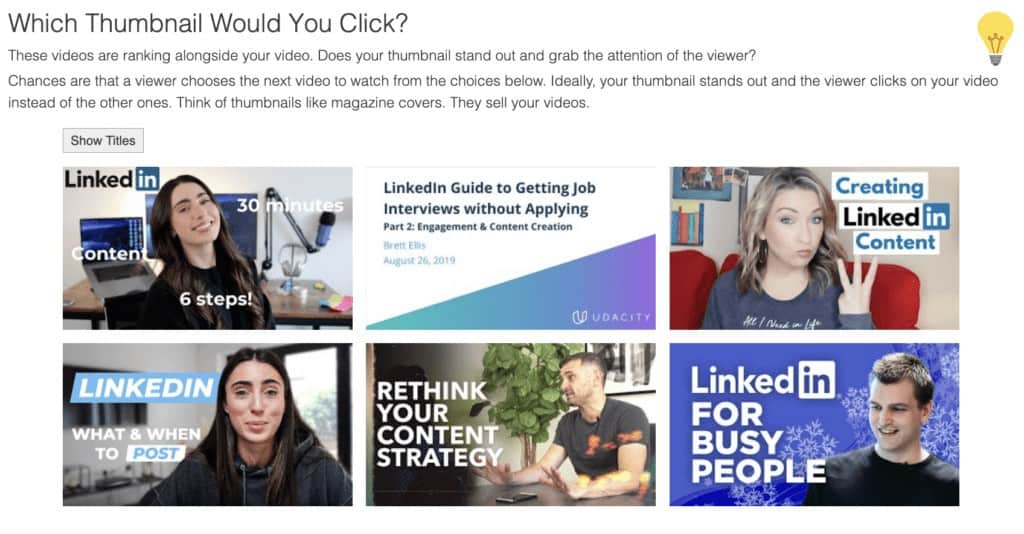
This Morningfame feature is really cool. It allows you to compare your most recent video thumbnails against competing videos that rank for the same keywords as you.
This way, you can see if your thumbnails are standing out or if you should head back to the drawing desk to make them more appealing.
You can compare just the thumbnails or the combination of thumbnails + video titles against each other.
Publish At The Right Time Tab
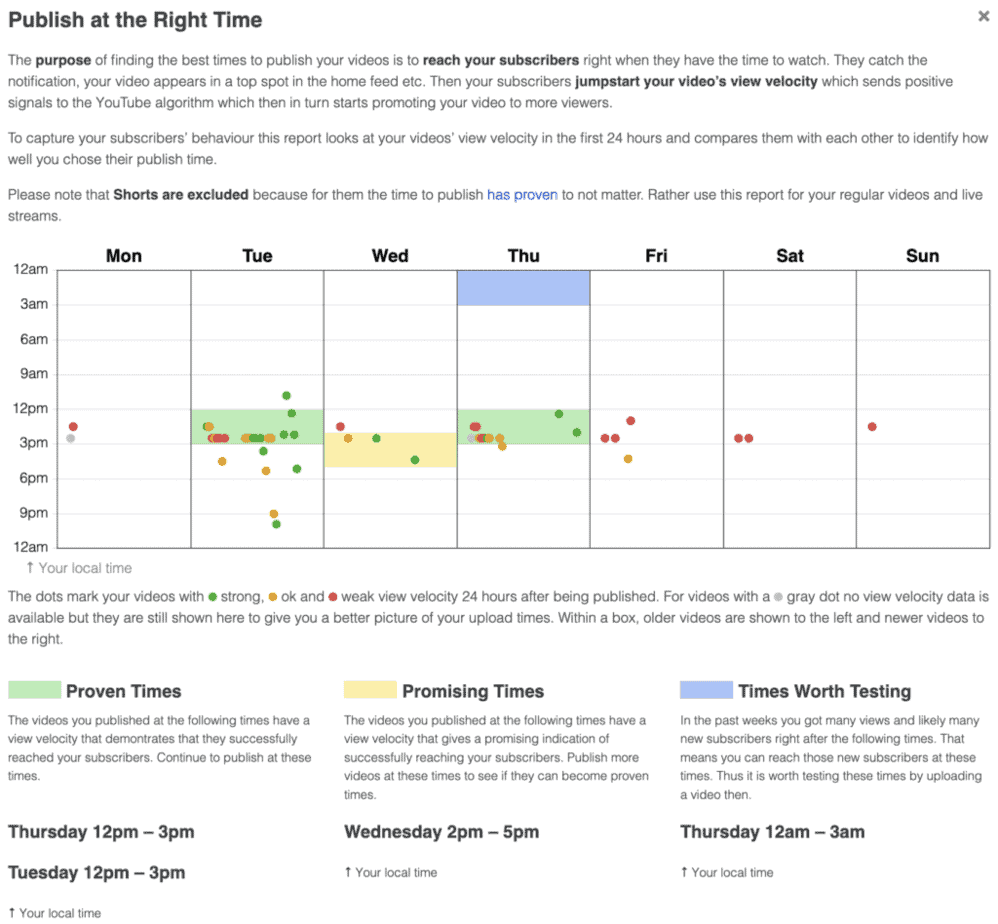
Morningfame allows you to find the best times to publish your videos to reach the highest number of your subscribers when they have time to watch.
If you can find the sweet spot in terms of weekdays and the best time of the day, you can boost your video's view velocity, which sends positive signals to the YouTube algorithm, so it promotes your video to more viewers.
This report looks at all of your videos' view velocity for the first 24 hours and compares them with each other to identify if a particular publishing time worked well for your channel.
YouTube Shorts are excluded from this report. Morningfame has found that the time of publication does not influence Shorts' performance.
Good Subscriber Experience Tab
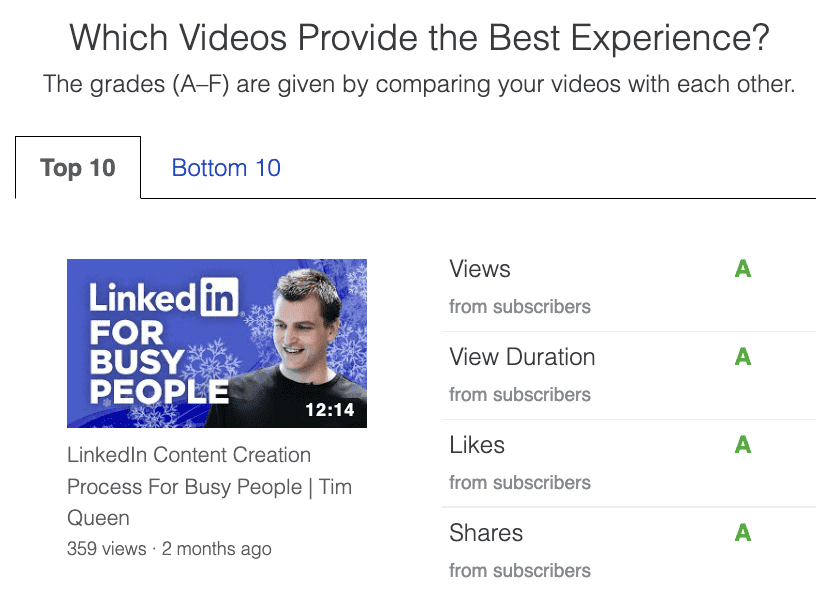
This report allows you to understand the performance of your most recent videos purely based on your current subscribers, excluding random visitors who discovered your video through search or discovery.
This will give you valuable insights when you plan your following videos, and you care about building a loyal community with your YouTube channel.
Views: Do your subscribers come back again and again? If you get many views from your subscribers, the answer is probably yes.
Watch Time: If your subscribers watch your videos for an extended period, you can take this as confirmation that they enjoy them.
Engagement: Engagement in likes, comments, and shares demonstrates that your videos engage your subscribers.
Interactions are just the tip of the iceberg for measuring your subscribers' enthusiasm for your videos.
Even if not everyone hits like or comments, you can be sure that many more find them thought-provoking.
Morningfame Algorithm Tab
Morningfame processes YouTube's raw traffic sources data and converts it into intuitive, easy-to-understand insights about how the YouTube algorithm works.
At the top of the page, Morningfame will tell you if some of your videos started showing in the suggested video section of other YouTube channels, as well as the number of your views that can be attributed to these suggestions.
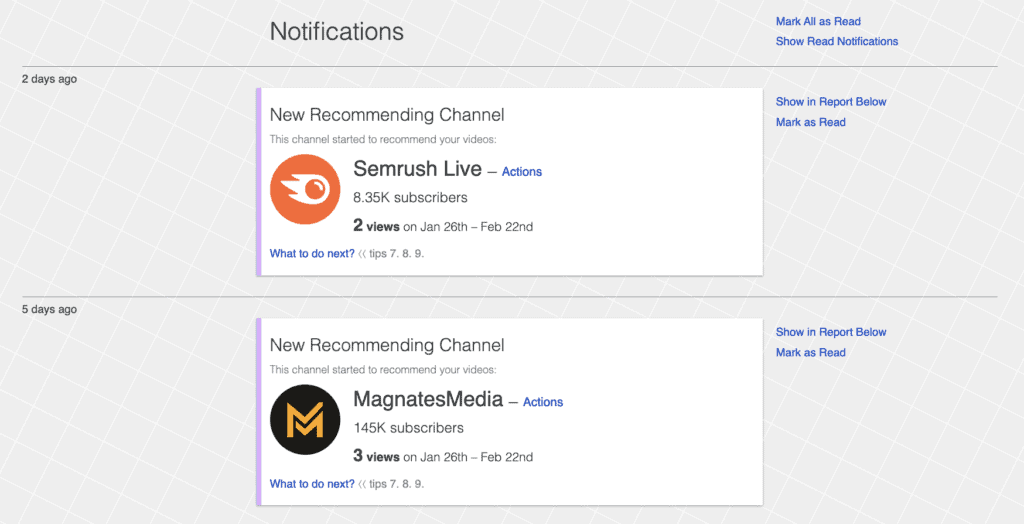
How do YouTube's Algorithms Promote You?
Here you can explore each algorithm in detail and learn how to optimize your videos for maximum YouTube promotion.
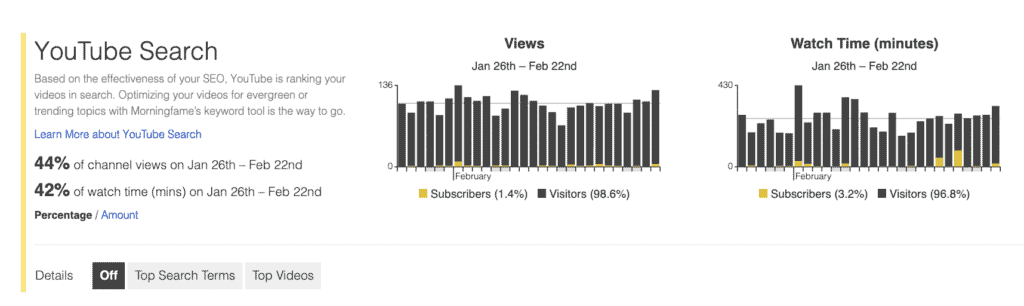
Your video views and watch time are broken down and analyzed for each traffic source algorithm individually.
- YouTube search: Based on the effectiveness of your YouTube SEO, YouTube is ranking your videos in search. You can use Morningfame's keyword planning tool to optimize your videos for evergreen or trending topics.
- Google search: If your videos are optimized for YouTube SEO and contain proper subtitles, they will also rank in Google search results. Ensure that you enable Google Search Support in the Morningfame keyword planning tool to take advantage of it.
- Home: Traffic in this section is based on the recommendations that appear on YouTube's website, main app, kids app (shows, music, learning, exploring), and music app.
- Suggested videos: These are video recommendations that appear on the right side of each video's watch page. Small YouTube creators usually only see recommendations for their own videos. As their channel grows, videos will also be recommended on other channels.
- Linked content: This is a compilation of your video playlists, cards, and end screens.
- Subscriptions: Despite its name, subscribers commonly discover your new videos via Notifications or Home, and not on the actual Subscription page on YouTube.
- Notifications: YouTube's notification algorithm determines who to notify based on how active your viewers are on your channel and whether they rang the bell.
- Shorts: This algorithm determines which video to play next when viewing vertical Shorts.
- Trending: Only big YouTube channels see their videos being promoted on YouTube's Trending page, usually very infrequently, unless your name is Mr. Beast. 😉
Morningfame Keyword Research Tool
If you want to optimize your videos for YouTube SEO, you are in the right place.
Morningfame is one of the best keyword research and planning tools for video meta-data optimization on the market that will help you to get your videos into YouTube search.
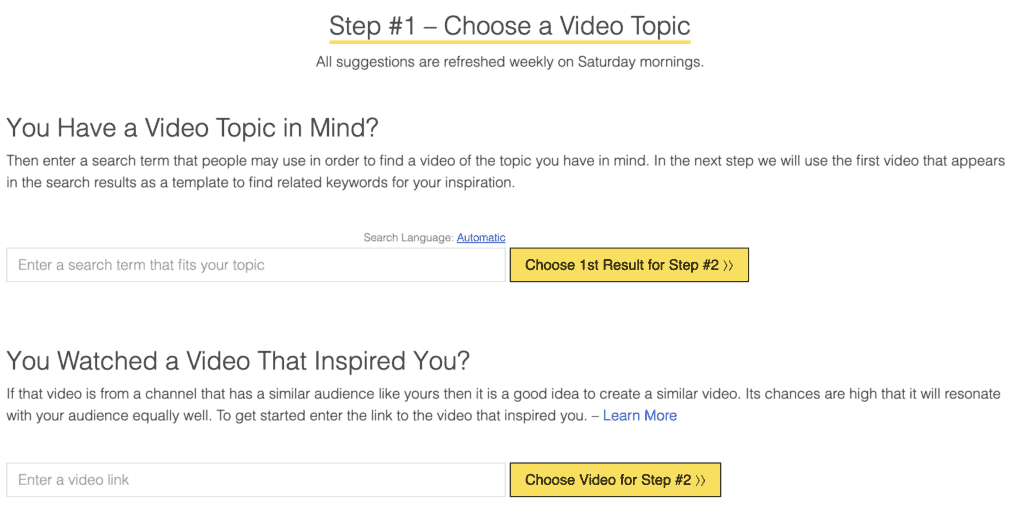
Step 1: Topic
Morningfame gives you the following options to select a seed keyword phrase:
- Search for a specific search phrase.
- Enter a video link of a video that inspired you.
- Use one of your best-performing videos as a starting point.
- Use one of your competitors' best-performing videos. (This is amazing, as Morningfame does most of the work for you by constantly adding YouTube channels that cover similar topics as you)
Next, you narrow down a specific search term that you want to optimize for.
Step 2: Keyword
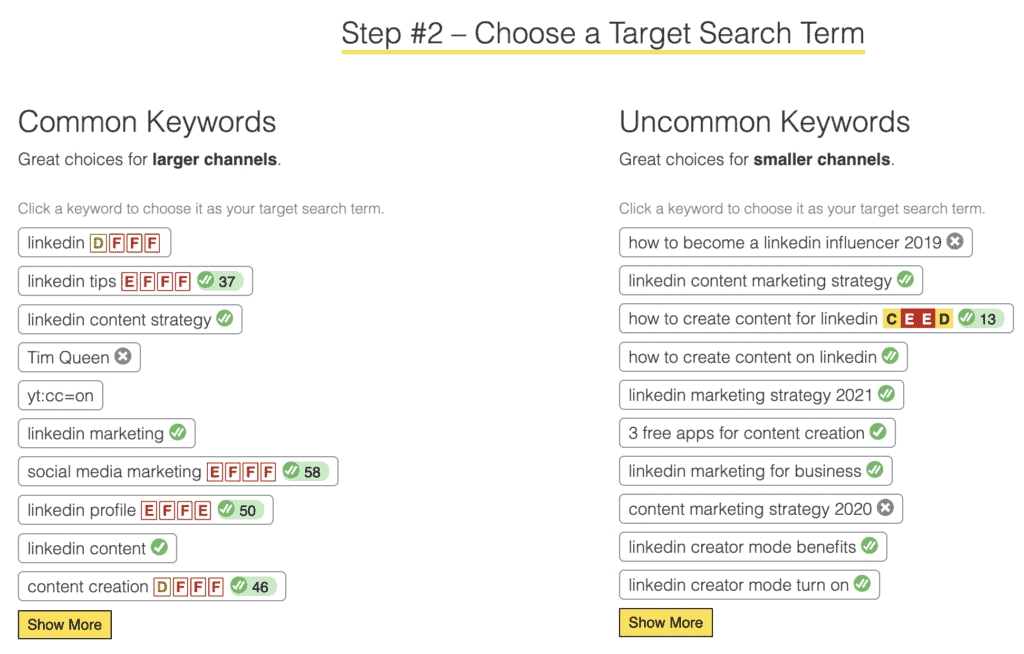
Morningfame will take your topic selection and then identify all videos that show up in YouTube search for your seed phrase.
It will then extract keywords (video tags) and hashtags and group them by most common and uncommon.
Each keyword is then analyzed and rated from A (best) to F (worst) for competition, traffic volume, engagement, and relevancy.
These are tailored to your channel's performance and represent your ranking probability if you create a video that targets the given search term.
Morningfame recommends finding search terms with a DDDB rating or better, representing a reasonably low competition with a good chance to rank.
Once you select a well-graded keyword, you can analyze it further on the Search analysis page.
Step 3: Search
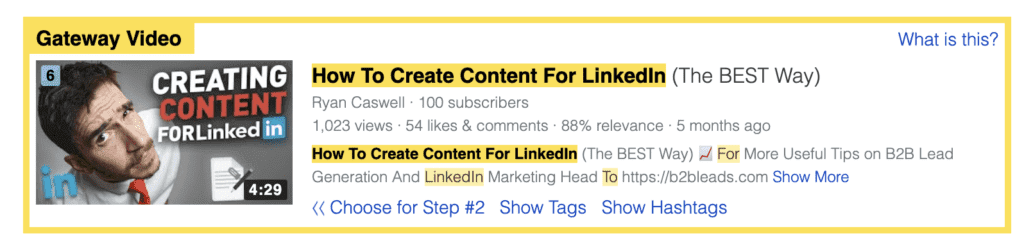
Here Morningfame's focus is to help you beat the Gateway Video for a particular search term. That's the first video on the search results page with fewer subscribers than your own channel.
If you can beat this Gateway Video with your content and keyword optimization you have a very high chance of outranking it.
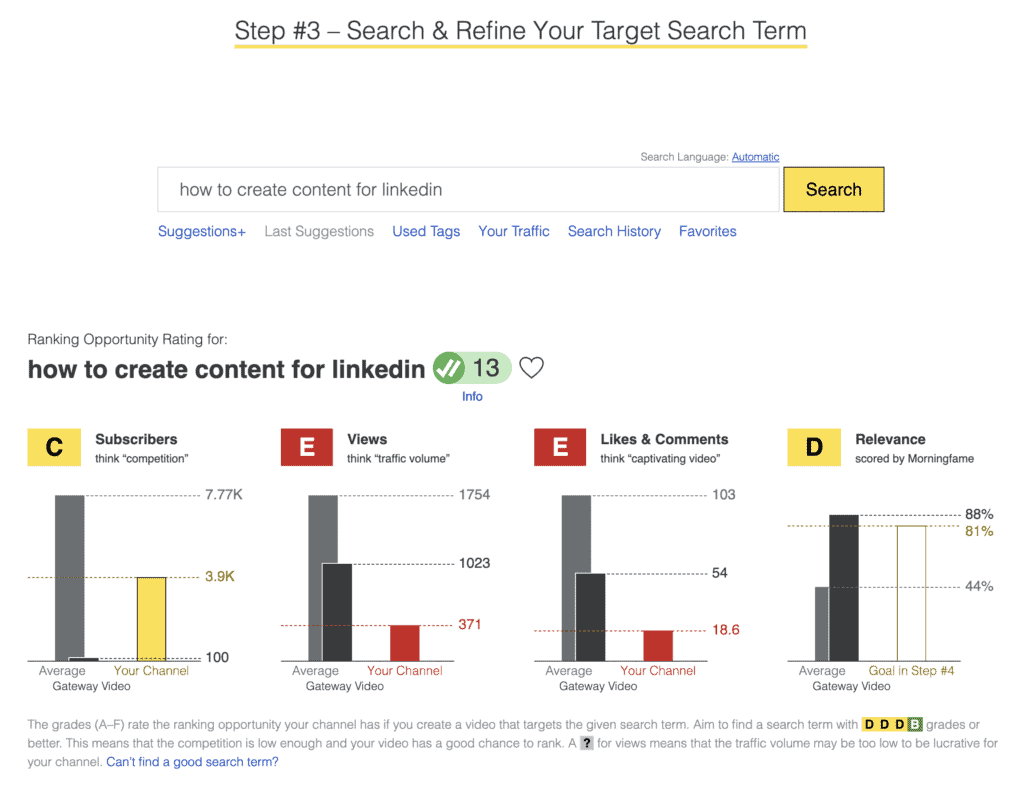
The four graphs at the top help you to compare the average number of subscribers, views, likes & comments, and relevancy of your YouTube channel against the average of all channels, and against the channel that uploaded the Gateway Video.
This is an incredibly powerful tool to take advantage of the YouTube search algorithm to find and evaluate video ideas that you are almost guaranteed to rank for.
Once you are happy, proceed to the Optimization page.
Step 4: Optimize for YouTube SEO
Here you find Morningfame's built-in YouTube SEO editor.
One of its best features, which is currently unique to Morningfame, is its neural language processing module, which gives you the ability to write like a person, and not as an SEO expert.
For example, if you wanted to rank for "keto chocolate ice cream". Most SEO editors would only give you a perfect rating if you type in words in exactly this order "keto chocolate ice cream".
If you typed a user-friendly title that contains all the keywords but in a different order, such as "Delicious chocolate ice cream that is keto-friendly?" you would get a bad rating.
Morningfame breaks down your search phrase and matches each word individually.
So for example, as long as you include "keto", "ice", "chocolate", and "cream" somewhere in your video title, you still get a perfect rating.
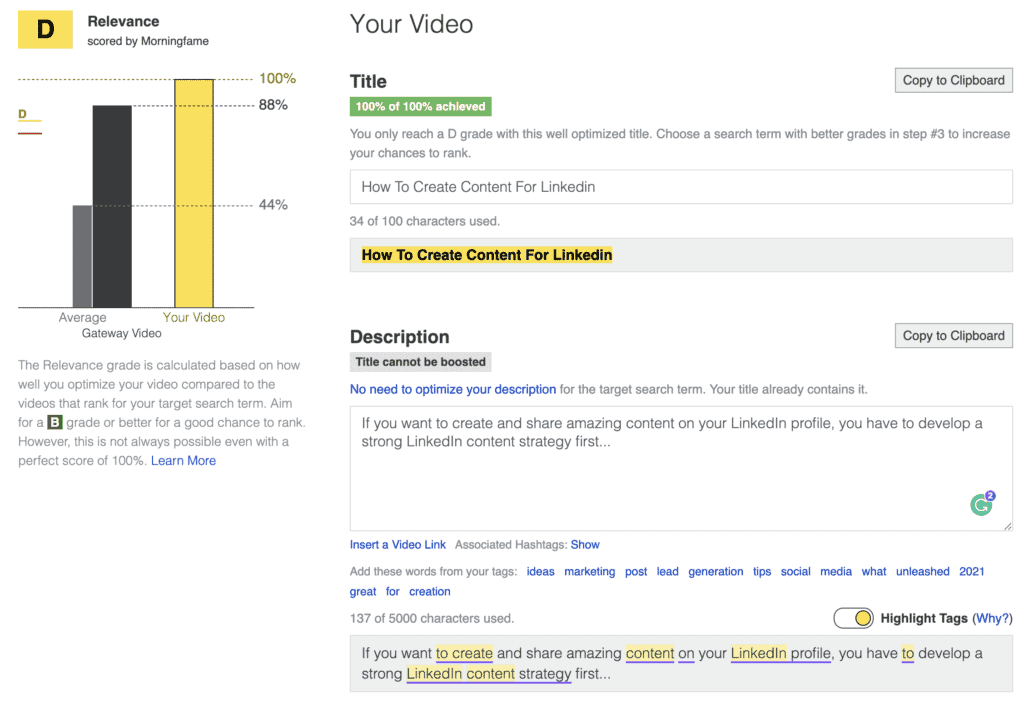
This also makes it much more convenient to use synonyms and alternative keyword ideas when you write a video description that is actually worth reading and not a list of stuffed keywords.
Morningfame even allows you to plan your pinned comment and video thumbnail.
Once you have optimized the video title, video description, and video tags, you can save your metadata for a later date when you are ready to upload your video or instantly copy them over into YouTube Studio.
In the future, we will hopefully have a more convenient way to upload everything in bulk within YouTube Studio. And who knows, maybe one day, we will see a Morningfame browser extension that can do just that... 🙂
Morningfame's Upcoming Features
Research Your YouTube Niche with X-Ray Vision
One of the new upcoming Morningfame features is its channel comparison tool that allows you to analyze your niche and to find many YouTube channels that are similar to either your channel or one of your role models.
Enter a channel name or URL to begin your analysis, and Morningfame will generate a list of related channels based on overlapping video topics.
Here is a screenshot of an early prototype based on the VidIQ YouTube channel.
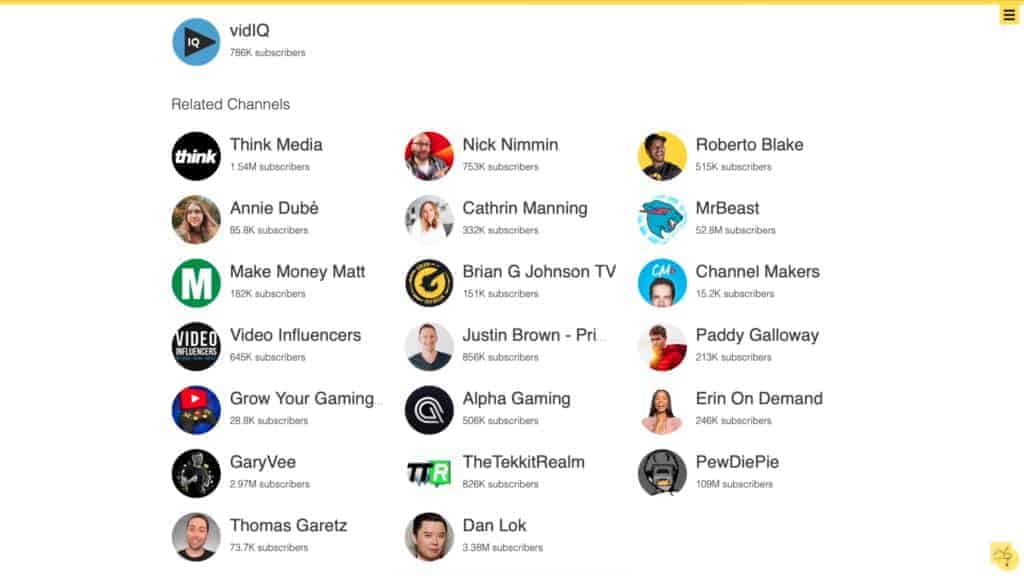
The niche analysis tool will be incredibly useful to better understand what is happening inside your niche, who are the big players and the up and coming newcomers, and what video topics seem to work well for your personal video topic content cluster.
You can learn more about this feature in this video:
Morningfame vs TubeBuddy
Morningfame is using a dedicated web app for everything, while most of TubeBuddy's features only work by installing its browser extension.
Both offer keyword research tools to help YouTube creators to identify video ideas with a high probability to rank.
The Morningfame and TubeBuddy algorithms work slightly differently.
Morningfame's algorithm focuses more on common keywords and hashtags for the top ranking videos for specific keywords, while TubeBuddy utilizes a much broader range of related keywords, for example, related Google search terms, video topics, video titles, and common related questions.
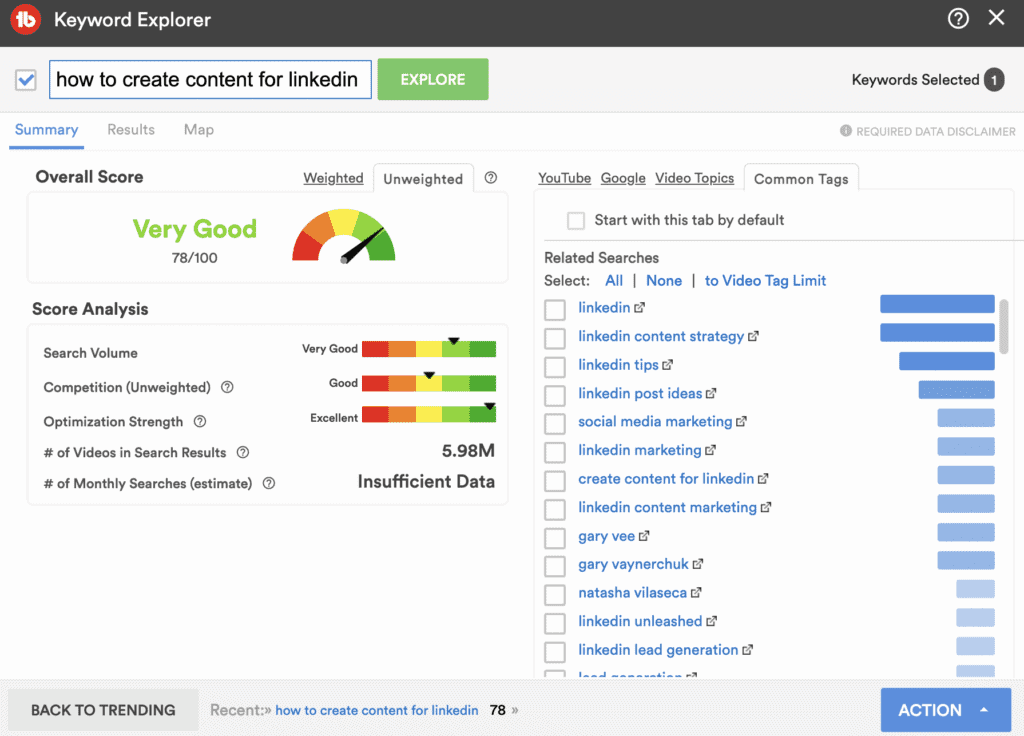
In my opinion, the TubeBuddy Keyword Explorer tool does a better job at generating a high number of video ideas really quickly, while Morningfame does a better job when it comes to evaluating the potential of a specific phrase to beat the Gateway Video on YouTube search.
Morningfame and TubeBuddy both have amazing enhanced video analytics tools that go far beyond what YouTube Studio has to offer. Morningfame focuses more on tracking and measuring your most recent videos, while TubeBuddy has some incredibly powerful AI-based analysis tools such as the TubeBuddy Click Magnet and its Thumbnail Analyzer tool.
While Morningfame only focuses on video analytics and keyword research, TubeBuddy has a much broader range of extra features.
TubeBuddy allows you to use advanced scheduling features, has AB testing tools for thumbnails, video titles, video descriptions, and video tags, has a bulk search and replace tool, allows you to pick a random winner from your video's comments section if you ever wanted to do a giveaway, and contains many more features that will save you so much time such as the end screen templates that can be applied to all videos in bulk if needed.
Overall I feel that any professional YouTube content creator should sign up for both Morningfame and TubeBuddy as both work really well together and complement each other.
Who Created MorningFame?
Morningfame was created by Nicolai Kamenzky, aka. Nico.
He is also the star of Morningfame's YouTube channel, where he shares valuable tips on how to grow your YouTube channel with Morningfame.
Pricing: How much does Morningfame cost?
Morningfame Basic Plan
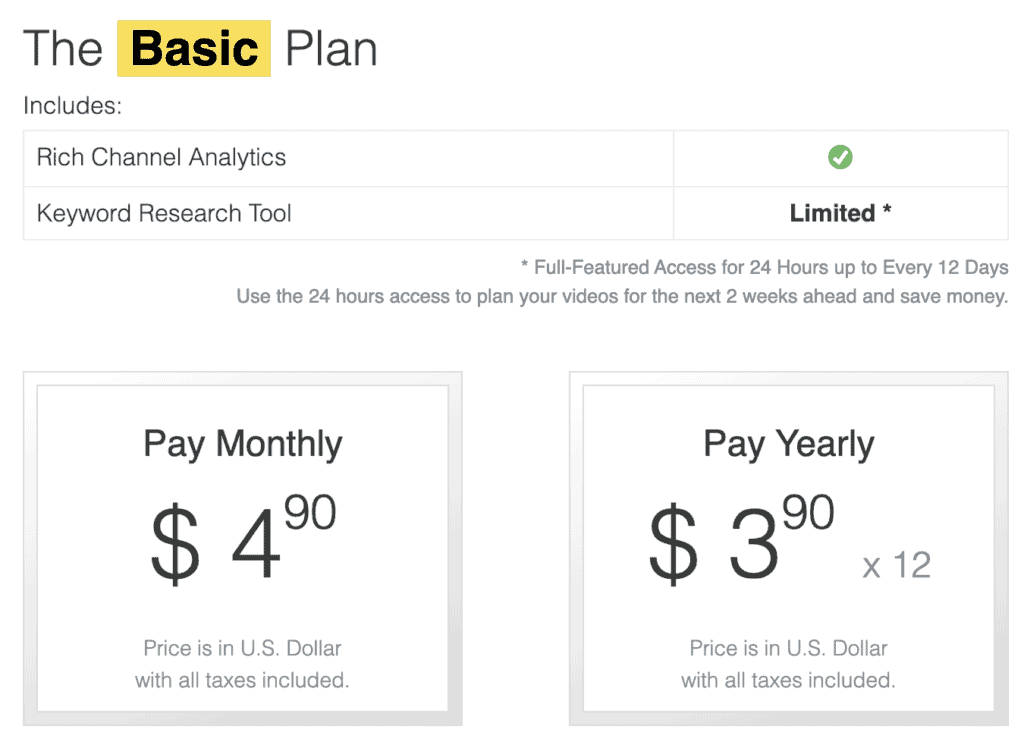
The Basic plan gives you full access to Morningfame's analytics tools and limited access to the keyword planner. Every 12 days, you can activate the keyword research tool for 24 hours to pre-plan your upcoming videos for the next two weeks.
If you pay monthly, the investment is $4.90. If you pay annually, you pay $46.80, which brings the average monthly price down to $3.90.
Click here to start a one-month Basic trial.
Morningfame Plus Plan
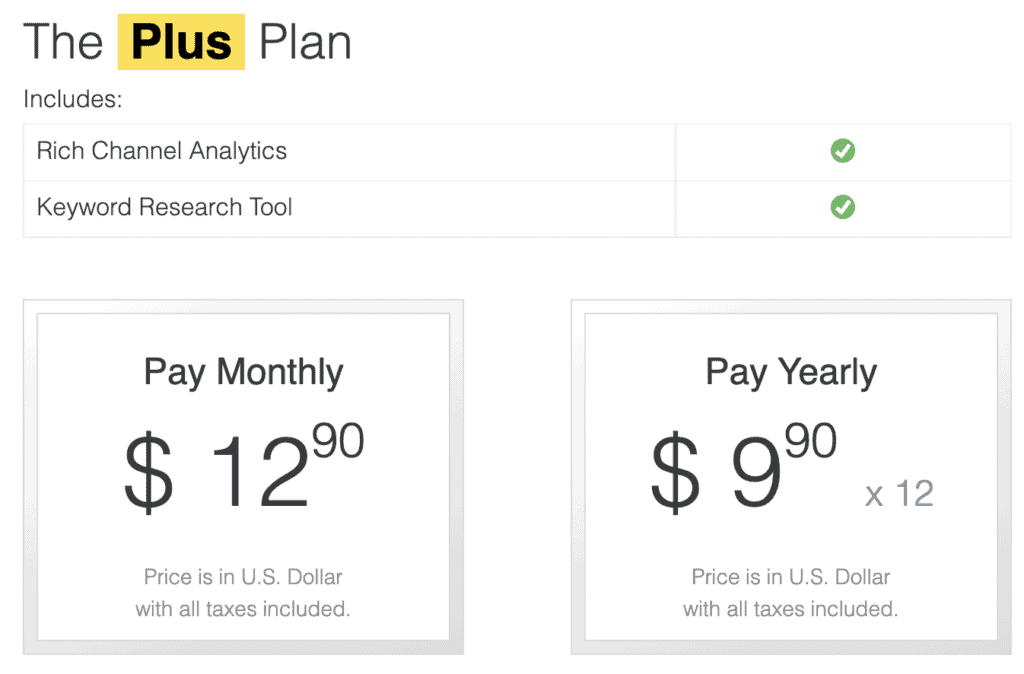
The Plus plan gives you access to everything you get in the Basic plan, but there are no limitations for the keyword research tool. You can use it as often as you like on every day of the month.
The investment is slightly higher.
The price is $12.90 per month. With annual payments, you pay $118.80, which brings the average monthly price down to $9.90.
Click here to start a one-month Plus trial.
Morningfame Free Trial
Morningfame doesn't have a free version, but you can always sign up for a 1 x month free trial with my invitation code TIMQUEEN or by clicking on this link.
Morningfame Discount Codes
Unfortunately, Morningfame is not offering any discount codes for its software, but you can get your first month for free by signing up with my link.
My recommendation for everyone who is looking for a Morningfame promo code is to sign up for their Basic plan. It saves you more than 70% per month, and with the right time management, you can still generate all the video ideas you need without a problem.
You can also earn free months with Mornigfame's referral system and earn free months for inviting your friends to use the app.
Is MorningFame worth paying for?
I recommend signing up for a free 1-month trial of the Morningfame Plus Plan with my invite code TIMQUEEN and to decide if you would want to use the keyword planner on a regular basis, or if once per month with the Basic Plan would be enough.
In my opinion, Morningfame is definitely worth the investment as it helps you to grow your YouTube channel faster by making data-driven decisions when you plan your upcoming videos.
I would always combine using Morningfame with TubeBuddy as both tools have different algorithms for their keyword research that complement each other, and because TubeBuddy has so many other time-saving features that are essential for every YouTuber who wants to make money with their channel.
If you want to learn more about growing your channel, I recommend reading about how to improve your watch time, how to get more views, how to attract more subscribers, how to design better thumbnails, how to improve your video click-through rate, how to increase the production quality of your videos by adding music to your videos, and how to rank your videos even better in search by using subtitles.
P.S. The correct spelling is MorningFame or Morningfame, not Morning Fame with a space in between. 😉


